


点击上方卡片,关注「CloudPilot AI」
5分钟,降低50%云成本


01/
引言
在 2023 年的 KubeCon 北美大会上,微软宣布在 Azure Kubernetes Service(AKS) 中引入 Karpenter 作为 Cluster Autoscaler(CA)的替代方案,并将其命名为 Node Autoprovisioning(NAP)。
虽然 Cluster Autoscaler 一直以来是 AKS/Kubernetes 的默认节点扩缩工具,但其存在诸多限制,促使微软引入 Karpenter。
本文将深入探讨这些挑战,并介绍 Karpenter 如何有效解决它们。

02/
CA vs Karpenter vs CloudPilot AI
太长不看版

如果你想了解这几款工具的更多技术细节、查看 Karpenter 与 Cluster Autoscaler 的架构差异,点击下方卡片,在公众号对话框回复关键词【对比】,获取完整版 PDF 文件。
Cluster Autoscaler 的局限性
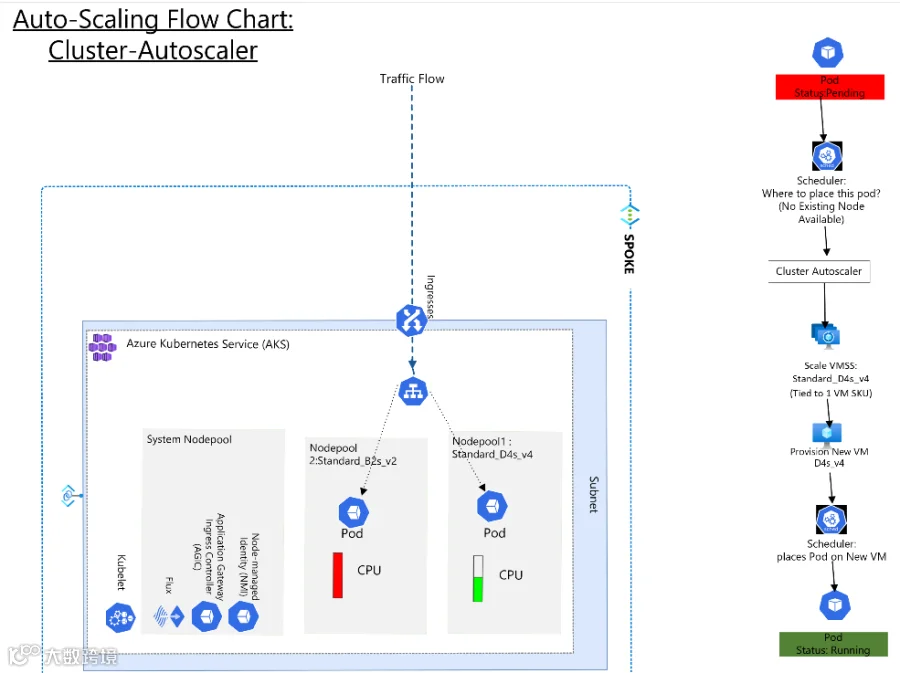
以下是 Cluster Autoscaler 进行节点自动扩缩的流程示意图:
1. 受限于虚拟机规模集( VMSS Groups ):
Cluster Autoscaler 仅支持 AKS 中的虚拟机规模集。
每个 VMSS 由特定类型的 VM 实例组成,具有固定的 VM SKU、硬件规格和 CPU:内存比(例如 Standard D4sv5,4 vCPU 和 16GB 内存)。
2. 节点池约束:
当新 Pod 需要部署但当前节点容量已满时,Cluster Autoscaler 会尝试创建新的节点,但只能基于现有 VMSS SKU 进行扩容。如果该类型的实例不可用,Pod 将保持待调度状态。
3. 扩缩能力受限:
Cluster Autoscaler 仅能基于指定的 VMSS 进行弹性扩缩,即使其他虚拟机 SKU 有闲置资源,也无法利用这些 VM SKU 的剩余容量。
Karpenter的优势
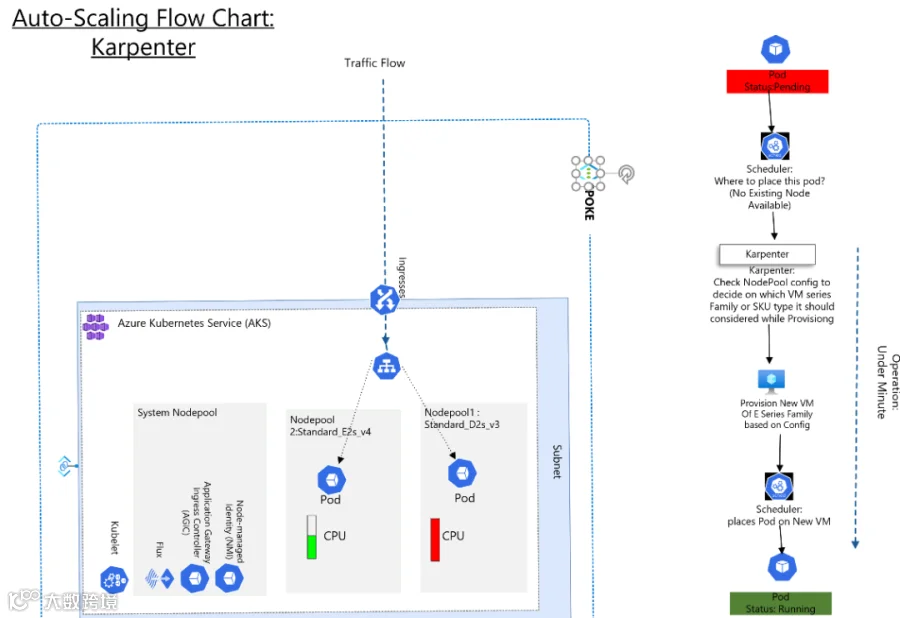
Karpenter 是一款开源的 Kubernetes 集群自动扩缩工具,专为优化性能和成本而设计,旨在以灵活、高性能和简洁的方式实现节点的弹性扩展。它比 Cluster Autoscaler 的扩缩速度更快,并且能够直接创建独立节点,无需传统的节点组限制。
Karpenter 的核心特性:
✅高效扩缩:快速弹性扩展 Kubernetes 节点。
✅灵活调度:无需依赖 VMSS 也能启动新节点。
✅成本优化:支持自动补丁更新和 Kubernetes 版本升级,降低总体成本。
✅基于 YAML 配置的 NodePool,可自定义节点类型及调度策略。

03/
Karpenter 的中断管理
中断控制器 (Disruption Controller)负责在 Kubernetes 集群中终止或替换节点,并采用以下三种策略来决定如何处理节点:
1. 节点到期
Karpenter 会为节点设置存活时间(TTL),到期后进行替换。例如:
spec:disruption:consolidationPolicy: WhenUnderutilizedexpireAfter: 300s #
2. 延迟合并
设置中断间隔,控制在触发中断操作前等待的时间。
3. 资源整合
Karpenter 通过分析节点资源使用情况来主动减少集群成本。
📌 支持的策略模式:
无工作负载时:仅移除无 Pod 运行的节点。
资源利用不足时:当节点资源利用率低时,尝试减少或替换节点。
示例:
apiVersion: karpenter.sh/v1beta1kind: NodePoolmetadata:name: ondemandspec:disruption:consolidationPolicy: WhenEmptyconsolidateAfter: 60s

04/
在 AKS 上启用 Karpenter
启用 Karpenter 之前,需要满足以下前置条件:
✅ 安装 Az CLI 并更新至 0.5.17 以上版本
✅ 注册 NAP 预览功能
✅ AKS 需使用 Cilium + Overlay 作为网络配置
如果在 Karpenter 安装上有困难,欢迎尝试 Karpenter 的托管云服务 CloudPilot AI(www.cloudpilot.ai),仅需5分钟即可完成安装。
在现有 AKS 集群上启用 Karpenter
确保 AKS 集群启用了 Azure 网络插件,并使用 Cilium 作为网络策略。
关键参数:node-provisioning-mode Auto,用于将 Karpenter 设为默认节点扩缩工具。
az aks update --name--resource-group--node-provisioning-mode Auto创建新的 AKS 集群并启用 Karpenter
az aks create --name <aks-cluster-name> --resource-group <rg-name> \--node-provisioning-mode Auto --network-plugin azure --network-plugin-mode overlay --network-dataplane cilium
验证 Karpenter 是否已启用
kubectl api-resources | grep -e aksnodeclasses -e nodeclaims -e nodepools返回结果示例:
aksnodeclasses aksnc,aksncs karpenter.azure.com/v1alpha2 false AKSNodeClassnodeclaims karpenter.sh/v1beta1 false NodeClaimnodepools karpenter.sh/v1beta1 false NodePool

05/
禁用 Cluster Autoscaler
如果希望从 Cluster Autoscaler 切换到 Karpenter,首先需要在 AKS 集群上禁用 Cluster Autoscaler:
az aks update --name <aks-cluster-name> --resource-group <rg-name> --disable-cluster-autoscaler
06/
部署示例应用
为了观察节点自动扩缩的实际运行情况,可以部署一个示例应用:
osama [ ~ ]$ kubectl get nodesNAME STATUS ROLES AGE VERSIONaks-default-h2jxh Ready agent 35m v1.27.9aks-nodepool1-41633911-vmss000000 Ready agent 3d19h v1.27.9
调整 Vote 应用副本数量以触发扩容事件
osama [ ~ ]$ kubectl scale deployment azure-vote-front --replicas=12 -n karpenter-demo-ns^[[Adeployment.apps/azure-vote-front scaledosama [ ~ ]$ kubectl scale deployment azure-vote-back --replicas=12 -n karpenter-demo-nsdeployment.apps/azure-vote-back scaled
使用以下 kubectl 命令检查 Karpenter 自动扩容情况
kubectl get events -A --field-selector source=karpenter --sort-by='.lastTimestamp' -n 10NAMESPACE LAST SEEN TYPE REASON OBJECT MESSAGEdefault 50m Normal Unconsolidatable nodeclaim/default-95f54 SpotToSpotConsolidation is disabled, can't replace a spot node with a spot nodedefault 50m Normal Unconsolidatable node/aks-default-95f54 SpotToSpotConsolidation is disabled, can't replace a spot node with a spot nodedefault 38m Normal DisruptionBlocked nodepool/default No allowed disruptions due to blocking budgetdefault 5m33s Normal Unconsolidatable nodeclaim/default-h2jxh Can't remove without creating 2 candidatesdefault 5m33s Normal Unconsolidatable node/aks-default-h2jxh Can't remove without creating 2 candidatesdefault 2m12s Normal DisruptionBlocked nodepool/system-surge No allowed disruptions due to blocking budgetkarpenter-demo-ns 63s Normal Nominated pod/azure-vote-front-6855444955-bnq7p Pod should schedule on: nodeclaim/default-mrh7wkarpenter-demo-ns 63s Normal Nominated pod/azure-vote-front-6855444955-gbwk6 Pod should schedule on: nodeclaim/default-mrh7wkarpenter-demo-ns 63s Normal Nominated pod/azure-vote-front-6855444955-l2bgj Pod should schedule on: nodeclaim/default-mrh7wkarpenter-demo-ns 63s Normal Nominated pod/azure-vote-front-6855444955-nvc56 Pod should schedule on: nodeclaim/default-mrh7wkarpenter-demo-ns 63s Normal Nominated pod/azure-vote-front-6855444955-22glj Pod should schedule on: nodeclaim/default-mrh7wkarpenter-demo-ns 63s Normal Nominated pod/azure-vote-front-6855444955-sxdl6 Pod should schedule on: nodeclaim/default-mrh7wkarpenter-demo-ns 63s Normal Nominated pod/azure-vote-front-6855444955-t69w4 Pod should schedule on: nodeclaim/default-mrh7w

07/
自定义 Karpenter 配置
Karpenter 在 Kubernetes 中引入了一种新的资源类型:NodePool,用于管理和优化节点调度。
自定义 NodePools:指定特定的 VM 系列、VM 家族,或自定义 CPU 与内存比例。
基于特性选择节点:支持 GPU 加速或网络加速等功能。
定义 CPU 架构:根据特定工作负载需求,选择 ARM 或 AMD 架构。
构建高可用节点架构:通过配置可用区拓扑提高容灾能力。
限制节点级别的 CPU 和内存使用:控制单个节点可分配的 CPU 和内存资源。
以下是 Karpenter 默认的 NodePool 配置 YAML,其中包含:
节点 SKU 类型和容量配置
CPU:内存比例限制
在多个 NodePools 存在时的调度权重(Weight)
apiVersion: karpenter.sh/v1beta1kind: NodePoolmetadata:name: defaultspec:disruption:consolidationPolicy: WhenUnderutilizedexpireAfter: 10stemplate:spec:nodeClassRef:name: default# Requirements that constrain the parameters of provisioned nodes.# These requirements are combined with pod.spec.affinity.nodeAffinity rules.# Operators { In, NotIn, Exists, DoesNotExist, Gt, and Lt } are supported.# https://kubernetes.io/docs/concepts/scheduling-eviction/assign-pod-node/#operatorsrequirements:- key: kubernetes.io/archoperator: Invalues:- amd64- key: kubernetes.io/osoperator: Invalues:- linux- key: karpenter.sh/capacity-typeoperator: Invalues:- ondemand- key: karpenter.azure.com/sku-familyoperator: Invalues:- E- D- key: karpenter.azure.com/sku-nameoperator: Invalues:- Standard_E2s_v5- Standard_D4s_v3limits:cpu: "1000"memory: 1000Giweight: 100

08/
使用 Spot 节点与 Karpenter
在 AKS-Vote 示例应用中添加 Toleration。(如"karpenter.sh/disruption:NoSchedule"),该 Toleration 在 AKS 集群预配 Spot 节点时默认存在
请参考我的 GitHub 仓库,获取应用的 YAML 配置和示例 NodePool 配置。
(https://github.com/Osshaikh/Karpenter-AKS-Spot)
spec:nodeSelector:"kubernetes.io/os": linuxtolerations:- key: "kubernetes.azure.com/scalesetpriority"operator: "Equal"value: "spot"effect: "NoSchedule"containers:- name: azure-vote-frontimage: mcr.microsoft.com/azuredocs/azure-vote-front:v1
缩减应用副本数量,以便 Karpenter 逐步驱逐现有的 On-Demand 节点,并用 Spot 节点替换:
osama [ ~/karpenter ]$ kubectl get nodesNAME STATUS ROLES AGE VERSIONaks-nodepool1-41633911-vmss000000 Ready agent 3d21h v1.27.9aks-nodepool1-41633911-vmss00000b Ready agent 24m v1.27.9osama [ ~/karpenter ]$ kubectl get pods -n karpenter-demo-ns -o wideNo resources found in karpenter-demo-ns namespace.osama [ ~/karpenter ]$ kubectl scale deployment azure-vote-back --replicas=10 -n karpenter-demo-nsdeployment.apps/azure-vote-back scaledosama [ ~/karpenter ]$ kubectl scale deployment azure-vote-front --replicas=10 -n karpenter-demo-nsdeployment.apps/azure-vote-front scaledosama [ ~/karpenter ]$
部署并扩展 Vote 应用副本,使 Karpenter 根据 NodePool 配置启动 Spot 节点,并在 Toleration 验证后将 Pod 调度到 Spot 节点上。
Karpenter 启动新的 Spot 节点,并将该节点指定用于调度 Vote 示例应用。
osama [ ~/karpenter ]$ kubectl get events -A --field-selector source=karpenter --sort-by='.lastTimestamp'NAMESPACE LAST SEEN TYPE REASON OBJECT MESSAGEkarpenter-demo-ns 104s Normal Nominated pod/azure-vote-back-687ddb67bd-pz8sp Pod should schedule on: nodeclaim/default-52gbgkarpenter-demo-ns 104s Normal Nominated pod/azure-vote-back-687ddb67bd-ckdcq Pod should schedule on: nodeclaim/default-52gbgkarpenter-demo-ns 104s Normal Nominated pod/azure-vote-back-687ddb67bd-v9nqj Pod should schedule on: nodeclaim/default-52gbgkarpenter-demo-ns 104s Normal Nominated pod/azure-vote-back-687ddb67bd-vswvs Pod should schedule on: nodeclaim/default-52gbgkarpenter-demo-ns 104s Normal Nominated pod/azure-vote-back-687ddb67bd-lnxmp Pod should schedule on: nodeclaim/default-52gbgkarpenter-demo-ns 104s Normal Nominated pod/azure-vote-back-687ddb67bd-jc2jz Pod should schedule on: nodeclaim/default-52gbgkarpenter-demo-ns 104s Normal Nominated pod/azure-vote-back-687ddb67bd-hwnbh Pod should schedule on: nodeclaim/default-52gbgkarpenter-demo-ns 104s Normal Nominated pod/azure-vote-back-687ddb67bd-r7msb Pod should schedule on: nodeclaim/default-52gbgkarpenter-demo-ns 104s Normal Nominated pod/azure-vote-back-687ddb67bd-96lm9 Pod should schedule on: nodeclaim/default-52gbgkarpenter-demo-ns 104s Normal Nominated pod/azure-vote-back-687ddb67bd-5qcvk Pod should schedule on: nodeclaim/default-52gbgdefault 1s Normal DisruptionLaunching nodeclaim/default-bkz6c Launching NodeClaim: Expiration/Replacedefault 1s Normal DisruptionWaitingReadiness nodeclaim/default-bkz6c Waiting on readiness to continue disruptiondefault 1s Normal DisruptionBlocked nodepool/system-surge No allowed disruptions due to blocking budgetdefault 1s Normal DisruptionWaitingReadiness nodeclaim/default-5vp7x Waiting on readiness to continue disruptiondefault 1s Normal DisruptionLaunching nodeclaim/default-5vp7x Launching NodeClaim: Expiration/Replace

09/
配置多个NodePools
为 Spot 和 On-Demand 资源分别配置 NodePool:
使用 E 系列 VM(如 "Standard_E2s_v5")的 Spot 节点和使用 D 系列 VM(如 "Standard_D4s_v5")的 On-Demand 节点。
设置 NodePool 的优先级
在多 NodePool 场景中,每个 NodePool 需要配置 Weight 属性,Karpenter 会优先选择权重最高的 NodePool 进行调度。
📌 在此配置中,Spot 节点的权重为 100,On-Demand 节点的权重为 60:
osama [ ~ ]$ kubectl get nodepool default -o yamlapiVersion: karpenter.sh/v1beta1kind: NodePoolmetadata:name: defaultspec:disruption:budgets:- nodes: 100%consolidationPolicy: WhenUnderutilizedexpireAfter: 720htemplate:spec:nodeClassRef:name: defaultrequirements:- key: kubernetes.io/archoperator: Invalues:- amd64- key: kubernetes.io/osoperator: Invalues:- linux- key: karpenter.sh/capacity-typeoperator: Invalues:- spot- key: karpenter.azure.com/sku-familyoperator: Invalues:- B- key: karpenter.azure.com/sku-nameoperator: Invalues:- Standard_B2s_v2weight: 100
如果未指定具体的 SKU 名称,Karpenter 将默认考虑整个 VM 系列。
要验证示例 VoteApp 是否运行在 Spot 节点上,请使用以下命令:
输出结果应显示节点的容量类型为 "spot":
osama [ ~ ]$ kubectl get pods -n karpenter-demo-ns -o wideNAME READY STATUS RESTARTS AGE IP NODE NOMINATED NODE READINESS GATESazure-vote-back-687ddb67bd-w7ghm 1/1 Running 0 63m 10.244.3.11 aks-default-5cr5f <none> <none>azure-vote-front-6855444955-64558 1/1 Running 0 63m 10.244.3.168 aks-default-5cr5f <none> <none>osama [ ~ ]$ kubectl describe node aks-default-5cr5f | grep karpenter.shkarpenter.sh/capacity-type=spotkarpenter.sh/initialized=truekarpenter.sh/nodepool=defaultkarpenter.sh/registered=truekarpenter.sh/nodepool-hash: 12393960163388511505karpenter.sh/nodepool-hash-version: v2

10/
模拟 Spot 节点驱逐
要测试 Spot 节点的驱逐情况,可以使用 Azure CLI 模拟 Spot 节点被回收:
osama [ ~ ]$ az vm simulate-eviction --resource-group MC_aks-lab_aks-karpenter_eastus --name aks-default-5cr5fosama [ ~ ]$ dateTue May 21 06:20:02 PM IST 2024
使用以下 curl 命令监控 VoteApp 的可用性:
while true; do echo "$(date) $(curl -s -v -o /dev/null -w 'HTTP %{http_code}\n' http://voteapp.com 2>&1 | grep 'HTTP')"; sleep 2; done在运行 Spot 模拟驱逐后,现有节点将被标记为终止,Karpenter 将自动创建新的 Spot 节点来调度 VoteApp 的 Pods。
在不到一分钟内,VoteApp 应该会恢复运行,并开始返回 HTTP 200 状态码。
root@MININT-8C81HDE:/home/osamaex while true; do echo "$(date) $(curl -s -v -o /dev/null -w 'HTTP %{http_code}\n' http://voteapp.com 2>&1 | grep 'HTTP')"; sleep 2; doneTue May 21 18:20:04 IST 2024 > GET / HTTP/1.1< HTTP/1.1 200 OKHTTP 200Tue May 21 18:20:07 IST 2024 > GET / HTTP/1.1< HTTP/1.1 200 OKHTTP 200Tue May 21 18:20:09 IST 2024 > GET / HTTP/1.1< HTTP/1.1 200 OKHTTP 200Tue May 21 18:20:12 IST 2024 HTTP 000 $Failure-AlertTue May 21 18:21:14 IST 2024 > GET / HTTP/1.1< HTTP/1.1 200 OK $Successful-ResponseHTTP 200Tue May 21 18:22:58 IST 2024 > GET / HTTP/1.1< HTTP/1.1 200 OKHTTP 200
查看 Karpenter 记录的事件日志:
kubectl get events -A --field-selector source=karpenter --sort-by='.lastTimestamp'Karpenter 记录的事件日志显示 Spot 节点被替换为 On-Demand 节点的过程:
osama [ ~ ]$NAMESPACE LAST SEEN TYPE REASON OBJECT MESSAGEdefault 23s Warning FailedDraining node/aks-default-5cr5f Failed to drain node, 10 pods are waiting to be evictedkarpenter-demo-ns 22s Normal Evicted pod/azure-vote-back-687ddb67bd-w7ghm Evicted podkarpenter-demo-ns 22s Normal Evicted pod/azure-vote-front-6855444955-64558 Evicted podkarpenter-demo-ns 21s Normal Nominated pod/azure-vote-back-687ddb67bd-tb2pv Pod should schedule on: nodeclaim/default-6zkklkarpenter-demo-ns 21s Normal Nominated pod/azure-vote-front-6855444955-7wzss Pod should schedule on: nodeclaim/default-6zkkl
验证 Pods 是否已运行在新的 Spot 节点上:
kubectl get pods -n karpenter-demo-ns -o wideNAME READY STATUS RESTARTS AGE IP NODE NOMINATED NODE READINESS GATESazure-vote-back-687ddb67bd-tb2pv 1/1 Running 0 18m 10.244.2.103 aks-default-6zkkl <none> <none>azure-vote-front-6855444955-7wzss 1/1 Running 0 18m 10.244.2.47 aks-default-6zkkl <none> <none>

11/
通过使用预留实例节省成本
NodePool 配置允许您指定不同的 VM 系列以及多个 VM SKU。
您可以创建一个独立的 NodePool,设置最高权重,并通过karpenter.azure.com/sku-name 或 karpenter.azure.com/sku-family参数,指定所有预留实例的 VM SKU 家族或具体 SKU 名称。
spec:nodeClassRef:name: defaultrequirements:- key: kubernetes.io/archoperator: Invalues:- amd64- key: kubernetes.io/osoperator: Invalues:- linux- key: karpenter.sh/capacity-typeoperator: Invalues:- on-demand- key: karpenter.azure.com/sku-familyoperator: Invalues:- D- key: karpenter.azure.com/sku-nameoperator: Invalues:- [Standard_D2s_v3, Standard_D4s_v3, Standard_D8s_v3, Standard_D16s_v3, Standard_D32s_v3, Standard_D64s_v3, Standard_D96s_v3]weight: 90

12/
结论
在 AKS 引入 Karpenter 标志着节点扩缩效率、灵活性和成本优化方面的一次重大升级。
Karpenter 克服了 Cluster Autoscaler 的局限性,引入了动态且快速的节点预置能力,为 Kubernetes 集群管理提供了更强大、更高效的解决方案。
Karpenter 在支持不同 VM 类型、提高扩缩能力以及优化成本方面展现出了极大的灵活性,使其成为 Kubernetes 集群管理的重要利器。
通过 Karpenter,企业可以实现更敏捷、更具成本效益的 Kubernetes 部署,提升集群的响应速度和资源利用率。
如果你正在寻找 Karpenter 的相关实践教程,点击下方卡片关注「 CloudPilot AI 」,我们将持续带来更多干货💡

推荐阅读
逐层优化!网安独角兽如何在 AWS 上削减 60% 的 K8s 成本

公司介绍
CloudPilot AI 是一家全球领先的 Karpenter 托管云服务提供商,致力于通过智能化、自动化的云资源调度和编排技术,帮助企业最大化云资源利用率。我们秉持“让客户在云中花费的每一分钱都物超所值”的使命,为客户提升10倍的资源效率,同时将云成本降低50%以上。
目前,开源K8s弹性伸缩器 Karpenter 已为全球超500家知名企业在生产环境中提供服务,包括阿迪达斯、Anthropic、Slack、Figma等。CloudPilot AI 已为数十家全球顶尖科技公司提供服务,累计为客户节省超过30万美金,平均节省67%。 选择CloudPilot AI,让每一笔支出都更智慧。
免费试用,2步5分钟,降低50%云成本:
cloudpilot.ai