1、编写GetUser.ps1脚本示例,内容如下:
while ($True){get-date |Out-File D:\Operations\Scripts\date.txt -AppendSleep -Seconds 2}
2、登录Http://nssm.cc,下载nssm程序,将其放在目录(D:\Operations\Tools)下,然后通过PowerShell命令将脚本GetUser.ps1注册为系统服务,如下:
#将PowerShell脚本安装为Windows服务$ServiceName = "GetUser" #指定服务名称$PSPath = (Get-Command powershell).Source$PSScriptPath = "D:\Operations\Scripts\GetUser.ps1" #指定脚本路径$PSargs = '-ExecutionPolicy bypass -NoProfile -File "{0}"' -f $PSScriptPath#通过nssm安装服务D:\Operations\Tools\nssm.exe install $ServiceName $PSPath $PSargsGet-Service $ServiceName #获取服务状态Start-Service $ServiceName #启动服务#删除服务D:\Operations\Tools\nssm.exe remove $ServiceName
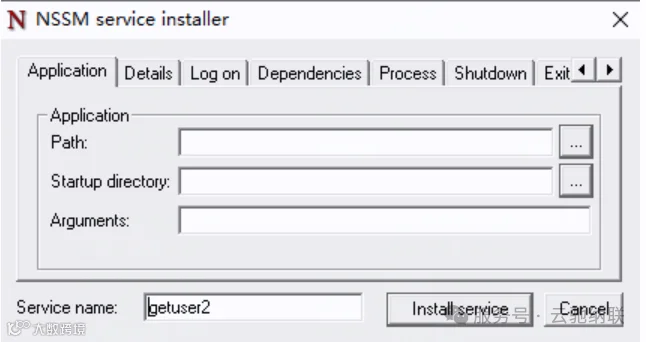
3、通过图形化界面注册服务
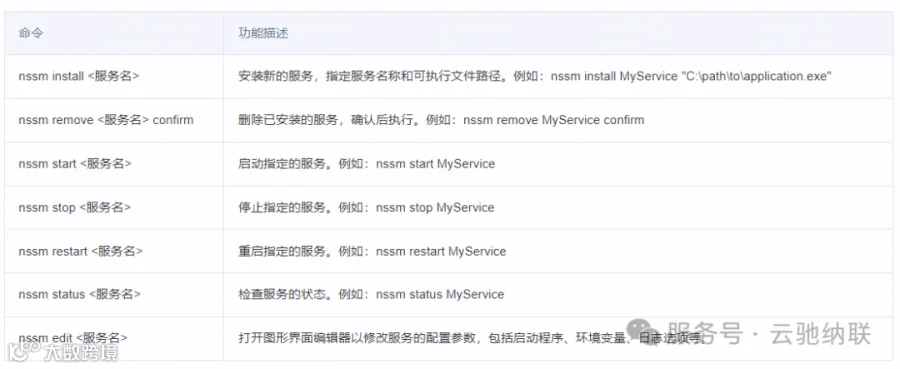
nssm常用命令: