


解决Mailgun中国手机号无法验证的完整操作指南
在协助客户注册Mailgun账号过程中,经常遇到中国手机号无法验证的问题。通过实践摸索出以下解决方案,可100%解决问题,请按如下步骤操作:
1、访问mailgun.com官网,正常登录进入后台。

2、在Mailgun后台界面右上角点击问号“?”,选择进入“Support”支持页面。

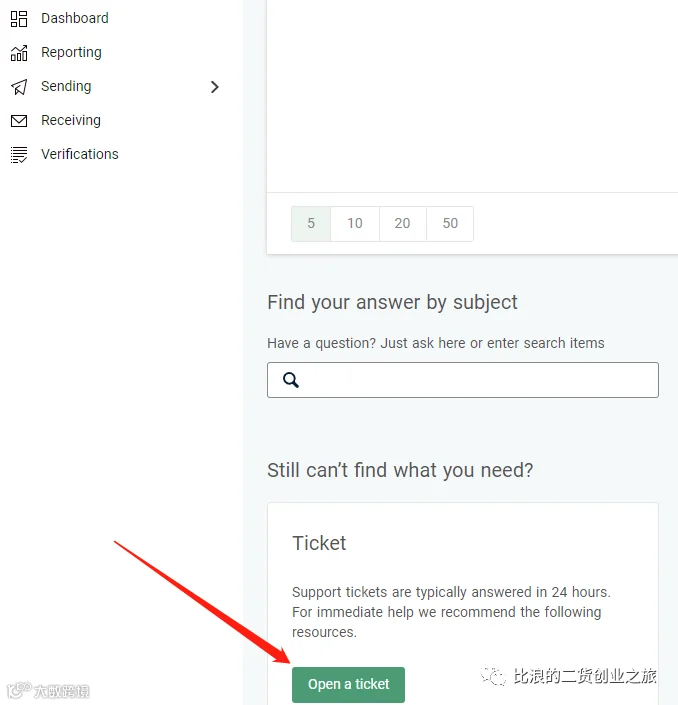
3、提交工单请求,点击“Open a ticket”按钮创建技术支持工单。
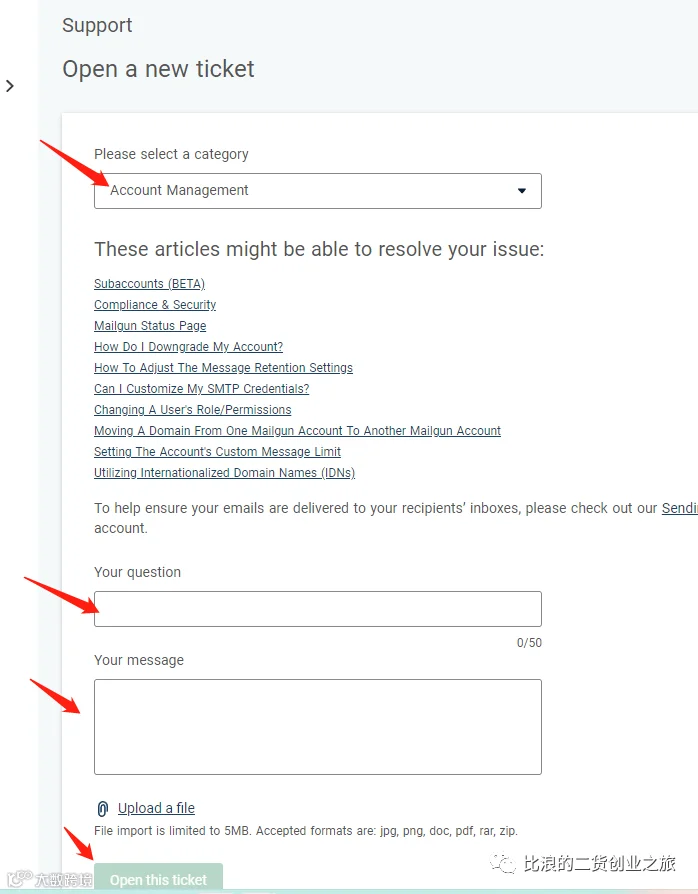
4、在工单类别中选择“Account Management”,问题标题填写“I can't verify my email”。问题描述可写:
"I can't verify my email because I clicked the link to enter my mobile phone number, and when I sent the verification code, it reminded me that I sent too many times and other reminders. This is My phone number +86 XXX XXXX XXXX."
其中XXX替换为实际使用的中国手机号。
5、提交工单后耐心等待,通常24小时内Mailgun技术人员将处理并完成验证设置,届时只需对服务进行好评即可。