


Claude Code 作者 Boris Cherny 在最近的访谈中说了一句让开发者圈震动的话:"I don't prompt Claude anymore. I have loops that are running." 这不是技术演示,这是他本人的日常工作方式。本文带你从零到一,掌握 /loop、/goal、动态工作流三大原语,把你的 Claude Code 从"问答工具"升级为"自动化引擎"。
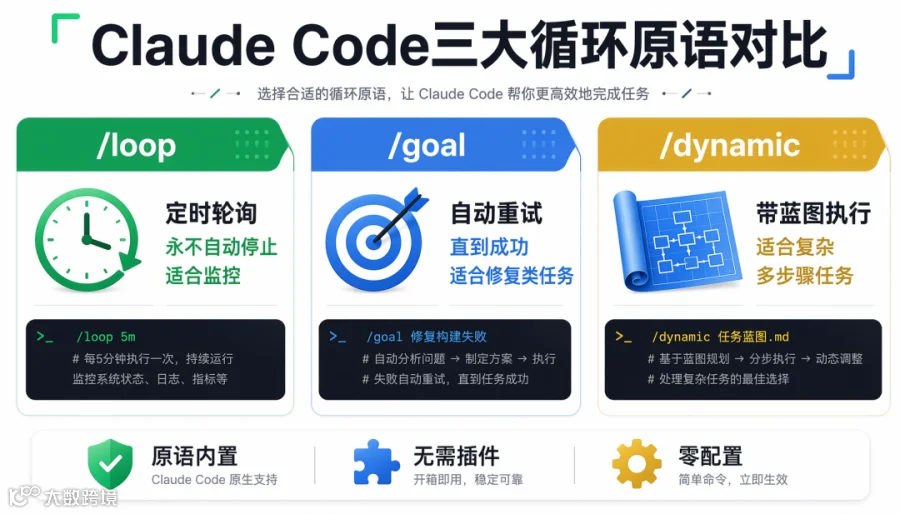 ▲ Claude Code 三大循环原语对比:/loop 定时轮询 /goal 自动重试 /dynamic 蓝图执行
你已经在一个循环里了——只是还没意识到
停下来想一想,你每次让 Claude Code 完成一个任务后做了什么:
-
让 Claude 写代码 -
手动跑测试 -
发现失败,复制错误贴回 Claude -
Claude 修复 -
手动再跑测试 -
通过后 git commit、push -
开 PR -
等 review 评论 -
复制评论贴回 Claude -
Claude 修改 -
手动 push -
等下一次 review -
循环往复
你在这个循环里扮演的是控制器角色——每一步都要你手动搬运上下文、判断是否继续、决定何时停止。Claude Code 的新循环原语(/loop 和 /goal)就是让你把这些搬运工作交还给 Agent 自己。不需要编排框架,不需要自定义工具链。原语已经内置在 Claude Code 里。
原语一:/loop —— 定时轮询,适合持续监控
它能做什么
/loop 让 Claude 按照固定时间间隔重复执行一个任务。Claude 醒来 → 做事 → 汇报 → 继续等待 → 再次醒来。你按 Esc 它才停。
三种调用方式
|
|
|
|---|---|
/loop 5m |
|
/loop |
|
/loop |
|
关键特性:/loop 永远不会自己停止。你必须按 Esc。这意味着它适合"无限期监控"类任务,不适合"有明确终点的任务"(后者用 /goal)。
实战:自动监听 PR 评论
假设你有一个开源项目,同事随时可能提 review 评论。以前你需要手动刷新 GitHub、复制评论进 Claude Code、让 AI 修改、手动 push。
现在,在项目根目录创建 .claude/loop.md:
# PR Watcher Instructions
Check all open PRs for new review comments every 3 minutes.
Command: gh pr list --state open --json number,title
For each open PR:
1. Read new review comments: gh pr view number --comments
2. If there are unaddressed comments, fix the code
3. Commit with message "address review: summary"
4. Push the change
5. Report what was changed
Only modify src/ directory. Do not modify tests unless the comment
specifically asks for test changes. Do not open new PRs.
然后启动:
cd your-project
/loop
Claude 开始每 3 分钟检查一次 PR。你在 GitHub 上留一条评论:"The POST /users route should return 201, not 200." 几分钟后,Claude 自动读取评论 → 修改代码 → commit → push。你继续写自己的代码、喝咖啡、刷 Twitter。Claude 在后台跑循环。
Worktree 隔离:循环不污染你的工作目录
问题来了:/loop 在修改代码的同时,你自己也在 main 分支上开发。两边往同一个工作目录写文件,冲突是必然的。Claude Code 的解决方案是 --worktree:
claude --worktree pr-watcher
这会创建一个独立的 git worktree,Claude 的修改在隔离环境里操作——循环代码和你自己手写的代码互不干扰。
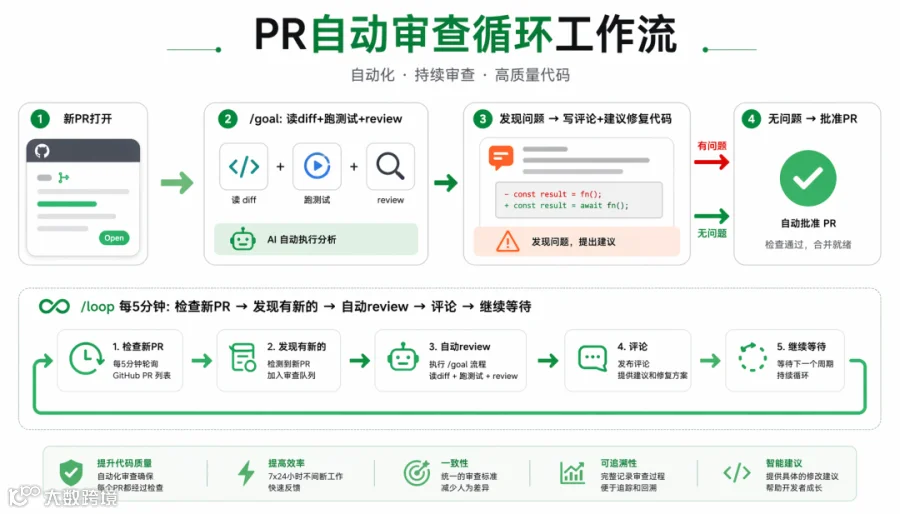 ▲ PR 自动审查循环工作流:/goal 处理新 PR + /loop 持续监听
原语二:/goal —— 自动重试直到成功,适合有终点的任务
它能做什么
/goal 让 Claude 反复尝试一个任务,直到成功才停。它适合"有明确终点的任务"——比如"让这个测试套件全部通过"或"把这个 bug 修好"。
语法
|
|
|
|---|---|
/goal |
|
/goal "描述" |
|
实战:自动修 Bug
有一批 TypeScript 类型错误你不想一个一个手动去改——每个都很简单,但数量太多:
# .claude/goal.md
Fix ALL TypeScript type errors in the src/ directory.
1. Run: npx tsc --noEmit
2. For each error:
- Read the relevant file
- Fix the type error
- Verify the fix compiles
3. Continue until npx tsc --noEmit returns zero errors
4. Commit all fixes with the message "fix: resolve all type errors"
然后:
/goal
Claude 会反复运行 tsc --noEmit → 看错误列表 → 改一个 → 重新编译 → 看还有没有剩余 → 继续 → 直到零错误。你在旁边喝咖啡。
原语三:动态工作流 (/dynamic) —— 给 /goal 加蓝图
问题
纯 /goal 有个盲区:Claude 埋头改造时可能会修改不该动的地方。动态工作流让你在启动前给出约束和边界。
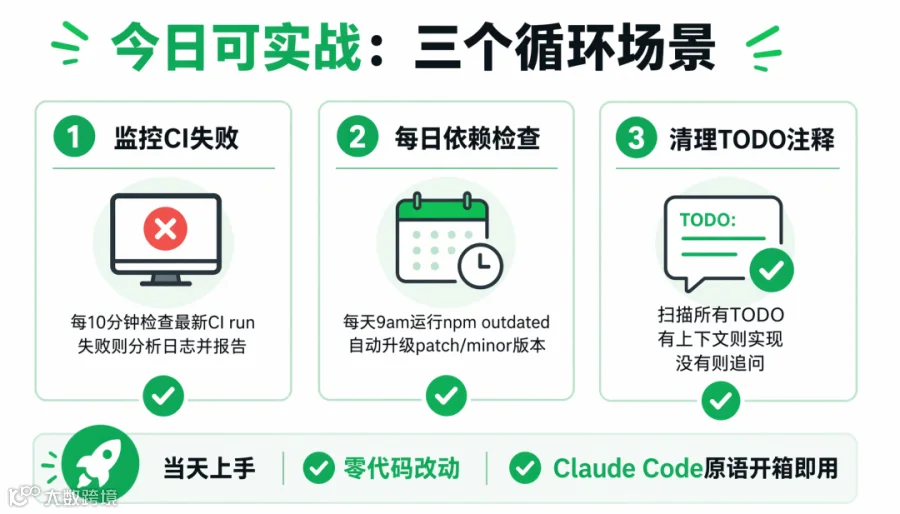 ▲ 今日可实战三个循环场景:监控 CI 失败/每日依赖检查/清理 TODO 注释
实战:完整的工作流示例
# .claude/workflow.md
## Blueprint
- The file structure should stay the same, root is src/
- Main entry point: src/index.ts
- Dependencies should not be changed
- Keep documentation comments intact
## Steps
1. Pull latest changes from main
2. Run: npx tsc --noEmit to identify type errors
3. For each error, read the file and fix the type
4. Verify the fix compiles before moving to the next
5. After all fixes, run full test suite: npm test
6. Commit with descriptive message
7. Push to the current branch
启动:
/goal "Fix all type errors following workflow.md"
// 或简写为
/dynamic
Claude 带着蓝图去干活——知道边界在哪、步骤是什么、什么时候算完成。
/loop vs /goal vs /dynamic 对比
|
|
|
|
|
|---|---|---|---|
|
|
|
|
|
|
|
|
|
|
|
|
|
|
|
|
|
|
|
|
|
|
|
|
|
实战组合:把三者串起来,搭建 CI/CD 自动化
一个完整的自动化 PR 审查流程:
1. /goal 处理新 PR
# .claude/goal.md
For every new open PR assigned to me:
1. Read the PR description and diff
2. Run the test suite on the PR branch
3. Review for:
- Type safety
- Error handling
- Test coverage
- Documentation
4. For each issue found, comment on the PR with:
- The file and line
- What's wrong
- A suggested fix (code snippet)
5. If no issues found, approve the PR
2. /loop 监听新的 review 请求
在你的项目 root 运行:
claude --worktree pr-reviewer
/loop
Claude 开始每 5 分钟检查一次。有人开新 PR → Claude 自动 review → 写评论 → 继续等下一个 PR。
行动建议
你自己可以立即测试的三个场景
场景 1:监控你的项目 CI 失败
# .claude/loop.md
Every 10 minutes:
1. Check latest CI run: gh run list --limit 1
2. If failed, read the log and identify the error
3. Propose a fix (but don't commit unless the error is trivial, like a linter issue)
4. Report to me what you found
场景 2:每天自动检查依赖更新
# .claude/loop.md
Every morning at 9am:
1. Run: npm outdated
2. For each outdated package, read the changelog
3. If the update is a patch or minor version with no breaking changes, create a branch and bump it
4. Report what was updated and what needs manual review (major versions)
场景 3:清理代码中的 TODO 注释
# .claude/goal.md
Find all TODO comments in the codebase.
For each one:
- If the TODO has enough context to implement it, implement it
- If it doesn't, add a comment asking for clarification
- Report what was done and what needs input
总结
Boris Cherny 不说"I don't code anymore",他说"I don't prompt Claude anymore"。区别在于:前者是被动等待 AI 完成单次任务,后者是给自己建了一支不领工资、不会离职、24 小时干活的自动化循环。
从今天开始,你的工作不是"用 Claude Code 写代码",而是"为 Claude Code 设计循环"。设计一个好的循环,它就在你睡觉、吃饭、过周末的时候推着项目往前跑。