
Quick Start Guide
(I)Download and Installation
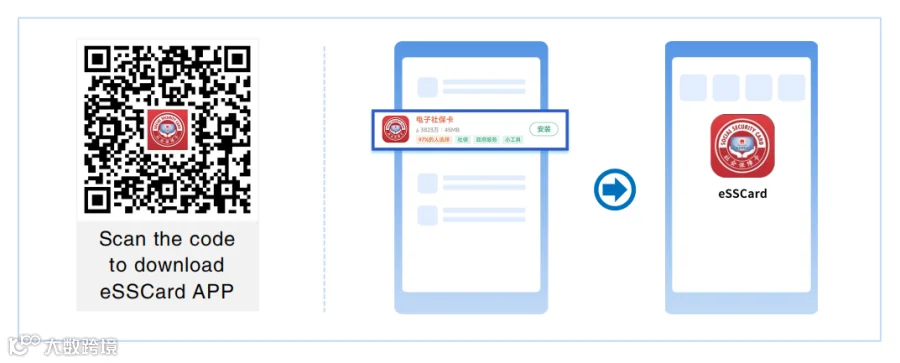
After entry into China,scan the QR code below with your mobile phone,or search "Electronic Social Security Card" or "eSSCard" in "APP Store" for download and installation.
(II)Registration and Obtaining the Card
Use your Work Permit Number and follow these steps to register and obtain your Electronic Social Security Card.
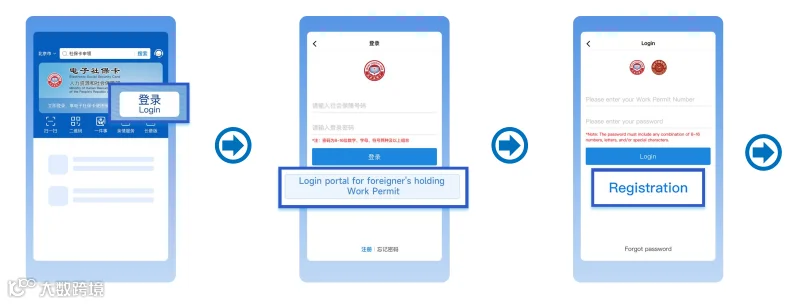
Step 1
Click“Login”
Step 2
Click “Login portal for
foreigner's holding Work
Permit”
Step 3
Click “Registration”
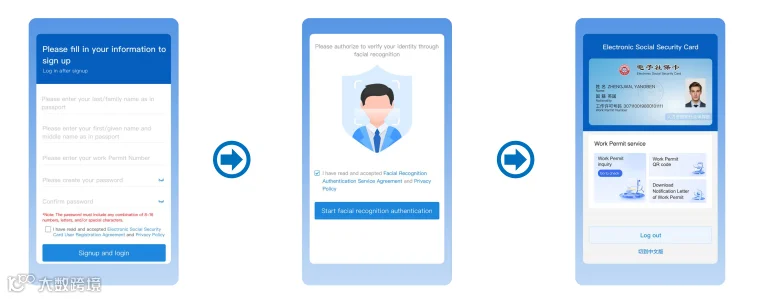
Step 4
Enter your name, Work Permit Number, and
set a login password
Step 5
Follow the APP guidance Facial recognition
authentication
Step 6
Completed
Note
1. The name entered must match the one on your passport.
2. Please enter the Work Permit Number listed on your “Notification Letter ofForeigner’s Work Permit in the the People’s Republic of China’.
3. If you choose a bank card for identity verification, you need to enter yourname,passport number,UnionPay Card number (issued by banks in China), andmobile phone number registered with the bank account, and complete theverification through SMS code.
4. If you choose the mobile phone number for identity verification, you need toenter your phone number (the SIM card obtained in China), and complete theverification through SMS code.
(III)Use the Work Permit Services
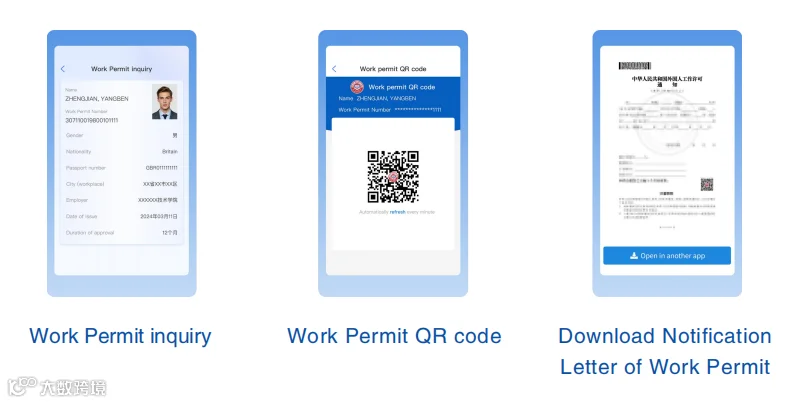
You can use services such as Work Permit inquiry, Work Permit QR code, and Download Notification Letter of Work Permit.
Frequently Asked Questions
Q
Can I get the Electronic Social Security Card if I have already obtained the Work Permit, but have not yet applied for the physical social security card?
A
Yes. Foreigners who have Work Permit within validity period can obtain the Electronic Social Security Card.
Q
What should I do if the name match fails during registration?
A
1. Please check whether the name entered is exactly the same as the one on your passport, including symbols, spaces, etc.
2. If you have entered it correctly, please confirm if the name on your Work Permit application matches your passport name. If not, please contact the Work Permit approval department in your workplace to make corrections
Q
What should I do if the facial recognition
authentication fails?
A
1. Please confirm that you have enabled the Electronic Social Security Card APP (eSSCard APP) to access your mobile phone’s camera and microphone.
2. During facial recognition, please follow the instructions to make corresponding movements.
3. If the facial recognition authentication fails, you can try again later. If it fails 6 times in a row, you will have to enter the bank card authentication page, enter your name, passport number, UnionPay Card(issued by banks in China)number, mobile phone number (registered with the bank account), and complete the verification through SMS code.
Q
What should I do if the bank account authentication fails?
A
1. Please confirm whether you entered the card number of your UnionPay Card(issued by banks in China).
2. Please confirm whether the name, passport number and mobile phone number you entered are exactly the same as the information for bank account application.
3. If the bank account verification fails, you can try to use the mobile phone
number verification to complete the identity verification.
Q
What should I do if the mobile phone number authentication fails?
A
1. Please confirm whether you entered the mobile phone number for SIM card
issued in China.
2. Please confirm whether the name and mobile phone number you entered are
exactly the same as the information for the SIM card application.
3. If the mobile phone number authentication fails, you can try to use the bank card verification to complete the identity verification.
Source:Ministry of Human Resources and Social Security of the People's Republic of China
HACOS always strive to provide our clients with more high-quality, efficient and considerate services, covering China visas, tax-planning, incorporation, financial consulting, global shipping, intellectual property, foreign trade services, legal consultation, etc.