
原文为英文版,后面有汉语版的翻译,应该还是通俗易懂的
以下为原文:
Yesterday while I was working in the terminal I noticed something unusual about the results of “ls -al” command:
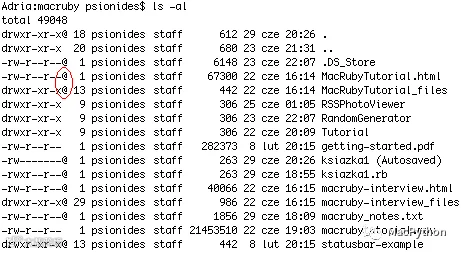
What are those symbols? I googled for “mac ls at sign”, but most of the results told me that “@” means “symbolic link”. Well, all those files can’t be symbolic links, I’m pretty sure of that. So what are they?
I found the answer in a mail on Apple mailing list. It seems that the @ symbol means that the file has something called “extended attributes”. The attributes are a kind of metadata about the file stored in a special place in the HFS filesystem, not visible during normal browsing. As I learned from a Wikipedia page, most of popular filesystems support such metadata – although I’ve never heard such thing existed in Windows or Linux… The mail also said that apart from “@”, files can have “+” symbol, which means that they have non-standard permissions set using some kind of ACLs.
The mail explained that you can print that metadata by adding a –@ option to ls. I did that, and learned that some of the files had an attribute “com.apple.TextEncoding”, and some others – “com.apple.quarantine”. It’s easy to guess what TextEncoding is for, but quarantine? WTF?
Again, a quick Google search solved the mystery – the quarantine tag is what causes those messages “xxx is an application which was downloaded from the Internet. Are you sure you want to open it?” that I get when I run an application for the first time. Every file (not only applications, it seems) that is downloaded from the Internet is marked with this quarantine metadata tag. When the user confirms that he wants to open the file, the tag is removed and the popup doesn’t appear again.
There is a command line utility for accessing and managing that metadata, named xattr. It can print file’s metadata attributes and their values, modify attributes and remove them, like this:
$ xattr macruby-interview.html
com.apple.quarantine
$ xattr -l macruby-interview.html
com.apple.quarantine: 0000;485e5e65;Firefox;|org.mozilla.firefox
$ xattr -w pl.psionides foo macruby-interview.html
$ xattr macruby-interview.html
com.apple.quarantine
pl.psionides
$ xattr -l macruby-interview.html
com.apple.quarantine: 0000;485e5e65;Firefox;|org.mozilla.firefox
pl.psionides: foo
$ xattr -d pl.psionides macruby-interview.html
$ xattr -d com.apple.quarantine macruby-interview.html
$ xattr macruby-interview.html
$ ls -l macruby-interview.html
-rw-r--r-- 1 psionides staff 40066 22 cze 16:15 macruby-interview.html
As you can see, the metadata store not only the information that a file was downloaded from the Internet, but also how it was downloaded (using Firefox), and I think also when it was downloaded (the hex value). The -d option can be useful if MacOSX for some reason forgets to remove the quarantine attribute, which – as I’ve read – can happen sometimes.

咦!我是小可爱,这可是我一字一句翻译的哦!溜啦。。。
以下是中文翻译:
昨天工作的时候,我在苹果电脑终端上输入“ls -al”命令后,我注意到了一些不寻常的结果
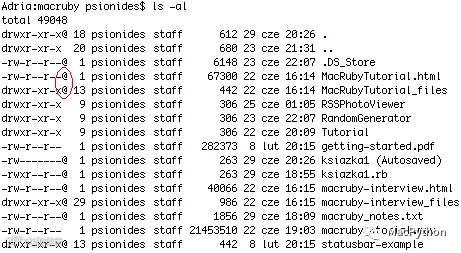
这些是什么符号? 我Google了一下“Mac ls at sign”,但是大多数结果告诉我“@”符号是象征性链接。当然啦,我也确信,不可能所有的这些文件都是象征性链接。所以说,这到底是啥呢?
苹果邮件清单中的一封邮件让我找到了答案。“@”符号表示该文件带有包含“扩展属性”的信息,该属性信息是存放于HFS文件系统的特殊空间的一种元数据,通过普通的搜索是不可见的。通过维基百科,我了解到,大多数的文件系统都支持该元数据类型,尽管我从来没有在Windows或Linux操作系统中听说过。。。 邮件中还说了,除了“@”符号外,文件还可能会有“+”符号,带有“+”符号表示该文件带有一些ACL类型的非标准权限集。
邮件还解释道,你可以通过向”ls”命令中添加“-@”选项来打印元数据,我试过了(终端中输入”ls -l -@”),并且我发现了一些文件有“com.apple.TextEncoding”属性,一些其他的文件带有“com.apple.quarantine”属性。很容易猜到TextEncoding是干嘛的,但是quarantine(检疫)?WTF?
同样的,Google解决了我的疑问,原来,带有“quarantine(检疫)”标签的文件会在我们第一次运行该文件时弹出”某某软件是从互联网上下载,你确定要打开它吗?”对话框。每个从互联网上下载的文件(好像不仅仅是应用软件)都带有“quarantine(检疫)”元数据标签,当用户确定想要打开文件后,该文件的“quarantine(检疫)”标签会自动移除掉,再次打开时就不会出现弹窗提示对话框。
有一个用于访问和管理元数据的命令行实用程序,名叫xattr。它能够打印输出元数据属性及其值,还能更新和移除他们,就像这样:
$ xattr macruby-interview.html
com.apple.quarantine
$ xattr -l macruby-interview.html
com.apple.quarantine: 0000;485e5e65;Firefox;|org.mozilla.firefox
$ xattr -w pl.psionides foo macruby-interview.html
$ xattr macruby-interview.html
com.apple.quarantine
pl.psionides
$ xattr -l macruby-interview.html
com.apple.quarantine: 0000;485e5e65;Firefox;|org.mozilla.firefox
pl.psionides: foo
$ xattr -d pl.psionides macruby-interview.html
$ xattr -d com.apple.quarantine macruby-interview.html
$ xattr macruby-interview.html
$ ls -l macruby-interview.html
-rw-r--r-- 1 psionides staff 40066 22 cze 16:15 macruby-interview.html
就像你所看到的,元数据不仅仅包含了文件是从哪儿下载的,而且还包含了文件是怎么下载下来的(通过火狐浏览器下载),同样的我认为还包括了下载的时间(十六进制值)。在我浏览的过程中,还发现了,如果苹果系统因为某些原因忘记删除“quarantine(检疫)”属性,那么“-d”选项可能会派上用场。
写在后面:
如果文章对你有帮助
欢迎关注我的公众号
谢谢!!!