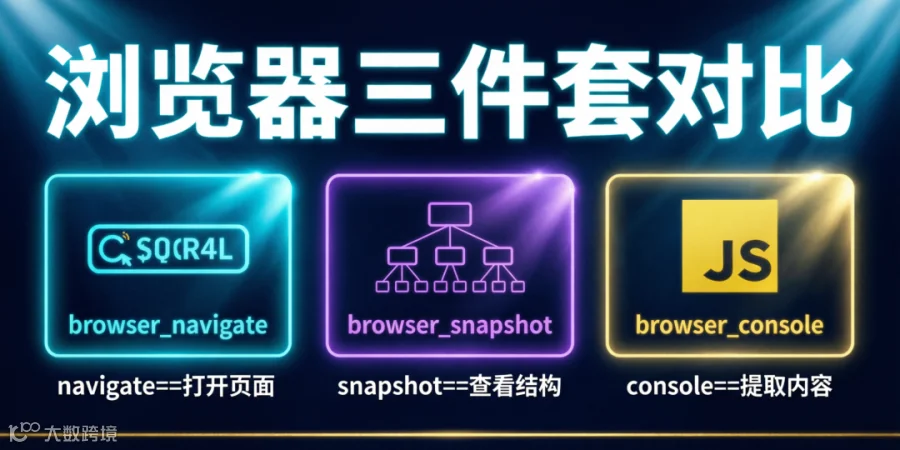
使用Hermes Agent浏览器工具链,5分钟构建网页采集系统,无需安装Playwright或Selenium,零依赖开箱即用。
当使用Hermes Agent进行内容监控、竞品分析或数据采集时,常遇以下问题:
-
GitHub Releases详情页:`web_extract`返回`Client error '432'`,无法打开
-
The Verge文章页:`web_extract`返回0字符,正文空白
-
OpenAI/Anthropic官方博客:Cloudflare拦截导致`web_extract`失败
-
Hacker News首页:`web_extract`仅获取标题,无法提取评论区
。三者底层基于Playwright CDP协议但已完整封装,无需安装浏览器驱动。
本文详解三工具实战用法,附完整代码、输出示例及7条避坑指南。
需提取网页正文? ├── 普通网页 → 优先用web_extract(更快省token) │ └── 失败 → 用browser_console提取 ├── GitHub页面 → 直接用browser_console(web_extract必失败) ├── The Verge/媒体站 → 用browser_console └── Cloudflare拦截 → Web Archive + browser_console 需分析页面结构? └── 用browser_snapshot(仅调试时使用)
实战1:提取GitHub Release正文(含完整输出)
https://github.com/NousResearch/hermes-agent/releases/tag/v2026.4.16
返回432错误。使用浏览器三件套可绕过且无需GitHub Token。
browser_navigate(url="https://github.com/NousResearch/hermes-agent/releases")
返回页面结构摘要以确认加载。注意:GitHub为SPA混合渲染,navigate后JS可能未执行完,snapshot返回的常为页面骨架。
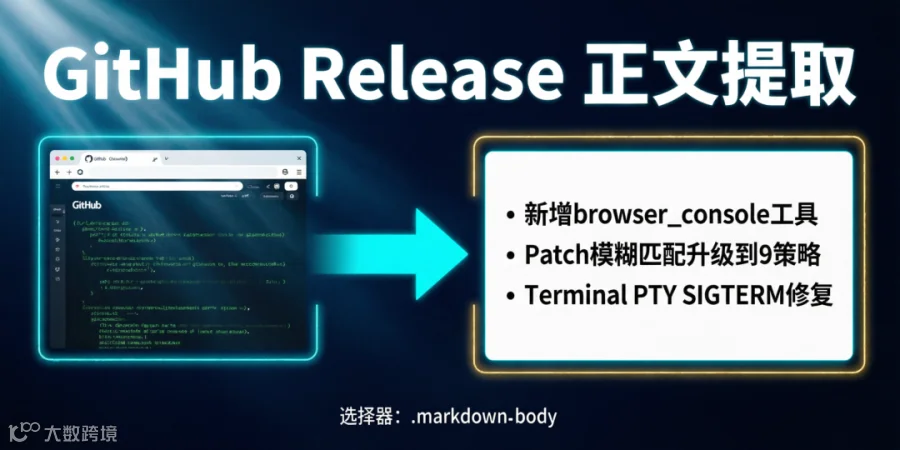
跳过snapshot,用console定位正文容器:
browser_console(expression="document.querySelector('.markdown-body')?.innerText || document.querySelector('article')?.innerText || document.body.innerText.substring(0, 5000)")
-
-
-
`body.innerText.substring(0, 5000)`
body.innerText.substring(0, 5000)
Hermes Agent v2026.4.16 ======================== ## What's New 🚀 - **Browser Console Tool**: New `browser_console` tool for executing JavaScript in loaded pages. Supports Promises for async extraction. - **Patch v2**: Fuzzy matching now uses 9 strategies instead of 3. Minor whitespace differences no longer break replacements. - **Terminal PTY**: Fixed SIGTERM handling in pseudo-terminal mode. Interactive CLIs (Codex, Claude Code) are now stable. ## Bug Fixes 🐛 - `read_file` offset parameter: Fixed off-by-one error when offset > 1 - `process.wait`: No longer hangs when process exits during poll cycle - `web_search`: Added bocha as native backend option for Chinese queries ## Breaking Changes ⚠️ - `browser_snapshot` now returns accessibility tree by default instead of raw HTML. Use `browser_console` for content extraction.
⚠️ 避坑1:navigate后勿急snapshot。GitHub页面动态内容多(React水合),snapshot返回的无障碍树通常不含Markdown正文。正确路径:navigate → 直接console → CSS选择器精准提取。除非需确认DOM结构,否则生产流程应跳过snapshot。
⚠️ 避坑2:`.markdown-body`仅适用于GitHub文件页和Release页。Pull Request或Issue页正文位于`.comment-body`或`.js-comment-body`容器。建议先用snapshot确认正确CSS选择器,再执行console表达式。快速验证方案:`browser_console(expression="document.querySelectorAll('[class*=comment]').length")`统计评论容器数量。
实战2:提取The Verge文章正文(含完整工作流)
返回0字符。浏览器三件套可稳定获取全文,包含评论区内容。
# 步骤1:打开AI专栏首页 browser_navigate(url="https://www.theverge.com/ai-artificial-intelligence") # 步骤2:首页提取最新文章列表 browser_console(expression="Array.from(document.querySelectorAll('[data-analytics-link] h3, .duet--article--headline a')).slice(0, 5).map(el => ({title: el.innerText?.trim(), href: el.href || el.closest('a')?.href}))") # 返回示例: # [ # {"title": "OpenAI quietly launched a new moderation tool", "href": "https://www.theverge.com/2026/5/14/..."}, # {"title": "Anthropic's Claude can now browse the web", "href": "https://www.theverge.com/2026/5/14/..."}, # ... # ] # 步骤3:进入目标文章 browser_navigate(url="https://www.theverge.com/2026/5/14/openai-quietly-launched-moderation-tool") # 步骤4:console提取正文 browser_console(expression="document.querySelector('.duet--article--article-body-component')?.innerText || document.querySelector('[class*=article-body]')?.innerText || document.body.innerText.substring(0, 10000)")
OpenAI quietly launched a new moderation tool that could reshape how AI companies handle content safety. The tool, called "Guardian," was rolled out to enterprise customers last week without a formal announcement. According to an internal document obtained by The Verge, Guardian uses a multi-layered approach... "We believe safety should be invisible but effective," said OpenAI's head of trust and safety. Industry analysts see this as a direct response to...
⚠️ 避坑3:The Verge站内搜索`https://www.theverge.com/search?q=关键词`对新文章常返回空结果(索引延迟)。AI专栏首页`https://www.theverge.com/ai-artificial-intelligence`的"LATEST IN AI"区块实时更新。正确入口:优先从专栏首页提取,搜索失败时用`browser_console`从DOM直接抓标题列表。
⚠️ 避坑4:The Verge正文容器class名随改版变化(截至2026年5月为`.duet--article--article-body-component`)。若失效,立即snapshot分析新结构。备选方案:用`browser_console(expression="Array.from(document.querySelectorAll('main p')).slice(0,30).map(p=>p.innerText).join('\n\n')")`提取全部段落文本。
实战3:绕过Cloudflare拦截(OpenAI/Anthropic/Medium)
|
|
|
|
|
|
|
|
|
`anthropic.com/engineering/*`
|
|
`/news/`返回404,`/engineering/`被拦截
|
|
|
|
|
# ❌ 直接访问触发Cloudflare browser_navigate(url="https://openai.com/index/why-we-no-longer-evaluate-swe-bench-verified") # ✅ 使用Web Archive快照 browser_navigate(url="https://web.archive.org/web/20260514/https://openai.com/index/why-we-no-longer-evaluate-swe-bench-verified")
https://web.archive.org/web/[YYYYMMDD]/[完整协议+URL]
⚠️ 避坑5:Web Archive非万能。对Medium付费墙文章或`archive.ph`快照,常返回"Hrm"错误。此时跳转至终极方案——HN评论API:
# 通过HN Algolia获取文章objectID curl -s "https://hn.algolia.com/api/v1/search?query=关键词&tags=story&hitsPerPage=5" # 用objectID拉取完整评论 curl -s "https://hn.algolia.com/api/v1/items/44569445"
组合三工具实现无人值守监控。以下为扫描HN热榜的分钟级流水线:
# === 内容监控流水线(Hermes Agent Cron任务) === # 步骤1:打开HN首页 browser_navigate(url="https://news.ycombinator.com/") # 步骤2:提取热榜前15条 browser_console(expression="Array.from(document.querySelectorAll('.titleline > a')).slice(0, 15).map(a => ({title: a.innerText, url: a.href}))") # 返回示例: # [ # {"title": "Show HN: I built an AI agent that manages my calendar", "url": "https://..."}, # {"title": "Claude Code can now deploy to production", "url": "https://..."}, # {"title": "Hermes Agent v2026.5.14 released with browser tools", "url": "https://..."}, # ... # ] # 步骤3:Hermes对话中自然语言筛选 # "提取含AI/Agent/Claude/Hermes/LLM的条目,过滤广告" # 步骤4:对每条目提取正文 browser_navigate(url="具体文章URL") browser_console(expression="document.body.innerText.substring(0, 5000)") # 记录至草稿文件 # 步骤5:生成汇总报告 # 写入content/draft-YYYYMMDD-HHMM-ai-fengxiang-xxx.md
⚠️ 避坑6:HN首页SSR渲染标题列表,无需等待JS。但browser_snapshot返回稀疏结构,应跳过snapshot直接browser_console提取。注意:`.titleline > a`仅获取标题,需完整信息时用:
browser_console(expression="Array.from(document.querySelectorAll('.athing')).slice(0,10).map(row => { const title = row.querySelector('.titleline > a'); const meta = row.nextElementSibling; return { title: title?.innerText, url: title?.href, points: meta?.querySelector('.score')?.innerText, comments: meta?.querySelectorAll('a')[meta?.querySelectorAll('a').length-1]?.innerText }; })")
⚠️ 避坑7:长console表达式(>400字符)可能被截断。解决方案:拆分多次console调用——先取标题列表,再取元数据,在Hermes对话中手动合并。
|
|
|
|
|
|
|
|
|
`article` → `body.innerText`
|
|
|
|
|
|
|
|
|
`.duet--article--article-body-component`
|
|
|
|
|
`[data-analytics-link] h3`
|
`.duet--article--headline a`
|
|
|
|
|
|
|
|
|
|
|
|
|
|
|
`shreddit-post` shadow DOM
|
|
|
|
|
`.post-content` → `body.innerText`
|
|
|
|
`document.body.innerText.substring(0, 5000)`
|
|
-
console表达式控制在200字符内:过长JS累积消耗token
-
innerText截断至5000-10000字符:避免全文提取浪费token
-
避免连续snapshot+console:snapshot返回文本也计token,仅调试时使用
-
-
SPA页面用Promise延迟提取:避免sleep占用轮次
走内部文本提取pipeline,比浏览器快3-5倍且token消耗更低。浏览器工具链是降级方案。
new Promise(r => { const check = () => { const el = document.querySelector('.content-loaded'); if(el?.innerText?.length > 100) r(el.innerText.substring(0, 5000)); else setTimeout(check, 1500); }; check(); })
对日常需求(行业新闻监控、竞品分析),浏览器三件套性价比最高——无需额外基础设施,直接在对话中使用。
Q1:browser_console返回`undefined`?
A:99%情况为CSS选择器错误。解决流程:① 用browser_snapshot查看DOM结构;② 定位正文容器class名;③ 更新console表达式;④ 兜底用`document.body.innerText.substring(0, 3000)`
A:navigate自动等待`load`事件(5-15秒),但SPA框架页面正文可能未渲染完。需在console表达式内用Promise轮询(见性能优化第5条)。
A:不支持。三件套为单标签页模式,navigate替换当前页面。需监控多页面时,在多个对话中操作或顺序执行。
document.querySelector('.load-more').click(); window.scrollTo(0, document.body.scrollHeight); document.querySelector('input[name="search"]').value = '关键词';
write_file(path="/opt/hermes-home/projects/ai-neican/research/hn-20260514.md", content="[正文]")
projects/ai-neican/content/
-
navigate开门,console取货——snapshot仅调试用,不用于生产内容提取
-
选择器不对时snapshot——一次snapshot胜过10次盲目调整
-
普通网页优先web_extract,失败再用浏览器三件套——浏览器是降级方案
-
Cloudflare拦截走Web Archive,失败则用HN评论API——永不死磕