


在Shopify制作过程中,如果使用了Dawn主题,可能出现PC端上部主导航只有点击了一级栏目才能展开下级菜单,如果想要鼠标移动上去就能自动展开二级菜单,那怎么操作? 下面给出了解决方案,跟着往下看!
Add a JavaScript Code (Most Recommended)
This method is widely used in the Shopify Community and effectively converts the click-based menu to hover on desktop/PC .
In your Shopify admin, go to Online Store > Themes.
Find your current Dawn theme, click the ... (Actions) button, and select Edit code.
In the code editor, under the Layout folder, open theme.liquid.
Scroll to the very bottom of the file and paste the following code just before the </body> tag.
如下图:
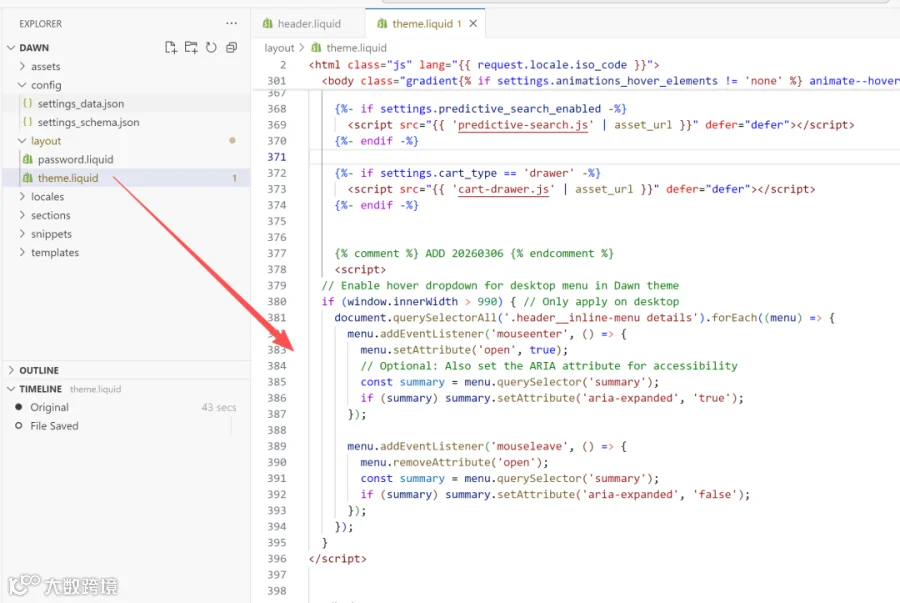
Snippet Code:
<script>// Enable hover dropdown for desktop menu in Dawn themeif (window.innerWidth > 990) {document.querySelectorAll('.header__inline-menu details').forEach((menu) => {menu.addEventListener('mouseenter', () => {menu.setAttribute('open', true);// Optional: Also set the ARIA attribute for accessibilityconst summary = menu.querySelector('summary');if (summary) summary.setAttribute('aria-expanded', 'true');});menu.addEventListener('mouseleave', () => {menu.removeAttribute('open');const summary = menu.querySelector('summary');if (summary) summary.setAttribute('aria-expanded', 'false');});});}</script>
如果您近期有Shopify制作的考虑,请联系我们,织晶网络是广州一家专业的外贸独立站制作公司,我们能给予合理的价格与优秀的制作,广州市区可预约面谈。

长按二维码加微信联系