


WordPress自动同步文章至X平台指南
- 通过WordPress钩子publish_post触发文章发布事件
- 调用X API v2发送推文
- 自动附加文章标题、直链及特色图片
- 密钥安全存储于wp-config.php而非主题文件
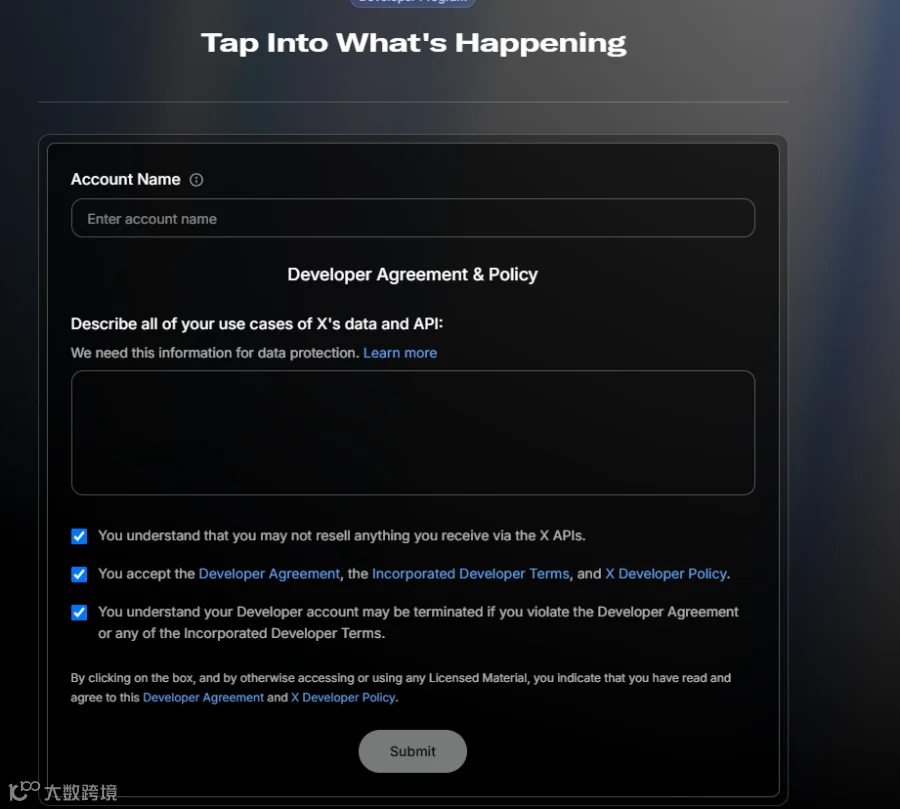
API审核通过要点
X平台审核核心要求为"用途明确、合规、无风险、不滥用"。避免以下描述:
不推荐描述:
批量操作、数据采集、商业分析等模糊用途
推荐描述模式:个人博客"文章自动同步到X",强调纯自用、无商业、无数据采集。该场景为个人开发者最高通过率方案。
高通过率描述模板
本人运营自建WordPress个人博客,唯一使用场景为:当发布新文章时,自动将原创内容同步至X账号。
具体实现:
- 发布新文章时自动推文,含标题、直链及特色图
- 仅针对自身内容的单向操作,不采集任何X用户数据
- 不转售/分发通过API获取的任何数据
- 所有内容均为原创作品,严格遵守X开发者协议
- 本项目属个人非商业性质,仅用于向粉丝分享博客内容
密钥权限配置详解
进入应用管理后台,按以下流程配置:
权限设置步骤:
- 关闭当前页面返回应用设置页
- 进入User authentication settings
- 配置选项:
- 应用权限:选择Read and Write
- 应用类型:选择Web App, Automated App or Bot
- 回调地址:填写WordPress域名
- 网站地址:填写博客域名
- 保存并生成新Access Token(需确认权限显示为Read and Write)
| 模块 | 凭证名称 | 核心用途 | 代码变量 |
|---|---|---|---|
| OAuth 1.0 Keys | Consumer Key | 应用身份ID | X_API_KEY |
| Consumer Secret | 生成OAuth签名 | X_API_SECRET |
|
| Access Token | 执行发推等写操作 | X_ACCESS_TOKEN |
|
| Access Secret | 配合Access Token生成签名 | X_ACCESS_TOKEN_SECRET |
在wp-config.php配置:
define('X_API_KEY', '填Consumer Key');
define('X_API_SECRET', '填Consumer Secret');
define('X_ACCESS_TOKEN', '填新Access Token');
define('X_ACCESS_TOKEN_SECRET', '填新Access Secret');
WordPress自动同步实现代码
在主题functions.php添加以下代码:
<?php
// 发布文章时自动同步到 X
add_action('publish_post', 'custom_post_to_x', 10, 2);
function custom_post_to_x($post_id, $post) {
    // 排除非正式文章
    if (wp_is_post_autosave($post_id) || wp_is_post_revision($post_id)) return;
    if (get_post_meta($post_id, '_x_posted', true)) return;
    if ($post->post_type !== 'post') return;

    // 构建推文内容
    $title = get_the_title($post_id);
    $url = get_permalink($post_id);
    $text = "$title\n$url";

    // 处理特色图
    $image_id = get_post_thumbnail_id($post_id);
    $image_path = $image_id ? get_attached_file($image_id) : '';

    // API认证
    require_once ABSPATH . WPINC . '/class-oauth.php';
    $oauth = new OAuth(X_API_KEY, X_API_SECRET, OAUTH_SIG_METHOD_HMACSHA1, OAUTH_AUTH_TYPE_URI);
    $oauth->setToken(X_ACCESS_TOKEN, X_ACCESS_TOKEN_SECRET);

    try {
        $media_id = null;

        // 1. 上传图片(如有)
        if ($image_path && file_exists($image_path)) {
            $oauth->fetch(
                'https://upload.x.com/1.1/media/upload.json',
                ['media' => class_exists('CURLFile') ? new CURLFile($image_path) : '@'.$image_path],
                OAUTH_HTTP_METHOD_POST
            );
            $media_res = json_decode($oauth->getLastResponse(), true);
            $media_id = $media_res['media_id_string'] ?? null;
        }

        // 2. 发布推文
        $post_data = ['text' => $text];
        if ($media_id) $post_data['media']['media_ids'] = [$media_id];

        $oauth->fetch(
            'https://api.x.com/2/tweets',
            json_encode($post_data),
            OAUTH_HTTP_METHOD_POST,
            ['Content-Type' => 'application/json']
        );

        // 标记已同步
        update_post_meta($post_id, '_x_posted', '1');
    } catch (OAuthException $e) {
        update_post_meta($post_id, '_x_error', $e->getMessage());
    }
}