


一、什么是 New Model?
核心逻辑
将新 ASIN 挂在老品详情页下,共享老品流量池,实现“老带新”精准推新。

展示位置:
老品详情页 “About this item” 下方,红框标注 “There is a newer model of this item”
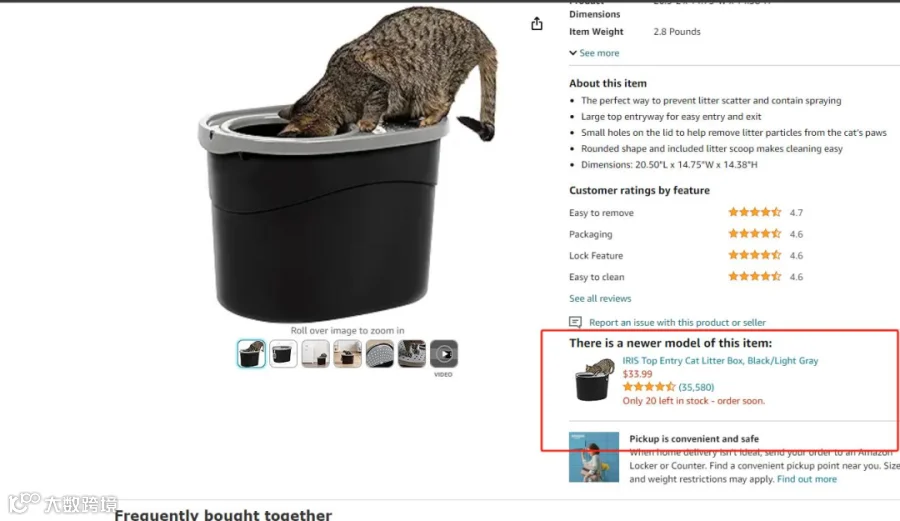
案例场景:
- 老品:瑜伽垫(BSR 前 100,500 + 评论)
- 新品:升级款瑜伽垫(新增防滑纹路)
- 效果:新品上架 7 天,自然流量占比达 42%
二、New Model 申请 5 大硬性要求(附避坑清单)
必须满足:
- 品牌 & 店铺统一:
新老 ASIN 品牌名、店铺名完全一致
错误案例:老品 A 品牌,新品 B 品牌(审核必拒) - 新品创建时间晚:
新 ASIN 需在老品之后创建 - 非变体关系:
新老 ASIN 不能是父子变体(如不同颜色) - 同类产品要求:
正确:瑜伽垫→升级款瑜伽垫;错误:瑜伽垫→瑜伽砖(非同类) - 规格 & 价格门槛:
- 规格相同(如老品 1Pack,新品也需 1Pack)
- 新品价格<老品(建议低 5%-10%)
审核拒绝原因 TOP3:
| 拒绝原因 | 解决方案 |
|---|---|
| 品牌不一致 | 检查商标备案状态,确保新老品同品牌 |
| 存在变体关系 | 拆分变体,创建独立 Listing |
| 规格不匹配 | 调整新品包装规格与老品一致 |
三、保姆级申请流程(附模板代码)
1. 准备材料
- 新 ASIN(B0xxxxxx01)
- 老 ASIN(B0xxxxxx02)
- 新旧产品对比图(标注升级点)
2. 后台操作路径
sellercentral.amazon.com/help/hub/solution/WF_NewVersionWidget
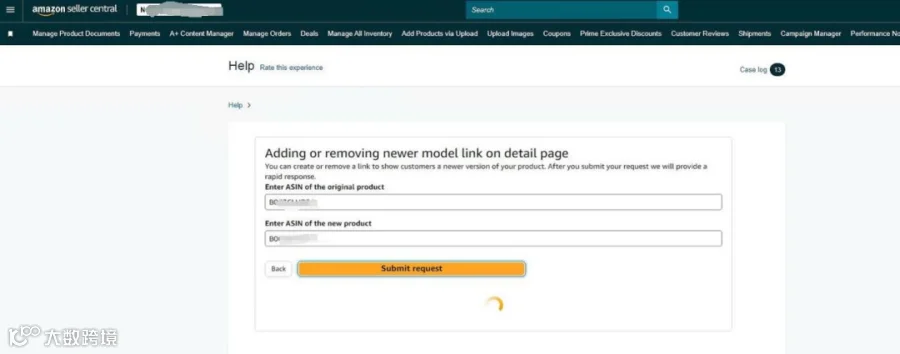
- 输入新 ASIN → 选择 “Show under ASIN” → 填写老 ASIN

3. 开 Case 模板(直接复制使用)
主题:
Link new version products - request ASINS: B0xxxxxx01,B0xxxxxx02
内容:
The new ASIN: B0xxxxxx01 has similar functions compared with the old ASIN: B0xxxxxx02, but the new product has upgraded the following functions on the basis of the original functions of the old product. Old products are all solid colors, with relatively single colors. The new product has added more beautiful pattern effects, providing users with more choices. Attachments.
四、实战效果 & 高阶技巧
卖家实测数据
- 某 3C 卖家:老品充电宝(5000 + 评论)→ 新品快充版
- 挂 New Model 后:
- 新品日均流量从 200→850
- 7 天订单破 200 单
- 关键词排名周提升 300 + 位
- 挂 New Model 后:
高阶优化策略
- 流量闭环设置:
- 新品详情页添加 “老品同款升级” 文案
- 老品 A + 页面插入新品 New Model 模块
- 价格策略:
- 新品首周设置 9 折,叠加老品关联流量
- 第 2 周恢复原价,提升利润率
互动话题:
“你申请 New Model 遇到过哪些坑?”