


关注【索引目录】服务号,更多精彩内容等你来探索!
TL;DR
当开发人员长期制作一个网站时,显然很少有人会考虑这样的功能,但想象一下,您的服务已经变得流行并且您想要扩展。
一个仓库似乎足以应付工作,但如果一个服务(公司)有 10 个网站,那么所有网站都必须使用相同的组件,因为重新设计根本无利可图。GitHub 和 YouTube 等服务的用户甚至无法想象会有多少个子网站。
2010 年的 Web 开发和 2025 年的 Web 开发几乎截然不同。因此,了解当今的现代实践至关重要。组件共享就是其中之一。在本文中,我们将探讨它!
组件
例如,我们可以采用按钮组件,并在组件之间进行传输。它看起来如下:
<button class="button">Click Me</button>
<style>
  .button {
    background-color: #4caf50;
    color: white;
    border: none;
    padding: 12px 24px;
    text-align: center;
    text-decoration: none;
    font-size: 16px;
    border-radius: 5px;
    cursor: pointer;
    transition: background-color 0.3s, transform 0.2s;
  }

  .button:hover {
    background-color: #45a049;
  }

  .button:active {
    transform: scale(0.95);
  }
</style>
网站上的结果如下:

现在,我们假设有两个站点需要将组件通用。假设它们分别是 example1 和 example2。它们可以分别托管在不同的主机上。其中一个站点部署在 GithHub 上,另一个部署在本地主机上。
现在,主要问题出现了——如何分享?
️ 多种分享方式
我将描述几种常用的方法,从最普通的到最实用的。
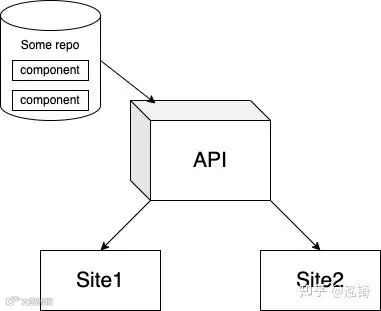
这两种方法看起来都像这样。
1. 输出到文件并通过脚本连接
此方法假设有一个返回 HTML 标记的函数。并且,该函数可以通过文件远程连接。该文件位于何处并不重要,您只需从那里进行连接即可。
createButton.js
// buttonModule.js
(function (global) {
  // Define the createButton function
  function createButton() {
    // Create a <style> element and add styles
    const style = document.createElement('style');
    style.textContent = `
      .button {
        background-color: #4caf50;
        color: white;
        border: none;
        padding: 12px 24px;
        text-align: center;
        text-decoration: none;
        font-size: 16px;
        border-radius: 5px;
        cursor: pointer;
        transition: background-color 0.3s, transform 0.2s;
      }
      .button:hover {
        background-color: #45a049;
      }
      .button:active {
        transform: scale(0.95);
      }
    `;

    // Create the button element
    const button = document.createElement('button');
    button.className = 'button';
    button.textContent = 'Click Me';

    // Return the elements (style and button)
    return { style, button };
  }

  // Expose the function to the global scope
  global.buttonModule = {
    createButton,
  };
})(window);
示例 1/根/index.html、
示例 2/根/index.html
<!DOCTYPE html>
<html lang="en">
<head>
  <meta charset="UTF-8">
  <meta name="viewport" content="width=device-width, initial-scale=1.0">
  <title>Button Module</title>
  <script src="https://.../buttonModule.js"></script>
</head>
<body>
  <div id="wrapper"></div>
  <script>
    // Use the buttonModule
    const { style, button } = buttonModule.createButton();
    const wrapper = document.getElementById("wrapper");
    wrapper.append(style); // Attach styles to the document
    wrapper.append(button); // Add the button to the page
  </script>
</body>
</html>
这里我们通过一个与我们两个站点无关的站点来连接模块。这个站点可以是同一个 GitHub。
特点(优点):
-
使用 HTML 中的标准标签即可轻松实现 <script>,无需额外设置。 -
不需要像 Webpack 或 Vite 这样的现代工具或配置。 -
适用于小型单页应用程序或快速实验。 -
最少的设置,实现更快的开发。 -
可以无缝集成到已经依赖全局变量的现有项目中。
缺点:
-
如果组件很多的话,就会有上千个脚本,这种方式只适合单一用途。 -
将变量或对象添加到全局范围,增加命名冲突的风险。 -
使用多个脚本时很难避免冲突。 -
使得项目更难扩展或重构。 -
脚本依赖于正确的加载顺序,必须手动管理。 -
维护性较差且不符合当前的最佳实践。
2. 使用第三方库并将组件移至 API
对于这种方法,我们将使用诸如HMPL之类的模块。它允许您使用基于对象的简单模板从服务器连接组件。首先,让我们将组件传输到服务器。创建一个单独的文件HTML并通过 API 请求发送。该.html文件将如下所示:
按钮.html
<button class="button">Click Me</button>
<style>
  .button {
    background-color: #4caf50;
    color: white;
    border: none;
    padding: 12px 24px;
    text-align: center;
    text-decoration: none;
    font-size: 16px;
    border-radius: 5px;
    cursor: pointer;
    transition: background-color 0.3s, transform 0.2s;
  }

  .button:hover {
    background-color: #45a049;
  }

  .button:active {
    transform: scale(0.95);
  }
</style>
之后,我们需要以某种方式将此文件传输到服务器。后端使用 Node.js。我们将使用 express.js 作为创建 API 的最流行框架之一。首先,我们将设置接收组件的路由:
buttonController.js
const express = require("express");
const expressRouter = express.Router();
const path = require("path");

const buttonController = (req, res) => {
  res.sendFile(path.join(__dirname, "../button.html"));
};

expressRouter.use("/getButton", buttonController);
应用程序.js
const express = require("express");
const path = require("path");
const bodyParser = require("body-parser");
const cors = require("cors");
const PORT = 8000;
const app = express();
const routes = require("./routes/buttonController");

app.use(bodyParser.urlencoded({ extended: false }));
app.use(cors({ origin: true, credentials: true }));

app.set(express.static(path.join(__dirname, "src")));

app.use("/api", routes);

app.listen(PORT);
完成此操作后,我们将获得一条可以轻松获取组件的路线。在站点上,我们连接 HMPL。它可以通过多种方式连接,让我们考虑一下主要几种:
通过脚本
<script src="https://unpkg.com/json5/dist/index.js"></script>
<script src="https://unpkg.com/hmpl-js/dist/hmpl.min.js"></script>
<script src="https://unpkg.com/dompurify/dist/purify.min.js"></script>
通过导入
import hmpl from "hmpl-js";我们使用方法 1,因为 index.html 是我们网站上的默认方法。
<!DOCTYPE html>
<html lang="en">
  <head>
    <meta charset="UTF-8" />
    <meta name="viewport" content="width=device-width, initial-scale=1.0" />
    <title>Button Module</title>
  </head>
  <body>
    <script src="https://unpkg.com/json5/dist/index.js"></script>
    <script src="https://unpkg.com/hmpl-js/dist/hmpl.min.js">
    <script src="https://unpkg.com/dompurify/dist/purify.min.js">
    </script>
</script>
    <script>
      const templateFn = hmpl.compile(
        `<div id="wrapper">
          {{#request src="https://.../api/getButton"}}
          {{/request}}
        </div>`
      );
      const btnWrapper = templateFn().response;
      document.body.append(btnWrapper);
    </script>
  </body>
</html>
这里的操作与第一种方法几乎相同,但诀窍在于,现在您可以安全地重用该组件。假设您可以这样做:
const btnWrapper1 = templateFn().response;
const btnWrapper2 = templateFn().response;
此外,该模块还具有许多附加功能 - 指示器、请求错误处理等。由于该模块基于 fetch,因此您可以有效地自定义请求并执行更多操作。
特点(优点):
-
重用组件 -
适用于具有数千个组件的小型和大型应用程序 -
大量功能专门针对这种面向服务器的方法,用于在客户端显示组件 -
使用灵活
缺点:
-
连接两个脚本文件 -
创建附加 API
这种方法在某种程度上实现了 SSR 方法,但在客户端上没有它的关键元素——机器人的可见性,但除此之外——这是一种很酷的方法,可以使问题的解决更容易。
结论
根据具体情况,您可以使用第一种方法或第二种方法。第一种方法可以完全控制整个过程,但当您需要处理多个组件时,它仍然不合适,因为您必须不断地导入文件,这并不好。
关注【索引目录】服务号,更多精彩内容等你来探索!