


关注「索引目录」公众号,获取更多干货。
在机器人领域,如同几乎所有其他科技领域一样,随着人工智能融入我们的工作流程和系统,格局正在迅速变化。在本文中,我准备了一些演示,以探索 Gemini 在视频理解方面的多模态功能。我们将探讨这些功能如何应用于机器人领域的特定用例,以及如何用于通用学习增强。
如果您还不熟悉 Gemini,这里有一个快速入门指南,教您运行一个基本的“Hello World”示例。请务必设置您的GOOGLE_GEMINI_API变量,以便找到您的 API 密钥(我几乎每次都会忘记这一步:))。
那么,让我们开始吧。
分析本地文件:视频到行动
在第一个示例中,我有一个保存在本地的视频文件,其中显示了双臂 Aloha 机器人在桌子上执行各种任务(如果您想使用相同的视频进行操作,可以在这里找到它)。
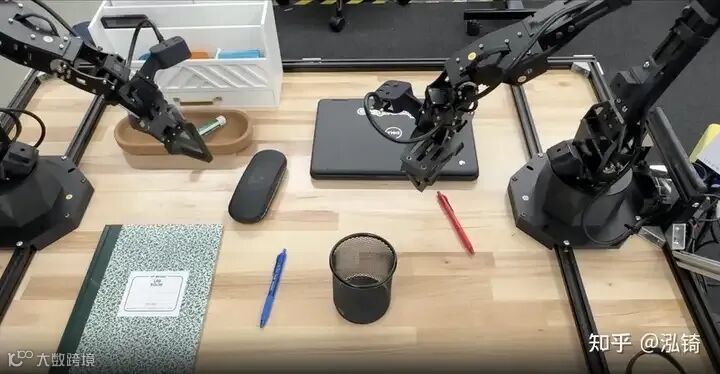
如果我想用视觉-语言-动作(VLA)模型使这个序列可重复,首先需要将视频分解成子任务。我编写了一个小程序,它可以分析视频并返回一个结构化的动作列表,其中会标明每个片段的“参与者”和具体任务。
from google import genai
from google.genai import types

import time
import json
import pandas as pd
import plotly.express as px
from datetime import timedelta


client = genai.Client()

myfile = client.files.upload(file="desk_organization.mp4")

while myfile.state == "PROCESSING":
  print(".", end="")
  time.sleep(1)
  myfile = client.files.get(name=myfile.name)

if myfile.state.name == "FAILED":
  raise ValueError(myfile.state.name)

print("Processed")


prompt = """
Review this video and break the actions into a structured JSON list.
Each object in the list must have:
- "actor": The entity performing the action (e.g., 'Left Robot Arm').
- "action": A short description of the task.
- "start_s": Start time in total seconds (integer).
- "end_s": End time in total seconds (integer).

Output ONLY the raw JSON list.
"""

response = client.models.generate_content(
    model="gemini-3-flash-preview",
    contents=[myfile, prompt],
    config=types.GenerateContentConfig(
        response_mime_type="application/json",
        thinking_config=types.ThinkingConfig(thinking_budget=-1)
    ),
)

print(response.text)
让我们把它分解成几个小部分。首先,我使用 Gemini 的文件 API来上传视频。client.files.upload这里使用的命令会阻塞脚本,直到文件上传完成,然后脚本才会开始处理文件以供使用。这样可以避免在文件准备就绪之前意外地尝试访问它,从而导致错误。我还设置了一个循环来检查文件的状态,然后再允许程序继续执行。
myfile = client.files.upload(file="desk_organization.mp4")

while myfile.state == "PROCESSING":
  print(".", end="")
  time.sleep(1)
  myfile = client.files.get(name=myfile.name)

if myfile.state.name == "FAILED":
raise ValueError(myfile.state.name)接下来,我有一个非常具体的提示,说明我希望如何获取数据,以便获取参与者、动作以及该动作的开始和结束时间。我还使用一个response_mime_type标志来指定我只希望返回 JSON 数据。
prompt = """
Review this video and break the actions into a structured JSON list.
Each object in the list must have:
- "actor": The entity performing the action (e.g., 'Left Robot Arm').
- "action": A short description of the task.
- "start_s": Start time in total seconds (integer).
- "end_s": End time in total seconds (integer).

Output ONLY the raw JSON list.
"""

response = client.models.generate_content(
    model="gemini-3-flash-preview",
    contents=[myfile, prompt],
    config=types.GenerateContentConfig(
        response_mime_type="application/json",
        thinking_config=types.ThinkingConfig(thinking_budget=-1)
    ),
)
此时我们可以获取概述机器人已执行操作的 JSON 数据,然后可以使用这些数据来提示 VLA 重复执行这些任务。
[
  {
    "actor": "Left Robot Arm",
    "action": "pick up the green marker",
    "start_s": 0,
    "end_s": 3
  },
  {
    "actor": "Left Robot Arm",
    "action": "place the green marker in the wooden bowl",
    "start_s": 3,
    "end_s": 6
  },
  {
    "actor": "Left Robot Arm",
    "action": "pick up the blue pen",
    "start_s": 13,
    "end_s": 16
  },
  {
    "actor": "Left Robot Arm",
    "action": "place the blue pen in the pencil holder",
    "start_s": 18,
    "end_s": 22
  },
  {
    "actor": "Right Robot Arm",
    "action": "pick up the red pen",
    "start_s": 22,
    "end_s": 25
  },
  {
    "actor": "Right Robot Arm",
    "action": "place the red pen in the pencil holder",
    "start_s": 25,
    "end_s": 28
  }
]
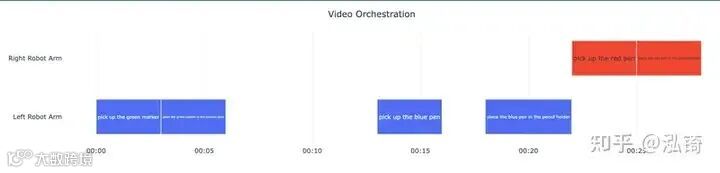
结构化数据对代码来说固然很好,但对人来说,可视化效果更佳。我请 Gemini 编写了一个脚本,使用 Plotly 将 JSON 数据转换为甘特图。这样一来,任务流程和时间戳就能一目了然。
data = json.loads(response.text)
df = pd.DataFrame(data)

base_time = pd.to_datetime("2025-01-01")
df['start_dt'] = df['start_s'].apply(lambda x: base_time + timedelta(seconds=x))
df['end_dt'] = df['end_s'].apply(lambda x: base_time + timedelta(seconds=x))

dynamic_height = 150 + (len(df['actor'].unique()) * 60)

fig = px.timeline(
    df,
    x_start="start_dt",
    x_end="end_dt",
    y="actor",
    color="actor",
    text="action",
    template="plotly_white",
    height=dynamic_height
)

fig.update_layout(
    title_text="Video Orchestration",
    title_x=0.5,
    showlegend=False,
    margin=dict(l=10, r=10, t=40, b=30),
    xaxis_title=None,
    yaxis_title=None,
    font=dict(size=11)
)

fig.layout.xaxis.update({
    'tickformat': '%M:%S',
    'fixedrange': True
})

fig.update_yaxes(autorange="reversed", fixedrange=True)
fig.update_traces(
    textposition='inside',
    insidetextanchor='middle',
    marker_line_width=1,
    marker_line_color="white",
    width=0.6
)

fig.show()
这让我们能够清晰、直观地了解机器人的性能:
理解 YouTube 视频
在我的下一个实验中,我从这篇关于移动性VLA的论文中汲取了一些灵感。我想尝试使用一段较长的YouTube视频,内容是关于参观开罗埃及博物馆(因为那是我最喜欢的博物馆之一,而且我去过埃及几次,都非常喜欢那里),然后就视频中出现的内容提出问题。
由于我有可能在具有自身移动堆栈的机器人上完成此操作,并根据时间戳返回到某个位置,因此我想我也应该请求一个时间戳,以便记录视频中出现巡视中最大物品的时间。
幸运的是,这段代码非常简单。你只需要提供一个 YouTube 链接作为file_data对象,然后发送你的提示信息即可。
from google import genai
from google.genai import types

client = genai.Client()
response = client.models.generate_content(
    model='models/gemini-3-flash-preview',
    contents=types.Content(
        parts=[
            types.Part(
                file_data=types.FileData(file_uri='https://www.youtube.com/watch?v=EdCReWs6-wI')
            ),
            types.Part(text='Please summarize the different things seen in this video and provide a timestamp for the location where the largest object is seen.')
        ]
    ),
)

print(response.text)
这将给你类似这样的回复:
The Egyptian Museum, also known as the Museum of Ancient Egyptian Antiquities, is a renowned institution in Cairo, Egypt. It is home to a vast and priceless collection of ancient Egyptian artifacts, including the world-famous treasures of Tutankhamun. The video displays various things like:

* **Museum exterior:** The video begins with an exterior shot of the museum at night.
* **Sarcophagi:** There are many sarcophagi of different sizes and materials, including stone, granite, and wood.
* **Statues:** The museum houses a wide range of statues representing pharaohs, gods, goddesses, and everyday people.
* **Wooden boats:** Ancient Egyptian wooden boats used for burial rituals are on display.
* **Display cases:** Many of the museum's smaller artifacts, such as jewelry, amulets, and pottery, are shown in display cases.

The largest object is seen at [05:54](https://www.youtube.com/watch?v=EdCReWs6-wI&t=352).好吧,缺点是:如果我想在机器人代码中使用这些信息,这就不太方便了,因为我需要额外做些工作来提取时间戳。但事实证明,使用 Gemini 的一项名为“结构化输出”的功能,可以更系统地完成这项工作。
为了以我可以使用的方式获取数据,我仍然会请求 JSON MIME 类型,但我也会创建一些对象来表示我想要的数据:
class ItemSeen(BaseModel):
    object: str = Field(description="Object seen in the video")
    description: str = Field(description="Description of the object seen in the video")

class Navigation(BaseModel):
    itemsSeen: List[ItemSeen]
timestamp: int = Field(description="Timestamp where the largest item is seen")然后,我将通过在调用中添加配置对象,使用这些对象作为数据模式generate_content。
response = client.models.generate_content(
    model='models/gemini-3-flash-preview',
    contents=types.Content(
        parts=[
            types.Part(
                file_data=types.FileData(file_uri='https://www.youtube.com/watch?v=EdCReWs6-wI')
            ),
            types.Part(text='Please summarize the different things seen in this video and provide a timestamp for the location where the largest object is seen.')
        ]
    ),
    config={
        "response_mime_type": "application/json",
        "response_json_schema": Navigation.model_json_schema(),
    }
)
此时,我可以将返回的数据提取到模型对象中,并在我的应用程序中使用它。输出结果如下所示:
itemsSeen = [
ItemSeen(object='Pharaohs and Queens statues', description='Statues depicting different Pharaohs and Queens, carved from various materials such as stone and wood, showcasing traditional poses and royal regalia.'),
ItemSeen(object='Sarcophagi and mummy cases', description='Ornate containers used to hold mummies, including stone sarcophagi and wooden mummy cases adorned with intricate hieroglyphs and religious imagery.'),
ItemSeen(object='Animal-headed deities', description='Statues of gods and goddesses represented with animal heads, like the jackal-headed Anubis, falcon-headed Horus, and lioness-headed Sekhmet.'),
ItemSeen(object='Pyramidions', description='Small pyramid-shaped stones, often made of basalt or granite, that once capped the tops of pyramids or obelisks, inscribed with prayers and scenes.'),
ItemSeen(object='Ancient wooden boat', description='A well-preserved funerary boat made of wood, reconstructed to show how these vessels were used for symbolic journeys in the afterlife.'),
ItemSeen(object='Reliefs and stelae', description='Stone slabs and wall segments featuring carved or painted scenes and inscriptions, documenting the lives, achievements, and religious beliefs of the ancient Egyptians.'),
ItemSeen(object='Display cases with artifacts', description='Glass-enclosed cases containing smaller items such as jewelry, figurines, tools, and household objects, providing a glimpse into daily life and craftsmanship.')
]
timestamp = 361
查询多个 YouTube 视频
既然我们已经知道如何查询 YouTube 视频,那就让我们更进一步。通过与付费账户绑定的 API 密钥,我只需一次调用即可使用 Gemini 分析10 个不同的 YouTube 视频。这对于分析多个摄像头画面以检查任务是否成功非常有用,但由于我手头没有这些数据,所以我将重点放在这个领域需要不断学习,并且我需要尽可能多的帮助上。
在这个例子中,我将加载斯坦福大学的六节机器人学讲座(我与他们或这些内容没有任何关系,我只是非常喜欢和重视免费的教育内容),并让 Gemini 生成一些简洁的笔记,同时使用 Google 搜索查找并给我一个推荐的阅读清单,以支持我的机器人学学习之旅。
from google import genai
from google.genai import types

client = genai.Client()

google_search_tool = types.Tool(
    google_search=types.GoogleSearch()
)

response = client.models.generate_content(
    model='models/gemini-3-flash-preview',
    contents=types.Content(
        parts=[
            types.Part(
                file_data=types.FileData(file_uri='https://www.youtube.com/watch?v=o5bW3C5OD6U'),
            ),
            types.Part(
                file_data=types.FileData(file_uri='https://www.youtube.com/watch?v=PYh9k4cy25w'),
            ),
            types.Part(
                file_data=types.FileData(file_uri='https://www.youtube.com/watch?v=RKFRO_G4YkA'),
            ),
            types.Part(
                file_data=types.FileData(file_uri='https://www.youtube.com/watch?v=v18Jo2ILXZ8'),
            ),
            types.Part(
                file_data=types.FileData(file_uri='https://www.youtube.com/watch?v=5uWtpDON7Vs'),
            ),
            types.Part(
                file_data=types.FileData(file_uri='https://www.youtube.com/watch?v=05SuBLowwKM'),
            ),
            types.Part(text='This is a set of six lectures for a robotics course. Please write concise notes for each video in markdown, then create a list of research papers and books that would be relevant to each course. Check reviews for books that you provide and mention why they would be worth reading to learn this material in depth.')
        ]
    ),
    config=types.GenerateContentConfig(
        tools=[google_search_tool],
    ),
)

print(response.text)
现在运行这段代码,我们会得到……一个错误:
google.genai.errors.ClientError: 400 INVALID_ARGUMENT. {'error': {'code': 400, 'message': 'Please use fewer than 10800 images in your request to this model', 'status': 'INVALID_ARGUMENT'}}这里的问题在于,Gemini 3.0-Flash 的上下文窗口最多支持 10,800 张图片。以每秒 1 帧的速度计算,这相当于三个小时的视频,而六节较长的讲座超过了这个限制。
为了解决这个问题,我们可以调整一些视频设置,因为这些讲座视频每帧变化不大,对图形处理要求也不高。首先,我们给对象添加一个media_resolution属性config,以便在处理时将视频转换为低分辨率视频。您可以在官方文档中找到有关此属性的更多信息(链接在此)。
我们还可以降低每个视频的处理帧速率,因此在这种情况下,我们将每十秒钟只查看一帧,而不是每秒一帧。
最终我们得到了一个如下所示的简单脚本:
from google import genai
from google.genai import types

client = genai.Client()

google_search_tool = types.Tool(
    google_search=types.GoogleSearch()
)


response = client.models.generate_content(
    model='models/gemini-3-flash-preview',
    contents=types.Content(
        parts=[
            types.Part(
                file_data=types.FileData(file_uri='https://www.youtube.com/watch?v=o5bW3C5OD6U'),
                video_metadata=types.VideoMetadata(fps=0.1),
            ),
            types.Part(
                file_data=types.FileData(file_uri='https://www.youtube.com/watch?v=PYh9k4cy25w'),
                video_metadata=types.VideoMetadata(fps=0.1)
            ),
            types.Part(
                file_data=types.FileData(file_uri='https://www.youtube.com/watch?v=RKFRO_G4YkA'),
                video_metadata=types.VideoMetadata(fps=0.1)
            ),
            types.Part(
                file_data=types.FileData(file_uri='https://www.youtube.com/watch?v=v18Jo2ILXZ8'),
                video_metadata=types.VideoMetadata(fps=0.1)
            ),
            types.Part(
                file_data=types.FileData(file_uri='https://www.youtube.com/watch?v=5uWtpDON7Vs'),
                video_metadata=types.VideoMetadata(fps=0.1)
            ),
            types.Part(
                file_data=types.FileData(file_uri='https://www.youtube.com/watch?v=05SuBLowwKM'),
                video_metadata=types.VideoMetadata(fps=0.1)
            ),
            types.Part(text='This is a set of six lectures for a robotics course. Please write concise notes for each video in markdown, then create a list of research papers and books that would be relevant to each course. Check reviews for books that you provide and mention why they would be worth reading to learn this material in depth.')
        ]
    ),
    config=types.GenerateContentConfig(
        tools=[google_search_tool],
        media_resolution=types.MediaResolution.MEDIA_RESOLUTION_LOW
    ),
)

print(response.text)
这反过来又给我们带来了以下输出:
Here are concise markdown notes for the six lectures featured in this robotics seminar, followed by curated lists of research papers and books to deepen your understanding of each specific domain.

---

# Lecture 1: Autonomous Navigation in Complex Outdoor Environments
**Speaker:** Jing Liang (Stanford/UMD)

### Concise Notes
*   **Problem Definition:** Moving beyond obstacle avoidance to "traversability analysis"—understanding which surfaces (grass, gravel, etc.) a robot can actually handle.
*   **VLM Integration:** Utilizing Vision-Language Models (VLMs) to translate natural language goals and visual cues into viable path Candidates.
*   **Gaussian Splats for Mapping:** Implementing 3D Gaussian Splatting to estimate not just geometry, but semantic material types and physical properties (friction, hardness, density).
*   **Companion Robotics:** Applying these navigation stacks to older adults ("longevity robots") to assist with outdoor exercise and health monitoring.
*   **Dataset:** Introduction of the Global Navigation Dataset (GND) covering 10 campuses with multi-modal sensor data.

### Relevant Resources
**Research Papers:**
*   *MaPNav: Trajectory Generator with Traversability Coverage for Outdoor Navigation* (Liang et al., 2024).
*   *SplatFlow: Traversability-Aware Gaussian Splatting for Outdoor Robot Navigation* (Chopra et al., 2024).

**Books:**
*   **"Probabilistic Robotics" by Sebastian Thrun, Wolfram Burgard, and Dieter Fox.**
    *   *Review:* Regarded as the "bible" of modern navigation. It is essential for understanding the SLAM and state estimation fundamentals that Jing Liang’s complex environment navigation is built upon.

---

# Lecture 2: From Digital Humans to Safe Humanoids
**Speaker:** Yao Feng (Stanford)

### Concise Notes
*   **GentleHumanoid Framework:** Focuses on safe physical contact. Instead of just following a path, the robot must regulate interaction forces.
*   **Force Modeling:** Differentiates between *Resistive Contact* (robot hitting an object) and *Guiding Contact* (human pulling the robot’s hand).
*   **Tunable Force:** Implements a safety threshold (e.g., limiting force to 5N or 15N) to ensure the robot "gives way" during a hug or assistance task.
*   **Grounded Reasoning:** Uses "ChatPose" and "ChatHuman" to allow robots to predict human intent and next-frame poses from visual/textual data.

### Relevant Resources
**Research Papers:**
*   *GentleHumanoid: Learning Upper-body Compliance for Contact-rich Human and Object Interaction* (Lu et al., 2024).
*   *ChatPose: Chatting about 3D Human Pose* (Feng et al., 2024).

**Books:**
*   **"Humanoid Robotics" by Shuuji Kajita et al.**
    *   *Review:* A comprehensive guide to the kinematics and dynamics of two-legged machines. It helps bridge the gap between Feng’s "digital humans" and the physical constraints of a humanoid.

---

# Lecture 3: Resilient Autonomy in Extreme Environments
**Speaker:** Sebastian Scherer (Carnegie Mellon University)

### Concise Notes
*   **Definition of Resilience:** The ability to maintain performance in "degraded" conditions (smoke, dust, total darkness, or GPS-denied areas).
*   **MapAnything:** A unified feed-forward model that performs 3D reconstruction and metric-scale estimation from simple monocular video.
*   **Multi-Modal Sensors:** Leveraging thermal cameras (AnyThermal) and Doppler radar to navigate when visual cameras fail due to glare or darkness.
*   **Triage Challenge:** Application of these robots as "pre-first responders" to locate and assess casualties in disaster zones autonomously.

### Relevant Resources
**Research Papers:**
*   *MapAnything: Unified 3D Reconstruction from any Visual Input* (Scherer Lab, 2024).
*   *AnyThermal: A Single Backbone for Multiple Thermal Perception Tasks* (Li et al., 2024).


**Books:**
*   **"Autonomous Mobile Robots" by Roland Siegwart and Illah Nourbakhsh.**
    *   *Review:* Excellent for learning about the trade-offs between different sensor modalities (Lidar vs. Vision vs. Thermal), which is the core of Scherer's "resilience" strategy.

---4.  **Lecture 4: Robot Motion Learning with Physics-Based PDE Priors**
**Speaker:** Abdul H. Qureshi (Purdue University)

### Concise Notes
*   **Neural Time Fields (NTFields):** Using neural networks to solve the *Eikonal Partial Differential Equation (PDE)* for motion planning.
*   **TD-Learning for Motion:** Borrowing Temporal Difference learning from RL to regularize gradients between consecutive points in a path.
*   **Scalability:** This approach allows for planning in extremely high-dimensional spaces (up to 15-DOF for quadrupeds and arms) much faster than traditional sampling-based planners.
*   **Unknown Environments:** The robot builds a "Time Field" map in real-time, treating navigation as following the gradient of arrival time.

### Relevant Resources
**Research Papers:**
*   *Physics-Informed Neural Time Fields for Motion Planning* (Ni et al., 2023).
*   *Domain Decomposition for Large Scale Neural Motion Planning* (Liu et al., 2024).

**Books:**
*   **"Planning Algorithms" by Steven M. LaValle.**
    *   *Review:* This is the definitive text on how robots find paths. Reading this is necessary to understand why Qureshi’s use of PDEs is such a radical and efficient departure from traditional RRT* or PRM methods.

---

# Lecture 5: Learning to Control Large Teams of Robots
**Speaker:** Eduardo Montijano (University of Zaragoza)

### Concise Notes
*   **Distributed Policies:** Moving away from a "central brain" to local policies where each agent makes decisions based on its immediate neighbors.
*   **Self-Attention Swarms:** Utilizing Transformer-like attention mechanisms so robots can handle a varying number of neighbors (scaling from 3 to 3,000 robots).
*   **Port-Hamiltonian Systems:** Integrating energy-based physics equations into the neural network to ensure the learned behavior is physically stable and explainable.
*   **Gen-Swarms:** Applying Generative AI (Diffusion models) to "draw" complex shapes (like a dragon) for drone shows, then using local controllers to achieve those shapes.

### Relevant Resources
**Research Papers:**
*   *LEMURS: Learning Distributed Multi-Robot Interactions* (Sebastián et al., 2023).
*   *Gen-Swarms: Generative AI for Swarm Robotics* (Pueyo et al., 2024).

**Books:**
*   **"Graph Theoretic Methods in Multiagent Networks" by Mehran Mesbahi and Magnus Egerstedt.**
    *   *Review:* Essential for understanding how local connectivity influences global swarm behavior. It provides the mathematical logic for the "neighborhood" approach discussed by Montijano.

---

# Lecture 6: Next Generation Dexterous Manipulation
**Speaker:** Monroe Kennedy III (Stanford)

### Concise Notes
*   **The Manipulation Gap:** While robots can walk and flip, they still struggle with small, soft, or articulated objects (like tying shoelaces).
*   **Optical Tactile Sensors (DenseTact):** Using internal cameras within soft "fingertips" to sense 4-axis stress fields (normal, shear, and torsion).
*   **J-PARSE Algorithm:** Resolving "kinematic singularities" (when a robot arm gets stuck at full extension) through a safety Jacobian projection.
*   **Cross-Modality Learning:** Combining vision and touch (Touch-GS) to create 3D Gaussian Splats of objects that are otherwise invisible to cameras (transparent or highly reflective surfaces).

### Relevant Resources
**Research Papers:**
*   *DenseTact 2.0: High-Resolution Tactile Sensing for Robot Manipulation* (Do et al., 2023).
*   *Touch-GS: Visual-Tactile Supervised 3D Gaussian Splatting* (Swann et al., 2024).

**Books:**
*   **"Mechanics of Manipulation" by Matthew T. Mason.**
    *   *Review:* This book focuses on the physics of pushing, grasping, and friction. It is vital for understanding the "force closure" and "form closure" concepts Kennedy uses to move beyond simple suction-cup grippers.
输出结果包含所有讲座的简明笔记和精选阅读清单。我最近读过其中一本推荐书籍(Siegwart 和 Nourbakhsh 合著的《自主移动机器人导论》),我认为这些推荐相当可靠。
结论
本文介绍了Gemini的一项新功能,您今天就可以使用该gemini-3.0-flash-preview型号的相机进行体验。如果您觉得有趣,或者还有其他想了解的内容,请务必留言。
关注「索引目录」公众号,获取更多干货。