


关注【索引目录】服务号,更多精彩内容等你来探索!
挑战:超越云依赖(以及我对制作幻灯片的厌恶)
说实话,我之所以开始这个项目,是因为我实在讨厌制作 PowerPoint 演示文稿。构思内容、排版幻灯片、查找相关图片,还要让一切看起来专业,这些繁琐的过程快把我逼疯了。我宁愿花几个小时写代码,也不愿花 30 分钟做幻灯片。
因此,我很自然地想到:“如果我只需与设备对话,它就能为我生成整个演示文稿,那会怎样?”
但有趣的是,如今大多数人工智能应用都依赖于云推理——将数据发送到远程服务器,等待响应,并处理延迟、成本和隐私问题。我想探索现代边缘硬件是否能够处理更宏大的任务:一个完全在本地运行的完整多智能体人工智能工作流。
我的目标有两个:解决我个人的 PowerPoint 问题,并突破边缘硬件的极限。创建一个语音控制的演示文稿生成器,它可以理解语音、协调多个 AI 代理、生成结构化内容并合成语音响应——所有这些都可以在单个边缘设备上完成,并且完全不依赖互联网。
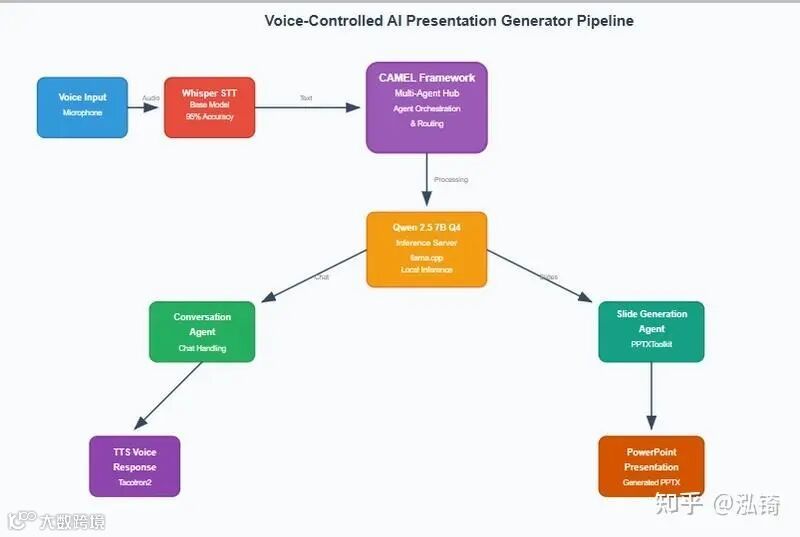
完整的流程:“创建电气工程幻灯片”→AI处理→格式化并显示详细内容的演示文稿,全部在Jetson Orin Nano上本地运行。
先决条件和设置
安装CAMEL-AI框架

# Install CAMEL-AI with all dependencies
pip install camel-ai[all]

# Or minimal installation
pip install camel-ai

# Additional dependencies for this project
pip install python-pptx faster-whisper sounddevice soundfile TTS
设置 llama.cpp 进行本地推理
# Clone and build llama.cpp
git clone https://github.com/ggerganov/llama.cpp
cd llama.cpp

# For Jetson Orin (ARM64 with CUDA)
mkdir build
cd build
cmake .. -DLLAMA_CUDA=ON -DCMAKE_CUDA_ARCHITECTURES=87
make -j$(nproc)

# Download your model (example: Qwen 2.5 7B)
wget https://huggingface.co/Qwen/Qwen2.5-7B-Instruct-GGUF/resolve/main/qwen2.5-7b-instruct-q4_k_m.gguf

# Start the server
./build/bin/llama-server --model qwen2.5-7b-instruct-q4_k_m.gguf \
  --port 8000 \
  --host 0.0.0.0 \
  --ctx-size 4096 \
  --threads 4
系统服务配置
对于生产部署,创建一个 systemd 服务:
# /etc/systemd/system/llama-server.service
[Unit]
Description=Local LLM Server (Qwen 2.5 7B on llama.cpp)
After=network.target

[Service]
Type=simple
User=your_user
WorkingDirectory=/home/your_user/llama.cpp
ExecStart=/home/your_user/llama.cpp/build/bin/llama-server \
  --model /home/your_user/models/qwen2.5-7b-instruct-q4_k_m.gguf \
  --port 8000 \
  --host 0.0.0.0 \
  --ctx-size 4096 \
  --threads 4
Restart=always

[Install]
WantedBy=multi-user.target

# Enable and start the service
sudo systemctl enable llama-server.service
sudo systemctl start llama-server.service
初始化CAMEL-AI组件
设置多代理框架需要初始化模型、代理和工具包:
from camel.agents import ChatAgent
from camel.models import ModelFactory
from camel.messages import BaseMessage
from camel.toolkits import PPTXToolkit
from camel.types import RoleType, ModelPlatformType

# Initialize the model factory pointing to your local llama.cpp server
model = ModelFactory.create(
    model_platform=ModelPlatformType.OLLAMA,  # For llama.cpp compatibility
    model_type="Qwen 2.5 7B",
    url="http://localhost:8000/v1",
    model_config_dict={
        "temperature": 0.1,
        "max_tokens": 512,
        "top_p": 0.9,
    }
)

# Load the PPTXToolkit for presentation generation
ppt_toolkit = PPTXToolkit()
tools = ppt_toolkit.get_tools()

# Create specialized agents
conversation_agent = ChatAgent(
    system_message=BaseMessage(
        role_name="assistant",
        role_type=RoleType.ASSISTANT,
        content="""You are Jetson, a helpful AI assistant that can have conversations and create PowerPoint presentations when asked.
When users ask you to create slides or presentations, tell them you'll create slides for them.
For regular conversation, respond naturally and helpfully.""",
        meta_dict={}
    ),
    model=model,
    tools=[]  # No tools needed for general conversation
)

slide_agent = ChatAgent(
    system_message=BaseMessage(
        role_name="assistant",
        role_type=RoleType.ASSISTANT,
        content="""You are a PowerPoint presentation assistant with access to presentation creation tools.

When asked to create slides about a topic, follow these steps:

Step 1: Create a new presentation
- Use the create_presentation function to start a new PowerPoint presentation

Step 2: Add multiple informative slides
- Use add_slide function for each slide
- Create slides with clear, descriptive titles
- Include bullet-point content that is educational and well-structured
- Make sure content is relevant to the requested topic
- Aim for 4-6 slides per presentation

Step 3: Save the presentation
- Use save_presentation function to save the file
- Save with a descriptive filename ending in .pptx

Example workflow for "Introduction to AI":
1. Create a new presentation
2. Add slide: "Introduction to Artificial Intelligence" with overview content
3. Add slide: "Types of AI" with different AI categories
4. Add slide: "Key Technologies" with AI technologies
5. Add slide: "Applications" with real-world uses
6. Add slide: "Future of AI" with trends and outlook
7. Save the presentation as "ai_introduction.pptx"

Be direct and use the available tools step by step. Focus on creating educational, well-organized content.""",
        meta_dict={}
    ),
    model=model,
    tools=tools  # PPTXToolkit functions available
)

# Agent usage example
def handle_request(user_input):
    if "slides" in user_input.lower():
        # Route to slide generation agent
        response = slide_agent.step(BaseMessage(
            role_name="user",
            role_type=RoleType.USER,
            content=user_input,
            meta_dict={}
        ))
    else:
        # Route to conversation agent
        response = conversation_agent.step(BaseMessage(
            role_name="user",
            role_type=RoleType.USER,
            content=user_input,
            meta_dict={}
        ))

    return response.msg.content
CAMEL-AI 的关键概念:
- ModelFactory
:使用特定配置创建模型实例 - ChatAgent
:具有专门角色和工具的个人代理 - BaseMessage
:代理通信的标准化消息格式 - 工具包
:预建的工具集合(PPTXToolkit 提供 PowerPoint 功能) - 代理编排
:将请求路由到适当的专门代理
架构概述
模型评估与选择
测试表明,边缘部署可行性存在显著差异:
米斯特拉尔 7B 指令 Q4 GGUF
# Typical output from Mistral during function calls
{
  "function": "create_slide",
  "parameters": {
    "title": "Introduction",
    "content": "Overview of the topic..." # Often malformed JSON
遇到的问题:
-
JSON 格式不一致,破坏了 CAMEL 的函数调用 -
会话能力良好,但结构化输出可靠性较差 -
内存使用量:模型权重约 4.2GB
元骆驼 3.1 8B 指导 Q4 GGUF
函数调用合规性更好,但资源限制变得明显:
# Memory pressure observed
Model RAM: ~5.1GB
Whisper: ~1GB
TTS Models: ~800MB
System overhead: ~1.2GB
Total: 8.1GB (exceeding available memory)结果:多模式操作期间频繁发生 OOM 崩溃。
Qwen 2.5 7B 指导 Q4 GGUF
此硬件配置的最佳平衡:
# Consistent structured output
{
    "name": "add_slide",
    "arguments": {
        "title": "Technical Implementation",
        "content": "• Core architecture components\n• Integration patterns\n• Performance considerations"
    }
}
性能指标:
-
模型 RAM:~4.0GB -
推理延迟:典型响应为 2-4 秒 -
函数调用成功率:>95% -
允许并发模型执行的内存效率
多代理架构实现
CAMEL-AI 的代理分离对于系统可靠性至关重要:
# Agent initialization
conversation_agent = ChatAgent(
    system_message=conversation_prompt,
    model=model,
    tools=[]  # No tools - pure conversation
)

slide_agent = ChatAgent(
    system_message=slide_generation_prompt,
    model=model,
    tools=pptx_toolkit.get_tools()  # Specialized tools
)
该架构提供:
- 隔离性
:代理故障不会引发连锁反应 - 专业化
:每个代理针对特定任务进行优化 - 可维护性
:明确关注点分离 - 可扩展性
:轻松添加新的代理类型
性能分析
成功的组件
Whisper STT 性能:
-
准确率:在各种噪声条件下达到 95% 以上 -
延迟:15 秒音频片段约 1-2 秒 -
内存占用:稳定在~1GB -
CPU 利用率:高效的 ARM64 优化
CAMEL框架:
-
代理编排:对话和任务执行之间的可靠切换 -
PPTXToolkit 集成:无缝 PowerPoint 生成 -
错误处理:函数调用失败时的优雅回退
性能瓶颈
TTS 合成:
文本转语音生成中出现的关键瓶颈:
Average TTS generation times:
- Short responses (5-10 words): 8-12 seconds
- Medium responses (20-30 words): 15-20 seconds
- Long responses (50+ words): 25-35 seconds
根本原因:
-
Tacotron2 模型未针对 ARM64 进行优化 -
顺序处理,无需批处理 -
声码器推理期间的内存带宽限制
模型推理扩展:
Memory usage scaling:
Base system: 1.2GB
+ Whisper: 2.2GB (+1GB)
+ LLM (7B Q4): 6.4GB (+4.2GB)
+ TTS models: 7.8GB (+1.4GB)
Peak usage: 7.8GB/8GB (97.5% utilization)
技术洞察和优化
内存管理
# Implemented model lifecycle management
def cleanup_unused_models():
    if not current_tts_active:
        del tts_model
        torch.cuda.empty_cache()
边缘计算的快速工程
复杂的提示导致超时。需要优化:
# Before: Complex 500+ token prompt → 3+ minute timeouts
# After: Simplified 150 token prompt → 30-60 second responses

simplified_prompt = f"""Create 5 slides about: {topic}
Keep each slide to 3-4 bullet points.
Focus on core concepts only."""
部署注意事项
资源配置策略
# Jetson power mode optimization
sudo nvpmodel -m 0  # Max performance mode
sudo jetson_clocks   # Lock clocks to maximum
模型量化影响
Q4量化提供了最佳平衡:
- 尺寸缩减
:7B 型号从约 28GB 缩减至约 4GB - 质量保持
:对结构化输出的影响最小 - 推理速度
:比 FP16 提高 2 倍
结果和实际应用
该系统成功证明:
- 完全离线操作
:设置后无需依赖互联网 - 多模式交互
:语音输入到文档输出 - 现实世界的实用性
:生成具有有意义内容的演示文稿 - 边缘可行性
:在消费硬件上的实际部署
工作流程时间示例:
User speech: "Create slides on quantum computing"
→ Whisper transcription: 2s
→ Agent orchestration: 5s
→ Content generation: ~180s
→ PowerPoint creation: ~120s
→ TTS response: 10s
Total pipeline: ~317 seconds
未来的优化方向
- TTS加速
:研究轻量级模型或硬件加速 - 模型蒸馏
:针对特定任务训练较小的专用模型 - 内存优化
:实现动态模型加载/卸载 - 量化研究
:探索 INT8 或混合精度推理
结论
多智能体 AI 工作流在边缘硬件上可行,但需要谨慎的架构决策和模型选择。CAMEL-AI 的编排功能与优化的本地推理相结合,表明复杂的 AI 应用程序可以独立于云基础架构运行。
关键洞察:边缘AI的成功更多地取决于系统集成和优化,而非原始计算能力。通过周到的设计,即使是普通的硬件也能提供令人信服的AI体验。
关注【索引目录】服务号,更多精彩内容等你来探索!