


关注【索引目录】服务号,更多精彩内容等你来探索!
如今,我们经常使用复杂的框架和工具链来创建交互式表单 - 但是如果我们告诉您,无需编写一行传统 JavaScript 逻辑就可以构建智能、动态的表单呢?
️ 项目结构
我们将使用一个简单的文件夹布局:
  smart-form
├──   components
│   └──   Register
│       └── index.html
├──   src
│   ├── global.css
│   ├── global.js
│   └── index.html
├── app.js
└── routes
└── post.js服务器:纯 HTML、CSS 和 HMPL 模板。
客户端:Node.js + Express 接收表单数据。
无需 React、Vue 甚至 jQuery 之类的框架。只需简洁的 Web API 和声明式逻辑。
️ 表单样式
让我们从基本风格开始。
src/global.css
body {
  font-family: Arial, sans-serif;
  background: #f4f4f4;
  padding: 50px;
}

form {
  background: white;
  padding: 20px;
  border-radius: 6px;
  box-shadow: 0 4px 10px rgba(0,0,0,0.1);
  max-width: 400px;
  margin: auto;
}

.form-example {
  margin-bottom: 15px;
}

label {
  display: block;
  margin-bottom: 5px;
}

input[type="text"],
input[type="password"] {
  width: 100%;
  padding: 8px;
  box-sizing: border-box;
}

input[type="submit"] {
  background-color: #649606;
  color: white;
  border-radius: 5px;
  padding: 10px 15px;
  cursor: pointer;
}
创建服务器
我们将设置一个简单的 Express 服务器,其中包含一个 POST 路由来处理我们的表单提交。
应用程序.js
const express = require("express");
const path = require("path");
const cors = require("cors");

const app = express();
const PORT = 8000;

app.use(cors());
app.use(express.urlencoded({ extended: true }));
app.use(express.json());

app.use(express.static(path.join(__dirname, "src")));

const postRoutes = require("./routes/post");
app.use("/api", postRoutes);

app.get("/", (_, res) => {
  res.sendFile(path.join(__dirname, "src/index.html"));
});

app.listen(PORT, () => {
  console.log(`Server running on http://localhost:${PORT}`);
});
路线/post.js
const express = require("express");
const router = express.Router();

router.post("/register", (req, res) => {
  const { login, password } = req.body;

  if (!login || !password) {
    return res.status(400).send("<p style='color: red;'>Missing fields!</p>");
  }

  console.log("User Registered:", login);
  res.send(`<p style='color: green;'>Welcome, ${login}!</p>`);
});

module.exports = router;
智能表单组件
神奇的事情就在这里发生了。这个表单将使用 HMPL 的request代码块提交数据,而无需你编写任何 JavaScript 事件监听器。
组件/注册/index.html
<div>
  <form onsubmit="function prevent(e){e.preventDefault();};return prevent(event);" id="form">
    <div class="form-example">
      <label for="login">Login:</label>
      <input type="text" name="login" id="login" required />
      <br/>
      <label for="password">Password:</label>
      <input type="password" name="password" id="password" required />
    </div>
    <div class="form-example">
      <input type="submit" value="Register!" />
    </div>
  </form>
  <p>
    {{#request
      src="/api/register"
      after="submit:#form"
      repeat=false
      indicators=[
        {
          trigger: "pending",
          content: "<p>Loading...</p>"
        }
      ]
    }}
    {{/request}}
  </p>
</div>
这里发生了什么事?
onsubmit防止默认行为。{{#request}}捕获表单提交事件。after="submit:#form"定义请求何时触发。indicators显示加载状态或反馈。
无需手动fetch,无需 async/await。所有操作均已声明。
⚙️ 使用 HMPL 加载组件
现在,让我们使用 HMPL 在我们的页面上动态呈现这个组件。
src/index.html
<!DOCTYPE html>
<html lang="en">
  <head>
    <meta charset="UTF-8" />
    <meta name="viewport" content="width=device-width, initial-scale=1.0"/>
    <title>Smart Form</title>
    <link rel="stylesheet" href="global.css" />
  </head>
  <body>
    <div id="wrapper"></div>

    <script src="https://unpkg.com/json5/dist/index.min.js"></script>
    <script src="https://unpkg.com/dompurify/dist/purify.min.js"></script>
    <script src="https://unpkg.com/hmpl-js/dist/hmpl.min.js"></script>
    <script>
      import { compile } from "hmpl-js";

      const templateFn = compile(`
        {{#request src="/components/Register/index.html"}}{{/request}}
      `);

      const obj = templateFn();
      document.getElementById("wrapper").append(obj.response);
    </script>
  </body>
</html>
global.js或者,如果您喜欢模块化,您可以将此逻辑分解为单独的文件。
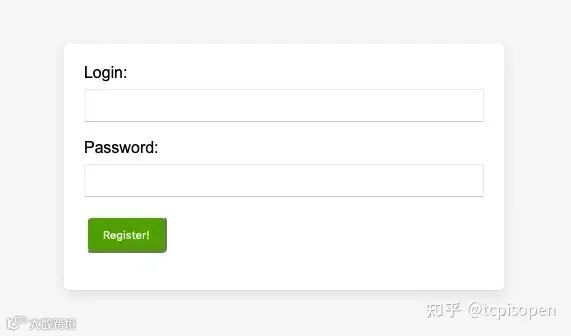
✅ 结果
您将获得以下内容:
简洁、时尚的表单
仅使用 HTML + HMPL 进行异步提交
验证和反馈——无需自定义 JS 逻辑
为什么要使用这种方法?
无需 JavaScript 框架:无需 React,无需 Angular。
声明性逻辑:描述应该发生什么,而不是如何发生。
简单且可扩展:非常适合登陆页面、管理工具和 MVP。
您甚至可以扩展此模式以支持多步骤表单、加载器、错误处理或repeat间隔自动保存。
最后的想法
构建交互式 Web 表单不再需要臃肿的 JavaScript 或繁琐的工具链。使用HMPL,您可以保持代码简洁、语义清晰且功能强大,非常适合热爱声明式逻辑和简洁性的开发者。