三个环境名称
测试: develop
灰度: pre-release
正式: master
git pull origin develop
git pull origin master
克隆项目
git clone 地址
本地新建一个分支
git checkout -b 新分支名称
添加文件到版本控制
git add $file_name/$dir_name
提交变更
git commit -m '$your_comment'
切出分支
git branch $branch_name
切换分支
git checkout $branch_name
放弃本次修改 示提交
git checkout .
git取消合并# 未提交 git add
git merge --abort
拉取更新
git pull origin master/$upstream_branch_name
推送分支
git push origin $branch_name
拉取远程分支到本地
git pull && git checkout -b feature-school-upgrade-v2 origin/feature-school-upgrade-v2
git pull && git checkout -b feature-school-upgrade-v2 origin/feature-school-upgrade-v2
git强制覆盖本地命令
git fetch --all && git reset --hard origin/master && git pull
git 查看某个人提交的log
git log --author="lhz <624677295@qq.com>"
git log --author='lhz <624677295@qq.com>' --after='2021-8-16' --before='2021-8-22' --name-only
查看当前目录下所有的项目提交日志
find . -type d -name ".git" -exec sh -c 'cd "{}" && echo "=== {} ===" && git log --author="liuhaizhong@cnbztrip.com" --since="2023-05-01" --until="2023-05-31" --oneline' \;
查看条数
git log --author="zhangphil" --oneline | wc -l
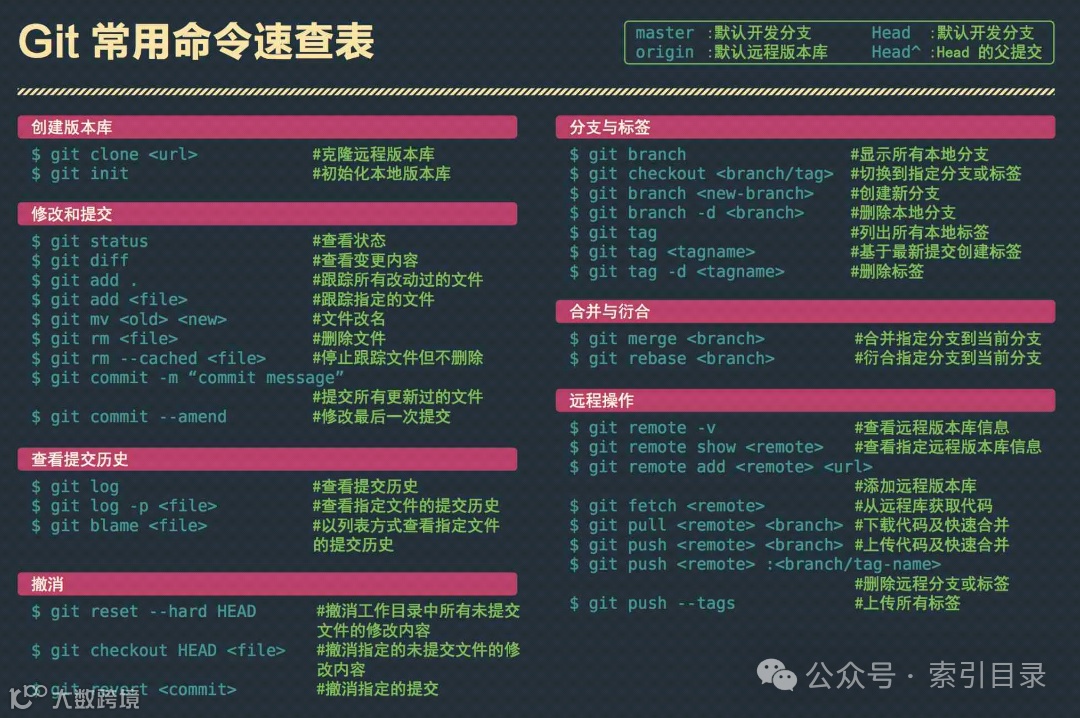
Git常用命令速查表
master:默认开发分支
Head:默认开发分支
origin:默认远程版本库ead:Head的父提交
创建版本库
git clone <url>
git branch
#显示所有本地分支
git init
#初始化本地版本库
$ git checkout<branch/tag>#切换到指定分支或标签
$ git branch<new-branch->#创建新分支
修改和提交
$ git branch-d<branch>#删除本地分支
git status
#查看状态
git tag
#列出所有本地标签
git diff
#查看变更内容
$ git tag< stagname>
#基于最新提交创建标签
git add
#跟踪所有改动过的文件
$ git tag-d<tagname>
#删除标签
$ git add<file>
#跟踪指定的文件
git mv <old> <new>
#文件改名
合并与衍合
$ git rm<file>
#删除文件
$ git merge<branch>
#合并指定分支到当前分支
$ git rm--cached-<file>#停止跟踪文件但不删除
$ git rebase<branch>
#衍合指定分支到当前分支
git commit -m "commit message"
#提交所有更新过的文件
远程操作
$ git commit--amend-
#修改最后一次提交
$ git remote-v
#查看远程版本库信息
查看提交历史
$g1L《reOteshoWrel0Le><remote>查看指定远程版本库信息
git remote add <remote> cur>
git log
#查看提交历史
#添加远程版本库
$ git log-p<file>
#查看指定文件的提交历史
$ git fetch<remote>
#从远程库获取代码
$ git blame<file>
#以列表方式查看指定文件
$ git pull<remote><branch>#下载代码及快速合并
的提交历史
$ git push<remote><branch>#上传代码及快速合并
$ git push<remote>:<branch/tag-name>
撤消
#删除远程分支或标签
$ git reset--hard- HEAD
#撤消工作目录中所有未提交
$ git push--tags
#上传所有标签
文件的修改内容
git checkout HEAD<file>#撤消指定的未提交文件的修
改内容
$ git revert<commit>
#撤消指定的提交