


关注【索引目录】服务号,更多精彩内容等你来探索!
TL;DR
在本指南中,您将学习如何使用 A2A 协议、AG-UI 协议和 CopilotKit 在来自不同 AI 代理框架的 AI 代理之间构建全栈代理到代理 (A2A) 通信。
在我们开始之前,我们将介绍以下内容:
-
什么是 A2A 协议? -
使用 CLI 设置 A2A 多代理通信 -
将来自不同代理框架的 AI 代理与 A2A 协议集成 -
使用 CopilotKit 构建 AG-UI 和 A2A 多代理通信的前端
什么是 A2A 协议?
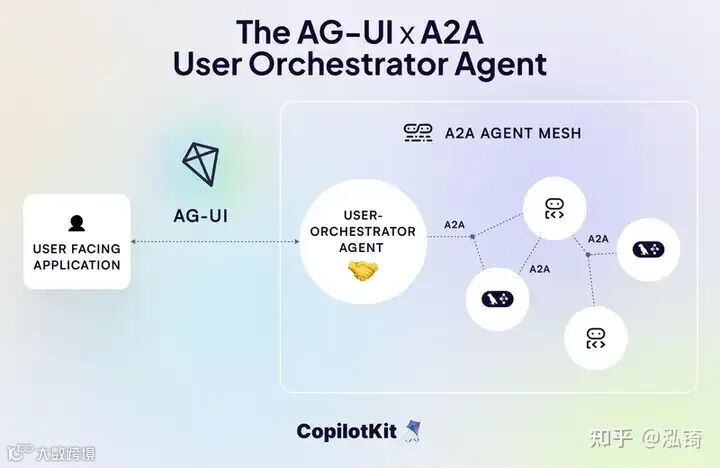
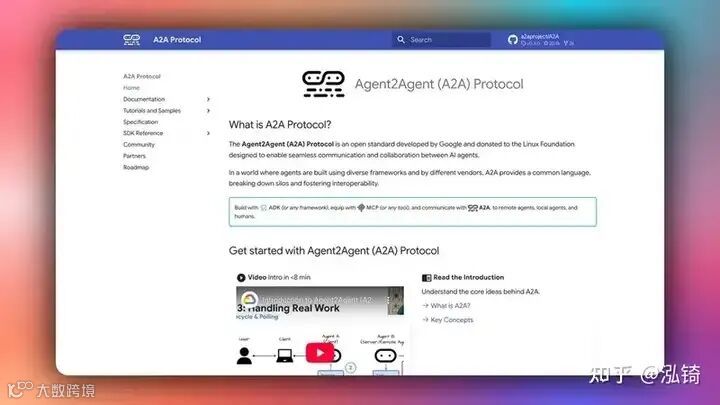
A2A(Agent-to-Agent)协议是 谷歌推出的标准化通信框架,使得不同的AI代理能够在分布式系统中不受框架限制地发现、通信和协作。
A2A 协议旨在促进代理间通信,其中代理可以调用其他代理作为工具或服务,从而创建专门的 AI 功能网络。
A2A 协议的主要特点包括:
- A2A 客户端
:这是启动一切的“老板代理”(我们称之为“客户代理”)。它会确定需要做什么,找到合适的辅助代理,并将任务交给它们。你可以把它想象成代码中的项目经理。 - A2A 代理
:一款 AI 代理,它会根据 A2A 规则设置一个简单的 Web 地址(HTTP 端点)。它会监听传入的请求,处理任务,并返回结果或更新。这对于让你的代理“公开”并随时准备协作非常有用。 - 代理卡
:想象一下 JSON 格式的数字身份证——易于阅读和共享。它包含 A2A 代理的基本信息,例如其名称、功能以及如何连接。 - 代理技能
:这些就像是代理的职位描述。每项技能都概括了其擅长的一项具体技能(例如,“总结文章”或“生成图像”)。客户阅读这些技能后,就能确切地知道需要分配哪些任务——无需猜测! - A2A Executor
:幕后大脑。它是代码中的一个函数,负责执行繁重的工作:接收请求,运行逻辑以解决任务,并输出响应或触发事件。 - A2A 服务器
:Web 服务器端。它将您代理的技能转化为可在互联网上共享的内容。您将使用 A2A 的请求处理程序进行设置,使用 Starlette(一个 Python Web 框架)构建一个轻量级 Web 应用,并使用 Uvicorn(一个快速的服务器运行器)启动它。轰隆隆——您的代理已上线并准备就绪!
如果您想深入了解 A2A 协议的工作原理及其设置,请查看此处的文档:A2A 协议文档。
现在您已经了解了 A2A 协议是什么,让我们看看如何将它与 AG-UI 和 CopilotKit 一起使用来构建全栈 A2A AI 代理。
先决条件
要完全理解本教程,您需要对 React 或 Next.js 有基本的了解
我们还将利用以下内容:
- Python——
一种用于使用 AI 代理框架构建 AI 代理的流行编程语言;确保它已安装在您的计算机上。 - AG-UI 协议
- 由 CopilotKit 开发的代理用户交互协议 (AG-UI) 是一种开源、轻量级、基于事件的协议,可促进前端和 AI 代理后端之间的丰富实时交互。 - Google ADK——
由 Google 设计的开源框架,旨在简化构建复杂且可投入生产的 AI 代理的过程。 - LangGraph
- 用于创建和部署 AI 代理的框架。它还有助于定义代理要执行的控制流和操作。 - Gemini API 密钥
- 一个 API 密钥,使您能够使用 Gemini 模型为 ADK 代理执行各种任务。 - CopilotKit
- 一个开源副驾驶框架,用于构建自定义 AI 聊天机器人、应用内 AI 代理和文本区域。
使用 CLI 设置 A2A 多代理通信
在本节中,您将学习如何使用 CLI 命令设置 A2A 客户端(编排器代理)+ A2A 代理,该命令使用带有 AG-UI 协议的 Google ADK 设置后端,并使用 CopilotKit 设置前端。
查看 AG-UI 的 GitHub ⭐️
让我们开始吧。
步骤 1:运行 CLI 命令
如果您还没有预先配置的 AG-UI 代理,则可以通过在终端中运行下面的 CLI 命令来快速设置一个。
npx copilotkit@latest create -f a2a然后给你的项目命名,如下所示。
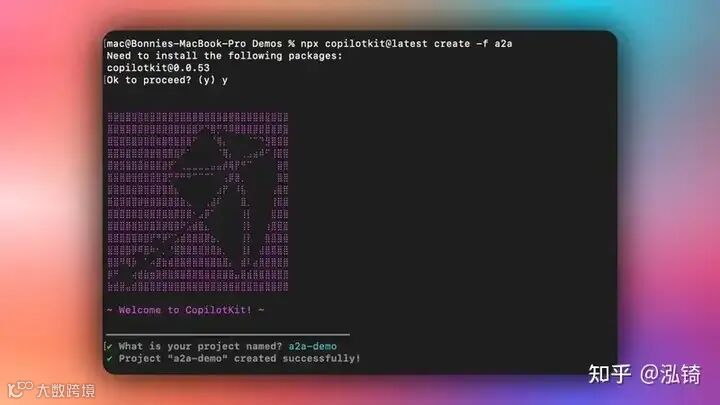
步骤 2:安装前端依赖项
成功创建项目后,使用您首选的包管理器安装依赖项:
npm install步骤 3:安装后端依赖项
安装前端依赖项后,安装后端依赖项:
cd agents
python3 -m venv .venv
source .venv/bin/activate  # On Windows: .venv\Scripts\activate
pip install -r requirements.txt
cd ..
步骤 4:设置环境变量
安装后端依赖项后,设置环境变量:
cp .env.example .env
# Edit .env and add your API keys:
# GOOGLE_API_KEY=your_google_api_key
# OPENAI_API_KEY=your_openai_api_key
步骤 5:启动所有服务
设置好环境变量后,启动包括后端和前端在内的所有服务。
npm run dev一旦开发服务器运行,导航到http://localhost:3000/您应该会看到您的 A2A 多代理前端启动并运行。
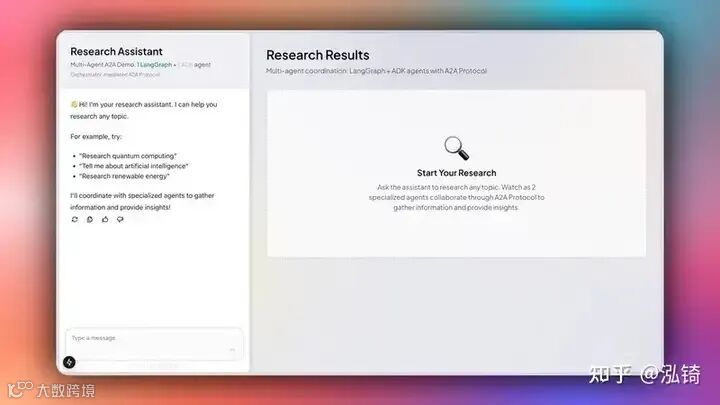
恭喜!您已成功设置 A2A 多智能体通信。尝试让您的智能体研究一个主题,例如“请研究量子计算”。您会看到它会向研究智能体和分析智能体发送消息。然后,它会将完整的研究和分析结果呈现给用户。
在后端将 Orchestrator 代理与 Google ADK 和 AG-UI 协议集成
在本节中,您将学习如何将您的编排代理与 Google ADK 和 AG-UI 协议集成,以将其作为 ASGI 应用程序公开给前端。
让我们开始吧。
步骤 1:设置后端
首先,克隆由基于 Python 的后端(代理)和 Next.js 前端组成的A2A-Travel 存储库。
接下来,导航到后端目录:
cd agents然后创建一个新的Python虚拟环境:
python -m venv .venv之后,激活虚拟环境:
source .venv/bin/activate # On Windows: .venv\Scripts\activate
最后,安装文件中列出的所有 Python 依赖项 requirements.txt 。
pip install -r requirements.txt步骤 2:配置 Orchestrator ADK 代理
设置后端后,通过定义代理名称、指定 Gemini 2.5 Pro 作为大型语言模型 (LLM) 以及定义代理的指令来配置您的编排器 ADK 代理,如下面的文件所示agents/orchestrator.py。
# Import Google ADK components for LLM agent creation
from google.adk.agents import LlmAgent

# === ORCHESTRATOR AGENT CONFIGURATION ===
# Create the main orchestrator agent using Google ADK's LlmAgent
# This agent coordinates all travel planning activities and manages the workflow

orchestrator_agent = LlmAgent(
    name="OrchestratorAgent",
    model="gemini-2.5-pro",  # Use the more powerful Pro model for complex orchestration
    instruction="""
    You are a travel planning orchestrator agent. Your role is to coordinate specialized agents
    to create personalized travel plans.

    AVAILABLE SPECIALIZED AGENTS:

    1. **Itinerary Agent** (LangGraph) - Creates day-by-day travel itineraries with activities
    2. **Restaurant Agent** (LangGraph) - Recommends restaurants for breakfast, lunch, and dinner by day
    3. **Weather Agent** (ADK) - Provides weather forecasts and packing advice
    4. **Budget Agent** (ADK) - Estimates travel costs and creates budget breakdowns

    CRITICAL CONSTRAINTS:
    - You MUST call agents ONE AT A TIME, never make multiple tool calls simultaneously
    - After making a tool call, WAIT for the result before making another tool call
    - Do NOT make parallel/concurrent tool calls - this is not supported

    RECOMMENDED WORKFLOW FOR TRAVEL PLANNING:

    // ...

    """,
)
步骤 3:创建 ADK 中间件代理实例
配置您的 Orchestrator ADK 代理后,创建一个 ADK 中间件代理实例,该实例包装您的 Orchestrator ADK 代理以将其与 AG-UI 协议集成,如下面agents/orchestrator.py文件中所示。
# Import AG-UI ADK components for frontend integration
from ag_ui_adk import ADKAgent

// ...

# === AG-UI PROTOCOL INTEGRATION ===
# Wrap the orchestrator agent with AG-UI Protocol capabilities
# This enables frontend communication and provides the interface for user interactions

adk_orchestrator_agent = ADKAgent(
    adk_agent=orchestrator_agent,          # The core LLM agent we created above
    app_name="orchestrator_app",           # Unique application identifier
    user_id="demo_user",                   # Default user ID for demo purposes
    session_timeout_seconds=3600,          # Session timeout (1 hour)
    use_in_memory_services=True            # Use in-memory storage for simplicity
)
步骤 4:配置 FastAPI 端点
创建 ADK 中间件代理实例后,配置一个 FastAPI 端点,将 AG-UI 包装的编排器 ADK 代理公开到前端,如下面的文件所示agents/orchestrator.py。
# Import necessary libraries for web server and environment variables
import os
import uvicorn

# Import FastAPI for creating HTTP endpoints
from fastapi import FastAPI

// ...

# === FASTAPI WEB APPLICATION SETUP ===
# Create the FastAPI application that will serve the orchestrator agent
# This provides HTTP endpoints for the AG-UI Protocol communication

app = FastAPI(title="Travel Planning Orchestrator (ADK)")

# Add the ADK agent endpoint to the FastAPI application
# This creates the necessary routes for AG-UI Protocol communication
add_adk_fastapi_endpoint(app, adk_orchestrator_agent, path="/")

# === MAIN APPLICATION ENTRY POINT ===
if __name__ == "__main__":
    """
    Main entry point when the script is run directly.

    This function:
    1. Checks for required environment variables (API keys)
    2. Configures the server port
    3. Starts the uvicorn server with the FastAPI application
    """

    # Check for required Google API key
    if not os.getenv("GOOGLE_API_KEY"):
        print("⚠️  Warning: GOOGLE_API_KEY environment variable not set!")
        print("   Set it with: export GOOGLE_API_KEY='your-key-here'")
        print("   Get a key from: https://aistudio.google.com/app/apikey")
        print()

    # Get server port from environment variable, default to 9000
    port = int(os.getenv("ORCHESTRATOR_PORT", 9000))

    # Start the server with detailed information
    print(f"🚀 Starting Orchestrator Agent (ADK + AG-UI) on http://localhost:{port}")

    # Run the FastAPI application using uvicorn
    # host="0.0.0.0" allows external connections
    # port is configurable via the environment variable
    uvicorn.run(app, host="0.0.0.0", port=port)
恭喜!您已成功将 Orchestrator ADK 代理与 AG-UI 协议集成,并且可在http://localhost:9000(或指定端口)端点上使用。
将来自不同代理框架的 AI 代理与 A2A 协议集成
在本节中,您将学习如何将来自不同代理框架的 AI 代理与 A2A 集成
协议。
让我们开始吧!
步骤 1:配置 A2A 远程代理
首先,配置您的 A2A 远程代理,例如使用 LangGraph 框架的行程代理,如agents/itinerary_agent.py文件所示。
# Import LangGraph components for workflow management
from langgraph.graph import StateGraph, END

// ...

# === MAIN AGENT CLASS ===
class ItineraryAgent:
    """
    Main agent class that handles itinerary generation using LangGraph workflow.

    """

    def __init__(self):

        self.llm = ChatOpenAI(model="gpt-4o-mini", temperature=0.7)

        # Build and compile the LangGraph workflow
        self.graph = self._build_graph()

    def _build_graph(self):
        workflow = StateGraph(ItineraryState)
        workflow.add_node("parse_request", self._parse_request)
        workflow.add_node("create_itinerary", self._create_itinerary)
        workflow.set_entry_point("parse_request")
        workflow.add_edge("parse_request", "create_itinerary")
        workflow.add_edge("create_itinerary", END)

        # Compile the workflow into an executable graph
        return workflow.compile()

    def _parse_request(self, state: ItineraryState) -> ItineraryState:
        message = state["message"]

        # Create a focused prompt for the extraction task
        prompt = f"""
        Extract the destination and number of days from this travel request.
        Return ONLY a JSON string with 'destination' and 'days' fields.

        Request: {message}

        Example output: {{"destination": "Tokyo", "days": 3}}
        """

        # Get LLM response for parsing
        response = self.llm.invoke(prompt)

        # Debug: Print the LLM response for troubleshooting
        print(response.content)

        try:
            # Attempt to parse the JSON response
            parsed = json.loads(response.content)
            state["destination"] = parsed.get("destination", "Unknown")
            state["days"] = int(parsed.get("days", 3))
        except:
            # Fallback values if parsing fails
            print("⚠️  Failed to parse request, using defaults")
            state["destination"] = "Unknown"
            state["days"] = 3

        return state

    def _create_itinerary(self, state: ItineraryState) -> ItineraryState:
        destination = state["destination"]
        days = state["days"]

        # Create detailed prompt for itinerary generation
        prompt = f"""
        Create a detailed {days}-day travel itinerary for {destination}.

        // ...

        Make it realistic, interesting, and include specific place names.
        Return ONLY valid JSON, no markdown, no other text.
        """

        # Generate itinerary using LLM
        response = self.llm.invoke(prompt)
        content = response.content.strip()

        # Clean up response - remove markdown formatting if present
        if "```

json" in content:
            content = content.split("

```json")[1].split("```

")[0].strip()
        elif "

```" in content:
            content = content.split("```

")[1].split("

```")[0].strip()

        try:
            # Step 1: Parse JSON from LLM response
            structured_data = json.loads(content)

            # Step 2: Validate structure using Pydantic model
            validated_itinerary = StructuredItinerary(**structured_data)

            # Step 3: Store both validated data and formatted JSON string
            state["structured_itinerary"] = validated_itinerary.model_dump()
            state["itinerary"] = json.dumps(validated_itinerary.model_dump(), indent=2)

            print("✅ Successfully created structured itinerary")

        // ...

        return state

    async def invoke(self, message: Message) -> str:

        # Extract text content from A2A message format
        message_text = message.parts[0].root.text
        print("Invoking itinerary agent with message: ", message_text)

        # Execute the LangGraph workflow with initial state
        result = self.graph.invoke({
            "message": message_text,
            "destination": "",  # Will be populated by parse_request
            "days": 3,          # Default, will be updated by parse_request
            "itinerary": ""     # Will be populated by create_itinerary
        })

        # Return the final itinerary JSON string
        return result["itinerary"]
步骤 2:设置 A2A 远程座席技能和座席卡
配置 A2A 远程代理后,请设置该代理以便其他代理可以发现和调用。
为此,定义每个代理提供的特定技能,以及其他代理可以发现的公共代理卡,如agents/itinerary_agent.py文件中所示。
from a2a.types import ( AgentCapabilities, AgentCard, AgentSkill)

// ...

# Define the specific skill this agent provides
skill = AgentSkill(
    id='itinerary_agent',
    name='Itinerary Planning Agent',
    description='Creates detailed day-by-day travel itineraries using LangGraph',
    tags=['travel', 'itinerary', 'langgraph'],
    examples=[
        'Create a 3-day itinerary for Tokyo',
        'Plan a week-long trip to Paris',
        'What should I do in New York for 5 days?'
    ],
)

# Define the public agent card that other agents can discover
public_agent_card = AgentCard(
    name='Itinerary Agent',
    description='LangGraph-powered agent that creates detailed day-by-day travel itineraries in plain text format with activities and meal recommendations.',
    url=f'http://localhost:{port}/',
    version='1.0.0',
    defaultInputModes=['text'],      # Accepts text input
    defaultOutputModes=['text'],     # Returns text output
    capabilities=AgentCapabilities(streaming=True),  # Supports streaming responses
    skills=[skill],                  # List of skills this agent provides
    supportsAuthenticatedExtendedCard=False,  # No authentication required
)
步骤3:配置A2A代理执行器
设置好每个代理的技能以及代理卡后,为每个代理配置一个 A2A 代理执行器,用于处理 A2A 请求和响应,如文件所示agents/itinerary_agent.py。
from a2a.server.agent_execution import AgentExecutor, RequestContext

// ...

# === A2A PROTOCOL EXECUTOR ===
class ItineraryAgentExecutor(AgentExecutor):
    """
    An executor class that bridges the A2A Protocol with our ItineraryAgent.

    This class handles the A2A Protocol lifecycle:
    - Receives execution requests from other agents
    - Delegates to our ItineraryAgent for processing
    - Sends results back through the event queue
    """

    def __init__(self):
        """Initialize the executor with an instance of our agent"""
        self.agent = ItineraryAgent()

    async def execute(
        self,
        context: RequestContext,
        event_queue: EventQueue,
    ) -> None:
        """
        Execute an itinerary generation request.

        This method:
        1. Calls our agent with the incoming message
        2. Formats the result as an A2A text message
        3. Sends the response through the event queue

        Args:
            context: Request context containing the message and metadata
            event_queue: Queue for sending response events back to caller
        """
        # Generate itinerary using our agent
        result = await self.agent.invoke(context.message)

        # Send result back through A2A Protocol event queue
        await event_queue.enqueue_event(new_agent_text_message(result))

    async def cancel(
        self, context: RequestContext, event_queue: EventQueue
    ) -> None:
        """
        Handle cancellation requests (not implemented).

        For this agent, we don't support cancellation since the itinerary
        Generation is typically fast and non-interruptible.
        """
        raise Exception('cancel not supported')
步骤 4:设置 A2A 代理服务器
为每个远程代理配置 A2A 代理执行器后,设置每个代理的 A2A 代理服务器,该服务器配置 A2A 协议请求处理程序、创建 Starlette Web 应用程序并启动 uvicorn 服务器,如agents/itineray_agent.py文件中所示。
# Import A2A Protocol components for inter-agent communication
from a2a.server.apps import A2AStarletteApplication
from a2a.server.request_handlers import DefaultRequestHandler
from a2a.server.tasks import InMemoryTaskStore

// ...

# Get port from environment variable, default to 9001
port = int(os.getenv("ITINERARY_PORT", 9001))

# === MAIN APPLICATION SETUP ===
def main():
    """
    Main function that sets up and starts the A2A Protocol server.

    This function:
    1. Checks for required environment variables
    2. Sets up the A2A Protocol request handler
    3. Creates the Starlette web application
    4. Starts the uvicorn server
    """

    # Check for required OpenAI API key
    if not os.getenv("OPENAI_API_KEY"):
        print("⚠️  Warning: OPENAI_API_KEY environment variable not set!")
        print("   Set it with: export OPENAI_API_KEY='your-key-here'")
        print()

    # Create the A2A Protocol request handler
    # This handles incoming requests and manages the task lifecycle
    request_handler = DefaultRequestHandler(
        agent_executor=ItineraryAgentExecutor(),  # Our custom executor
        task_store=InMemoryTaskStore(),           # Simple in-memory task storage
    )

    # Create the A2A Starlette web application
    # This provides the HTTP endpoints for A2A Protocol communication
    server = A2AStarletteApplication(
        agent_card=public_agent_card,           # Public agent information
        http_handler=request_handler,           # Request processing logic
        extended_agent_card=public_agent_card,  # Extended agent info (same as public)
    )

    # Start the server
    print(f"🗺️  Starting Itinerary Agent (LangGraph + A2A) on http://localhost:{port}")
    uvicorn.run(server.build(), host='0.0.0.0', port=port)

# === ENTRY POINT ===
if __name__ == '__main__':
    """
    Entry point when the script is run directly.

    This allows the agent to be started as a standalone service:
    python itinerary_agent.py
    """
    main()
恭喜!您已成功将远程代理与 A2A 协议集成,现在 Orchestrator 代理可以将任务委托给代理。
使用 CopilotKit 构建 AG-UI 和 A2A 多代理通信的前端
在本节中,您将学习如何使用 CopilotKit 为 AG-UI 和 A2A 多代理通信添加前端,CopilotKit 可以在 React 运行的任何地方运行。
让我们开始吧。
步骤 1:设置前端
首先,在您之前克隆的A2A-Travel 存储库中安装前端依赖项。
npm install然后配置环境变量并编辑.env文件,添加你的GOOGLE_API_KEY和OPENAI_API_KEY。
cp .env.example .env最后,启动所有后端和前端服务器:
npm run dev该命令启动 UI http://localhost:3000、Orchestrator http://localhost:9000、Itinerary Agent http://localhost:9001、Budget Agent http://localhost:9002、Restaurant Agenthttp://localhost:9003和 Weather Agenthttp://localhost:9005
如果您导航到http://localhost:3000/,您应该会看到旅行计划 A2A 多代理前端已启动并正在运行。
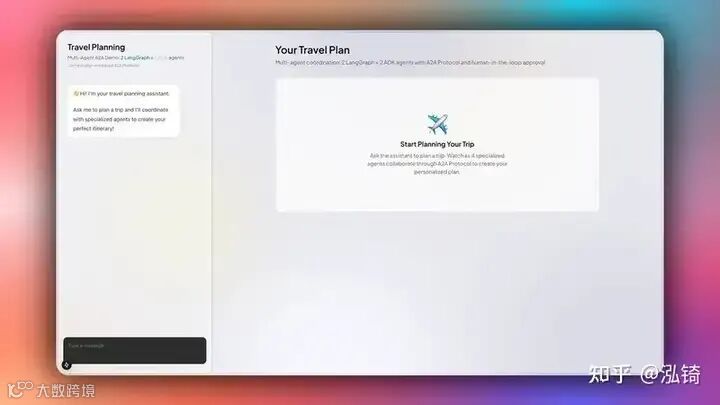
步骤 2:使用 A2A 中间件配置 CopilotKit API 路由
设置好前端后,使用 A2A 中间件配置 CopilotKit API 路由,以建立前端、AG-UI + ADK Orchestrator 代理和 A2A 代理之间的连接,如文件所示app/api/copilotkit/route.ts。
import {
  CopilotRuntime,
  ExperimentalEmptyAdapter,
  copilotRuntimeNextJSAppRouterEndpoint,
} from "@copilotkit/runtime";
import { HttpAgent } from "@ag-ui/client";
import { A2AMiddlewareAgent } from "@ag-ui/a2a-middleware";
import { NextRequest } from "next/server";

export async function POST(request: NextRequest) {
  // STEP 1: Define A2A agent URLs
  const itineraryAgentUrl =
    process.env.ITINERARY_AGENT_URL || "http://localhost:9001";
  const budgetAgentUrl =
    process.env.BUDGET_AGENT_URL || "http://localhost:9002";
  const restaurantAgentUrl =
    process.env.RESTAURANT_AGENT_URL || "http://localhost:9003";
  const weatherAgentUrl =
    process.env.WEATHER_AGENT_URL || "http://localhost:9005";

  // STEP 2: Define orchestrator URL (speaks AG-UI Protocol)
  const orchestratorUrl =
    process.env.ORCHESTRATOR_URL || "http://localhost:9000";

  // STEP 3: Wrap orchestrator with HttpAgent (AG-UI client)
    // the orchestrator agent we pass to the middleware needs to be an instance of a derivative of an ag-ui `AbstractAgent`
    // In this case, we have access to the agent via url, so we can gain an instance using the `HttpAgent` class
  const orchestrationAgent = new HttpAgent({
    url: orchestratorUrl,
  });

  // STEP 4: Create A2A Middleware Agent
  // This bridges AG-UI and A2A protocols by:
  // 1. Wrapping the orchestrator
  // 2. Registering all A2A agents
  // 3. Injecting send_message_to_a2a_agent tool
  // 4. Routing messages between orchestrator and A2A agents
  const a2aMiddlewareAgent = new A2AMiddlewareAgent({
    description:
      "Travel planning assistant with 4 specialized agents: Itinerary and Restaurant (LangGraph), Weather and Budget (ADK)",

    agentUrls: [
      itineraryAgentUrl, // LangGraph + OpenAI
      restaurantAgentUrl, // ADK + Gemini
      budgetAgentUrl, // ADK + Gemini
      weatherAgentUrl, // ADK + Gemini
    ],

    orchestrationAgent,
  });

  // STEP 5: Create CopilotKit Runtime
  const runtime = new CopilotRuntime({
    agents: {
      a2a_chat: a2aMiddlewareAgent, // Must match frontend: <CopilotKit agent="a2a_chat">
    },
  });

  // STEP 6: Set up Next.js endpoint handler
  const { handleRequest } = copilotRuntimeNextJSAppRouterEndpoint({
    runtime,
    serviceAdapter: new ExperimentalEmptyAdapter(),
    endpoint: "/api/copilotkit",
  });

  return handleRequest(request);
}
步骤 3:设置 CopilotKit 提供程序
使用 A2A 中间件配置 CopilotKit API 路由后,设置管理 A2A 多代理会话的 CopilotKit 提供程序组件。
要设置 CopilotKit 提供程序, [<CopilotKit>](https://docs.copilotkit.ai/reference/components/CopilotKit) 组件必须包装应用程序的 Copilot 感知部分,如components/travel-chat.tsx文件中所示。
import { CopilotKit } from "@copilotkit/react-core";

// ...

/**
 * MAIN COMPONENT: CopilotKit Provider Wrapper
 *
 * This is the main export that wraps the chat component with the CopilotKit provider.
 * The provider configuration enables:
 * - Runtime connection to backend agents via /api/copilotkit endpoint
 * - A2A agent communication protocol
 * - Development console for debugging (disabled in production)
 */
export default function TravelChat({
  onItineraryUpdate,
  onBudgetUpdate,
  onWeatherUpdate,
  onRestaurantUpdate,
}: TravelChatProps) {
  return (
    <CopilotKit
      runtimeUrl="/api/copilotkit" // Backend endpoint for agent communication
      showDevConsole={false} // Disable dev console in production
      agent="a2a_chat" // Specify A2A agent protocol
    >
      <ChatInner
        onItineraryUpdate={onItineraryUpdate}
        onBudgetUpdate={onBudgetUpdate}
        onWeatherUpdate={onWeatherUpdate}
        onRestaurantUpdate={onRestaurantUpdate}
      />
    </CopilotKit>
  );
}
步骤 4:配置 Copilot UI 组件
设置 CopilotKit 提供程序后,请设置一个 Copilot UI 组件,以便您与 AG-UI + A2A 代理进行交互。CopilotKit 附带多个内置聊天组件,包括CopilotPopup、 CopilotSidebar和CopilotChat。
要设置 Copilot UI 组件,请将其与核心页面组件一起定义,如components/travel-chat.tsx文件中所示。
import { CopilotChat } from "@copilotkit/react-ui";

// ...

const ChatInner = ({
  onItineraryUpdate,
  onBudgetUpdate,
  onWeatherUpdate,
  onRestaurantUpdate,
}: TravelChatProps) => {

  // ...


  /**
   * COPILOTKIT CHAT COMPONENT: Main chat interface
   *
   * The CopilotChat component provides the core chat interface with:
   * - Message history and real-time conversation
   * - Integration with all registered actions
   * - Customizable labels and instructions
   * - Built-in support for generative UI and HITL workflows
   */
  return (
    <div className="h-full">
      <CopilotChat
        className="h-full"
        labels={{
          initial:
            "👋 Hi! I'm your travel planning assistant.\n\nAsk me to plan a trip and I'll coordinate with specialized agents to create your perfect itinerary!",
        }}
        instructions="You are a helpful travel planning assistant. Help users plan their trips by coordinating with specialized agents."
      />
    </div>
  );
};
步骤 5:使用生成 UI 呈现代理间通信
设置 Copilot UI 组件后,使用聊天组件中的生成 UI呈现代理到代理的通信。
为了在聊天组件中实时呈现代理到代理的通信,请定义一个 useCopilotAction()名为的钩子send_message_to_a2a_agent,如文件中所示components/travel-chat.tsx。
import { useCopilotAction } from "@copilotkit/react-core";

//A2A Communication visualization components
import { MessageToA2A } from "./a2a/MessageToA2A";
import { MessageFromA2A } from "./a2a/MessageFromA2A";

// ...

const ChatInner = ({
  onItineraryUpdate,
  onBudgetUpdate,
  onWeatherUpdate,
  onRestaurantUpdate,
}: TravelChatProps) => {

  // ...

    useCopilotAction({
    name: "send_message_to_a2a_agent",
    description: "Sends a message to an A2A agent",
    available: "frontend", // This action runs on frontend only - no backend processing
    parameters: [
      {
        name: "agentName",
        type: "string",
        description: "The name of the A2A agent to send the message to",
      },
      {
        name: "task",
        type: "string",
        description: "The message to send to the A2A agent",
      },
    ],
    // Custom render function creates visual A2A communication components
    render: (actionRenderProps: MessageActionRenderProps) => {
      return (
        <>
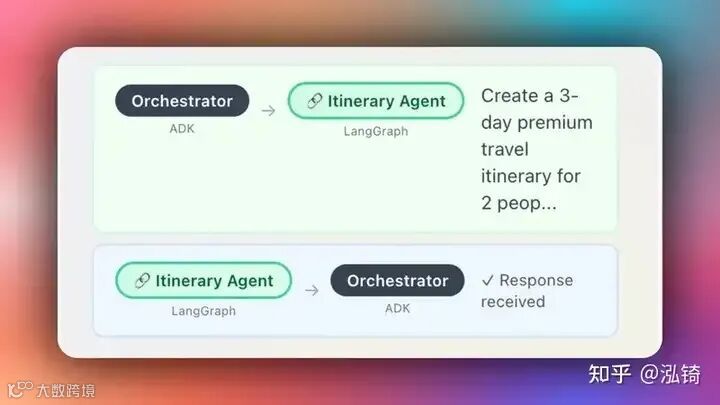
          {/* MessageToA2A: Shows outgoing message (green box) */}
          <MessageToA2A {...actionRenderProps} />
          {/* MessageFromA2A: Shows agent response (blue box) */}
          <MessageFromA2A {...actionRenderProps} />
        </>
      );
    },
  });

  // ...

  return (
    <div className="h-full">
      {*/ ... /*}
    </div>
  );
};
当协调器代理发送请求或接收来自 A2A 代理的响应时,您应该会看到聊天组件上呈现的通信,如下所示。
步骤 6:在前端实现人机交互(HITL)
人机在环 (HITL) 允许代理在执行过程中请求人工输入或批准,从而提高 AI 系统的可靠性和可信度。在构建需要处理复杂决策或需要人工判断的操作的 AI 应用程序时,这种模式至关重要。
您可以在 CopilotKit 文档中了解有关 Human in the Loop 的更多信息。
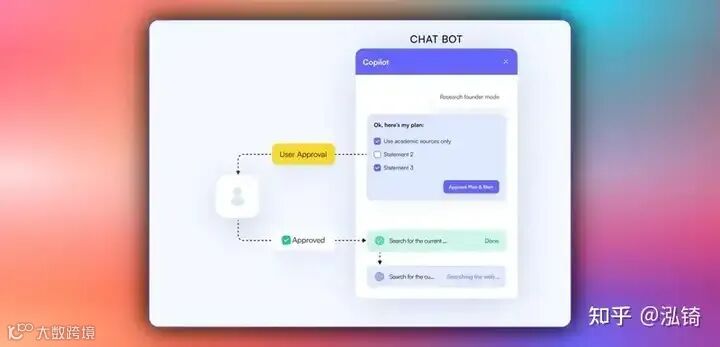
要在前端实现人机交互 (HITL),您需要使用 CopilotKit useCopilotKitAction 钩子和renderAndWaitForResponse方法,该方法允许从渲染函数异步返回值,如components/travel-chat.tsx文件中所示。
const ChatInner = ({
  onItineraryUpdate,
  onBudgetUpdate,
  onWeatherUpdate,
  onRestaurantUpdate,
}: TravelChatProps) => {
  // State management for HITL budget approval workflow
  // Tracks approval/rejection status for different budget proposals
  const [approvalStates, setApprovalStates] = useState<
    Record<string, { approved: boolean; rejected: boolean }>
  >({});


  /**
   * HITL FEATURE: Budget approval workflow with renderAndWaitForResponse
   *
   * This useCopilotAction demonstrates CopilotKit's Human-in-the-Loop (HITL)
   * capabilities, which pause agent execution and wait for user interaction
   * before continuing the workflow.
   *
   * Key features:
   * - renderAndWaitForResponse: Blocks agent until user provides input
   * - State management: Tracks approval/rejection status across re-renders
   * - Business logic integration: Only proceeds with approved budgets
   * - Custom UI: Renders an interactive approval card with approve/reject buttons
   * - Response handling: Sends the user's decision back to the agent
   */
  useCopilotAction(
    {
      name: "request_budget_approval",
      description: "Request user approval for the travel budget",
      parameters: [
        {
          name: "budgetData",
          type: "object",
          description: "The budget breakdown data requiring approval",
        },
      ],
      // renderAndWaitForResponse pauses agent execution until the user responds
      renderAndWaitForResponse: ({ args, respond }) => {
        // Step 1: Validate budget data structure
        if (!args.budgetData || typeof args.budgetData !== "object") {
          return (
            <div className="text-xs text-gray-500 p-2">
              Loading budget data...
            </div>
          );
        }

        const budget = args.budgetData as BudgetData;

        if (!budget.totalBudget || !budget.breakdown) {
          return (
            <div className="text-xs text-gray-500 p-2">
              Loading budget data...
            </div>
          );
        }

        // Step 2: Create a unique key for this budget to track approval state
        const budgetKey = `budget-${budget.totalBudget}`;
        const currentState = approvalStates[budgetKey] || {
          approved: false,
          rejected: false,
        };

        // Step 3: Define approval handler - updates state and responds to agent
        const handleApprove = () => {
          setApprovalStates((prev) => ({
            ...prev,
            [budgetKey]: { approved: true, rejected: false },
          }));
          // Send approval response back to the agent to continue the workflow
          respond?.({ approved: true, message: "Budget approved by user" });
        };

        // Step 4: Define rejection handler - updates state and responds to agent
        const handleReject = () => {
          setApprovalStates((prev) => ({
            ...prev,
            [budgetKey]: { approved: false, rejected: true },
          }));
          // Send rejection response back to the agent to handle accordingly
          respond?.({ approved: false, message: "Budget rejected by user" });
        };

        // Step 5: Render interactive budget approval card
        return (
          <BudgetApprovalCard
            budgetData={budget}
            isApproved={currentState.approved}
            isRejected={currentState.rejected}
            onApprove={handleApprove}
            onReject={handleReject}
          />
        );
      },
    },
    [approvalStates] // Re-register when approval states change
  );

  // ...

  return (
    <div className="h-full">
      {/* ... */}
    </div>
  );
当代理通过工具/操作名称触发前端操作,以在执行过程中请求人工输入或反馈时,系统会提示最终用户进行选择(该选项会呈现在聊天界面中)。然后,用户可以通过按下聊天界面中的按钮进行选择,如下所示。
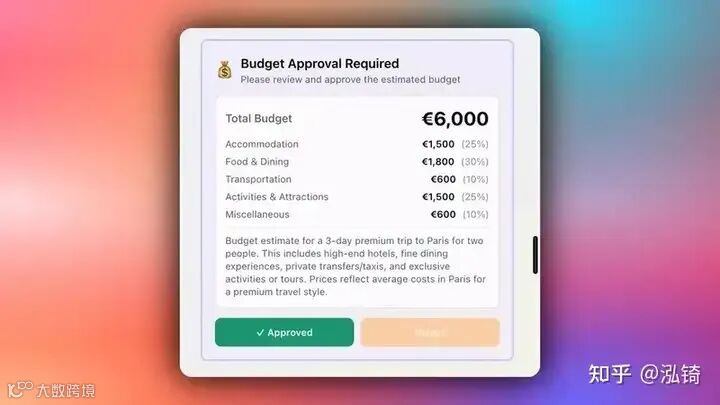
步骤 6:在前端流式传输代理到代理的响应
要在前端流式传输代理到代理的响应,请定义一个 useEffect() 钩子,该钩子解析 AI 代理响应以提取结构化数据(如行程、预算、天气或餐厅推荐),如components/travel-chat.tsx文件中所示。
const ChatInner = ({
  onItineraryUpdate,
  onBudgetUpdate,
  onWeatherUpdate,
  onRestaurantUpdate,
}: TravelChatProps) => {
  // State management for HITL budget approval workflow
  // Tracks approval/rejection status for different budget proposals
  const [approvalStates, setApprovalStates] = useState<
    Record<string, { approved: boolean; rejected: boolean }>
  >({});

  // CopilotKit hook to access chat messages for data extraction
  // visibleMessages contains all messages currently displayed in the chat
  const { visibleMessages } = useCopilotChat();

  /**
   * GENERATIVE UI FEATURE: Auto-extract structured data from agent responses
   *
   * This useEffect demonstrates CopilotKit's ability to automatically parse and
   * extract structured data from AI agent responses, converting them into
   * interactive UI components.
   *
   * Process:
   * 1. Monitor all visible chat messages for agent responses
   * 2. Parse JSON data from the A2A agent message results
   * 3. Identify data type (itinerary, budget, weather, restaurant)
   * 4. Update parent component state to render corresponding UI components
   * 5. Apply business logic (e.g., budget approval checks)
   */
  useEffect(() => {
    const extractDataFromMessages = () => {
      // Step 1: Iterate through all visible messages in the chat
      for (const message of visibleMessages) {
        const msg = message as any;

        // Step 2: Filter for A2A agent response messages specifically
        if (
          msg.type === "ResultMessage" &&
          msg.actionName === "send_message_to_a2a_agent"
        ) {
          try {
            const result = msg.result;
            let parsed;

            // Step 3: Parse the agent response data (handle both string and object formats)
            if (typeof result === "string") {
              let cleanResult = result;
              // Remove A2A protocol prefix if present
              if (result.startsWith("A2A Agent Response: ")) {
                cleanResult = result.substring("A2A Agent Response: ".length);
              }
              parsed = JSON.parse(cleanResult);
            } else if (typeof result === "object" && result !== null) {
              parsed = result;
            }

            // Step 4: Identify data type and trigger appropriate UI updates
            if (parsed) {
              // Itinerary data: destination + itinerary array
              if (
                parsed.destination &&
                parsed.itinerary &&
                Array.isArray(parsed.itinerary)
              ) {
                onItineraryUpdate?.(parsed as ItineraryData);
              }
              // Budget data: requires user approval before displaying
              else if (
                parsed.totalBudget &&
                parsed.breakdown &&
                Array.isArray(parsed.breakdown)
              ) {
                const budgetKey = `budget-${parsed.totalBudget}`;
                const isApproved = approvalStates[budgetKey]?.approved || false;
                // Step 5: Apply HITL approval check - only show if user approved
                if (isApproved) {
                  onBudgetUpdate?.(parsed as BudgetData);
                }
              }
              // Weather data: destination + forecast array
              else if (
                parsed.destination &&
                parsed.forecast &&
                Array.isArray(parsed.forecast)
              ) {
                const weatherDataParsed = parsed as WeatherData;
                onWeatherUpdate?.(weatherDataParsed);
              }
              // Restaurant data: destination + meals array
              else if (
                parsed.destination &&
                parsed.meals &&
                Array.isArray(parsed.meals)
              ) {
                onRestaurantUpdate?.(parsed as RestaurantData);
              }
            }
          } catch (e) {
            // Silently handle parsing errors - not all messages contain structured data
          }
        }
      }
    };

    extractDataFromMessages();
  }, [
    visibleMessages,
    approvalStates,
    onItineraryUpdate,
    onBudgetUpdate,
    onWeatherUpdate,
    onRestaurantUpdate,
  ]);

  // ...

  return (
    <div className="h-full">
      {/* ... */}
    </div>
  );
};
然后,提取的结构化数据触发 UI 更新以呈现交互式组件,如app/page.tsx文件中所示。
"use client";

import { useState } from "react";
import TravelChat from "@/components/travel-chat";
import { ItineraryCard, type ItineraryData } from "@/components/ItineraryCard";
import { BudgetBreakdown, type BudgetData } from "@/components/BudgetBreakdown";
import { WeatherCard, type WeatherData } from "@/components/WeatherCard";
import { type RestaurantData } from "@/components/ItineraryCard";

export default function Home() {
  const [itineraryData, setItineraryData] = useState<ItineraryData | null>(null);
  const [budgetData, setBudgetData] = useState<BudgetData | null>(null);
  const [weatherData, setWeatherData] = useState<WeatherData | null>(null);
  const [restaurantData, setRestaurantData] = useState<RestaurantData | null>(null);

  return (
    <div className="relative flex h-screen overflow-hidden bg-[#DEDEE9] p-2">

      // ...

      <div className="flex flex-1 overflow-hidden z-10 gap-2">

        // ...

        <div className="flex-1 overflow-hidden">
          <TravelChat
            onItineraryUpdate={setItineraryData}
            onBudgetUpdate={setBudgetData}
            onWeatherUpdate={setWeatherData}
            onRestaurantUpdate={setRestaurantData}
          />
        </div>
      </div>

      <div className="flex-1 overflow-y-auto rounded-lg bg-white/30 backdrop-blur-sm">
        <div className="max-w-5xl mx-auto p-8">

          // ...

          {itineraryData && (
            <div className="mb-4">
              <ItineraryCard data={itineraryData} restaurantData={restaurantData} />
            </div>
          )}

          {(weatherData || budgetData) && (
            <div className="grid grid-cols-1 lg:grid-cols-2 gap-4">
              {weatherData && (
                <div>
                  <WeatherCard data={weatherData} />
                </div>
              )}

              {budgetData && (
                <div>
                  <BudgetBreakdown data={budgetData} />
                </div>
              )}
            </div>
          )}
        </div>
      </div>
      </div>
    </div>
  );
}
关注【索引目录】服务号,更多精彩内容等你来探索!