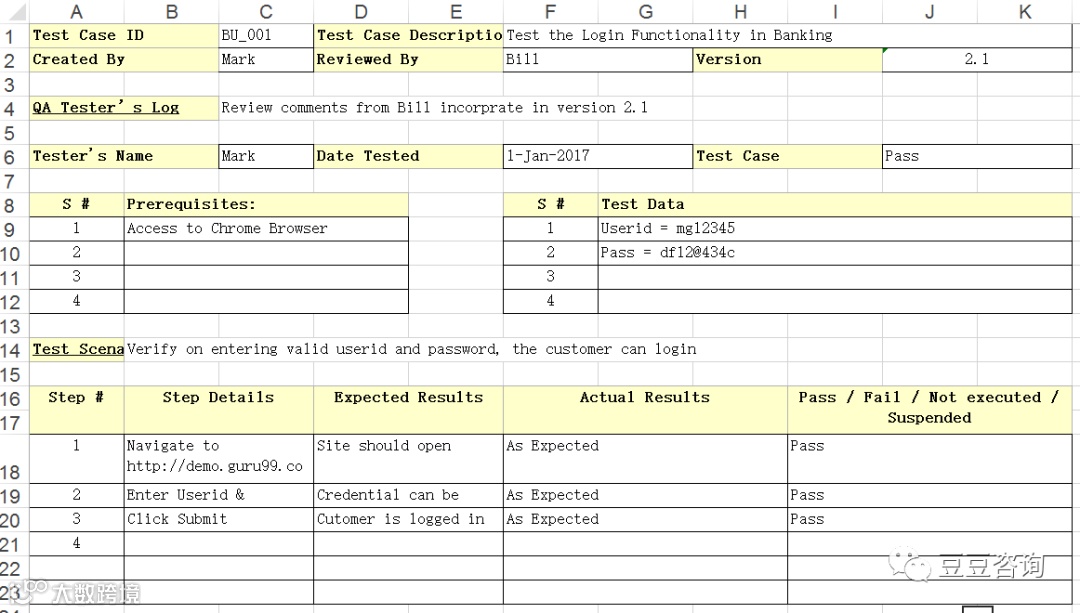
Whatis a Test Case?
A TESTCASE is a set of actions executed to verify a particularfeature or functionality of your software application. A Test Case containstest steps, test data, precondition, postcondition developed for specific testscenario to verify any requirement. The test case includes specific variablesor conditions, using which a testing engineer can compare expected and actualresults to determine whether a software product is functioning as per therequirements of the customer.
Test Scenario VsTest Case
Test scenarios arerather vague and cover a wide range of possibilities. Testing is all aboutbeing very specific.
For a Test Scenario: Check Login Functionality there many possible test cases are:
Test Case 1: Check results on entering valid User Id & Password
Test Case 2: Check results on entering Invalid User ID & Password
Test Case 3: Check response when a User ID is Empty & Login Button is pressed, and many more
This is nothing but aTest Case.
Howto Create a Test Case
Let’s create a TestCase for the scenario: Check Login Functionality
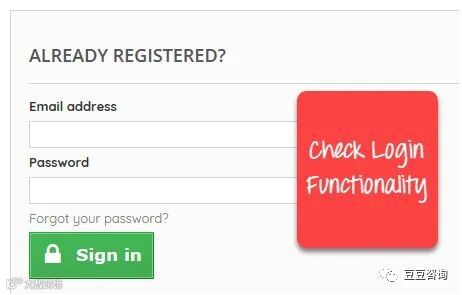
Step1) A simple test case for the scenario would be
Test Case # |
Test Case Description |
1 |
Check response when valid email and password is entered |
Step2) In order to execute the test case, you would need TestData. Adding it below
Test Case # |
Test Case Description |
Test Data |
1 |
Check response when valid email and password is entered |
Email: guru99@email.comPassword: lNf9^Oti7^2h |
Identifying test datacan be time-consuming and may sometimes require creating test data afresh. Thereason it needs to be documented.
Step3) In order to execute a test case, a tester needs to performa specific set of actions on the AUT. This is documented as below:
Test Case # |
Test Case Description |
Test Steps |
Test Data |
1 |
Check response when valid email and password is entered |
1) Enter Email Address 2) Enter Password 3) Click Sign in |
Email: guru99@email.com Password: lNf9^Oti7^2h |
Many times the TestSteps are not simple as above, hence they need documentation. Also, the authorof the test case may leave the organization or go on a vacation or is sick andoff duty or is very busy with other critical tasks. A recently hire may beasked to execute the test case. Documented steps will help him and alsofacilitate reviews by other stakeholders.
Step4) The goal of test cases is to check behavior the AUT for anexpected result. This needs to be documented as below
Test Case # |
Test Case Description |
Test Data |
Expected Result |
1 |
Check response when valid email and password is entered |
Email: guru99@email.com |
Login should be successful |
During test execution time, the tester will check expected results against actual results and assign a pass or fail status
Test Case # |
Test Case Description |
Test Data |
Expected Result |
Actual Result |
Pass/Fail |
1 |
Check response when valid email and password is entered |
Email: guru99@email.comPassword: lNf9^Oti7^2h |
Login should be successful |
Login was successful |
Pass |
Step5) That apart your test case -may have a field like, Pre -Condition which specifies things that must in place before the test can run.For our test case, a pre-condition would be to have a browser installed to haveaccess to the site under test. A test case may also include Post - Conditionswhich specifies anything that applies after the test case completes. For ourtest case, a postcondition would be time & date of login is stored in thedatabase
Theformat of Standard Test Cases
Below is a format ofa standard login Test case
Test Case ID |
Test Scenario |
Test Steps |
Test Data |
Expected Results |
Actual Results |
Pass/Fail |
TU01 |
Check Customer Login with valid Data |
1. Go to site http://demo.guru99.com 2. Enter UserId 3. Enter Password 4. Click Submit |
Userid = guru99 Password = pass99 |
User should Login into an application |
As Expected |
Pass |
TU02 |
Check Customer Login with invalid Data |
1. Go to site http://demo.guru99.com 2. Enter UserId 3. Enter Password 4. Click Submit |
Userid = guru99 Password = glass99 |
User should not Login into an application |
As Expected |
Pass |
This entire table maybe created in Word, Excel or any other Test management tool. That's all to TestCase Design
Whiledrafting a test case to include the following information
The description of what requirement is being tested
The explanation of how the system will be tested
The test setup like a version of an application under test, software, data files, operating system, hardware, security access, physical or logical date, time of day, prerequisites such as other tests and any other setup information pertinent to the requirements being tested
Inputs and outputs or actions and expected results
Any proofs or attachments
Use active case language
Test Case should not be more than 15 steps
An automated test script is commented with inputs, purpose and expected results
The setup offers an alternative to pre-requisite tests
With other tests, it should be an incorrect business scenario order
BestPractice for writing good Test Case Example.
1.Test Cases need to be simple and transparent:
Create test cases thatare as simple as possible. They must be clear and concise as the author of thetest case may not execute them.
Use assertive languagelike go to the home page, enter data, click on this and so on. This makes theunderstanding the test steps easy and tests execution faster.
2.Create Test Case with End User in Mind
The ultimate goal ofany software project is to create test cases that meet customer requirementsand is easy to use and operate. A tester must create test cases keeping in mindthe end user perspective
3.Avoid test case repetition.
Do not repeat testcases. If a test case is needed for executing some other test case, call thetest case by its test case id in the pre-condition column
4.Do not Assume
Do not assumefunctionality and features of your software application while preparing testcase. Stick to the Specification Documents.
5.Ensure 100% Coverage
Make sure you writetest cases to check all software requirements mentioned in the specificationdocument. Use TraceabilityMatrix to ensure nofunctions/conditions is left untested.
6.Test Cases must be identifiable.
Name the test case idsuch that they are identified easily while tracking defects or identifying asoftware requirement at a later stage.
7.Implement Testing Techniques
It's not possible tocheck every possible condition in your software application. Software Testingtechniques help you select a few test cases with the maximum possibility offinding a defect.
Boundary Value Analysis (BVA): As the name suggests it's the technique that defines the testing of boundaries for a specified range of values.
Equivalence Partition (EP): This technique partitions the range into equal parts/groups that tend to have the same behavior.
State Transition Technique: This method is used when software behavior changes from one state to another following particular action.
Error Guessing Technique: This is guessing/anticipating the error that may arise while doing manual testing. This is not a formal method and takes advantages of a tester's experience with the application
8. Self-cleaning
The test case youcreate must return the TestEnvironment to the pre-test stateand should not render the test environment unusable. This is especially truefor configuration testing.
9. Repeatable andself-standing
The test case shouldgenerate the same results every time no matter who tests it
10.Peer Review.
After creating testcases, get them reviewed by your colleagues. Your peers can uncover defects inyour test case design, which you may easily miss.
TestCase Management Tools
Test management toolsare the automation tools that help to manage and maintain the Test Cases. MainFeatures of a test case management tool are
1. For documenting Test Cases: With tools, you can expedite Test Case creation with use oftemplates
2. Execute the Test Case and Recordthe results: Test Case can beexecuted through the tools and results obtained can be easily recorded.
3. Automate the DefectTracking: Failed tests areautomatically linked to the bug tracker, which in turn can be assigned to thedevelopers and can be tracked by email notifications.
4. Traceability: Requirements, Test cases, Execution of Test cases are allinterlinked through the tools, and each case can be traced to each other tocheck test coverage.
5. Protecting Test Cases: Test cases should be reusable and should be protected frombeing lost or corrupted due to poor version control. Test Case Management Toolsoffer features like
Naming and numbering conventions
Versioning
Read-only storage
Controlled access
Off-site backup
Popular Test Managementtools are: QualityCenter and JIRA
Resources
Please note that the template used will vary from project to project. Read this tutorial to Learn Test Case Template with Explanation of Important Fields