


今天来学习2025 年7月7号发表在 nature communications 上的一篇文献中的棒棒图,标题为《Cell Marker Accordion: interpretable single-cell and spatial omics annotation in health and disease》。
前面我们做过背靠背的《Nature杂志:独特的背靠背双向间隔条形图》,今天就做这个背靠背的棒棒图!
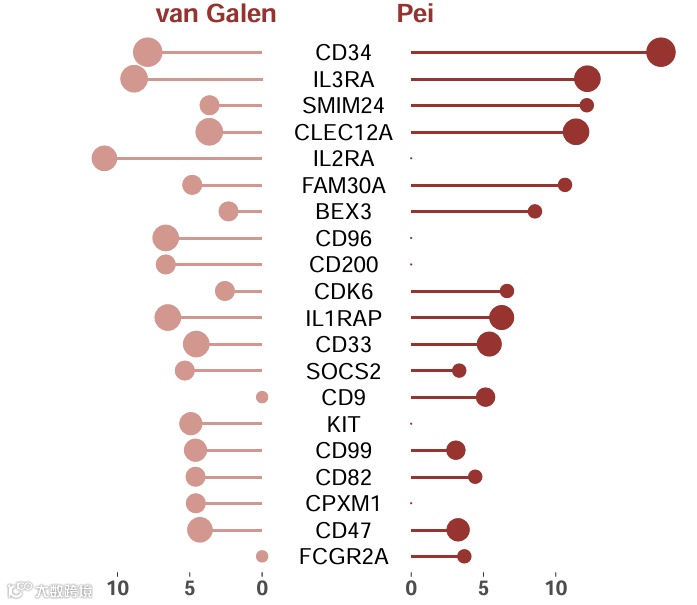
下图展示的是标记基因在LHSCs与肿瘤性单核细胞中的组间比较:
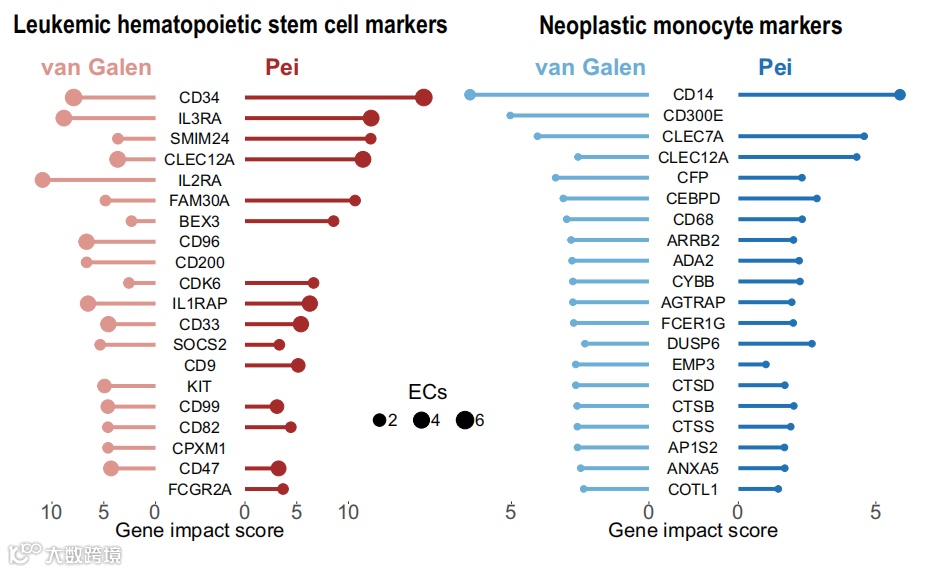
图注:
Fig. 5 | The Cell Marker Accordion identifies disease-critical cell types in acute myeloid leukemia patients.
I. Comparison of marker genes with the highest impact in defining LHSCs and neoplastic monocytes in the two leukemia datasets, for hematopoietic progenitor cells and monocytes, respectively
数据下载
作者将这个图的数据放在了附件,下载地址:https://static-content.springer.com/esm/art%3A10.1038%2Fs41467-025-60900-4/MediaObjects/41467_2025_60900_MOESM13_ESM.xlsx
在表格中的 Fig5 表中。
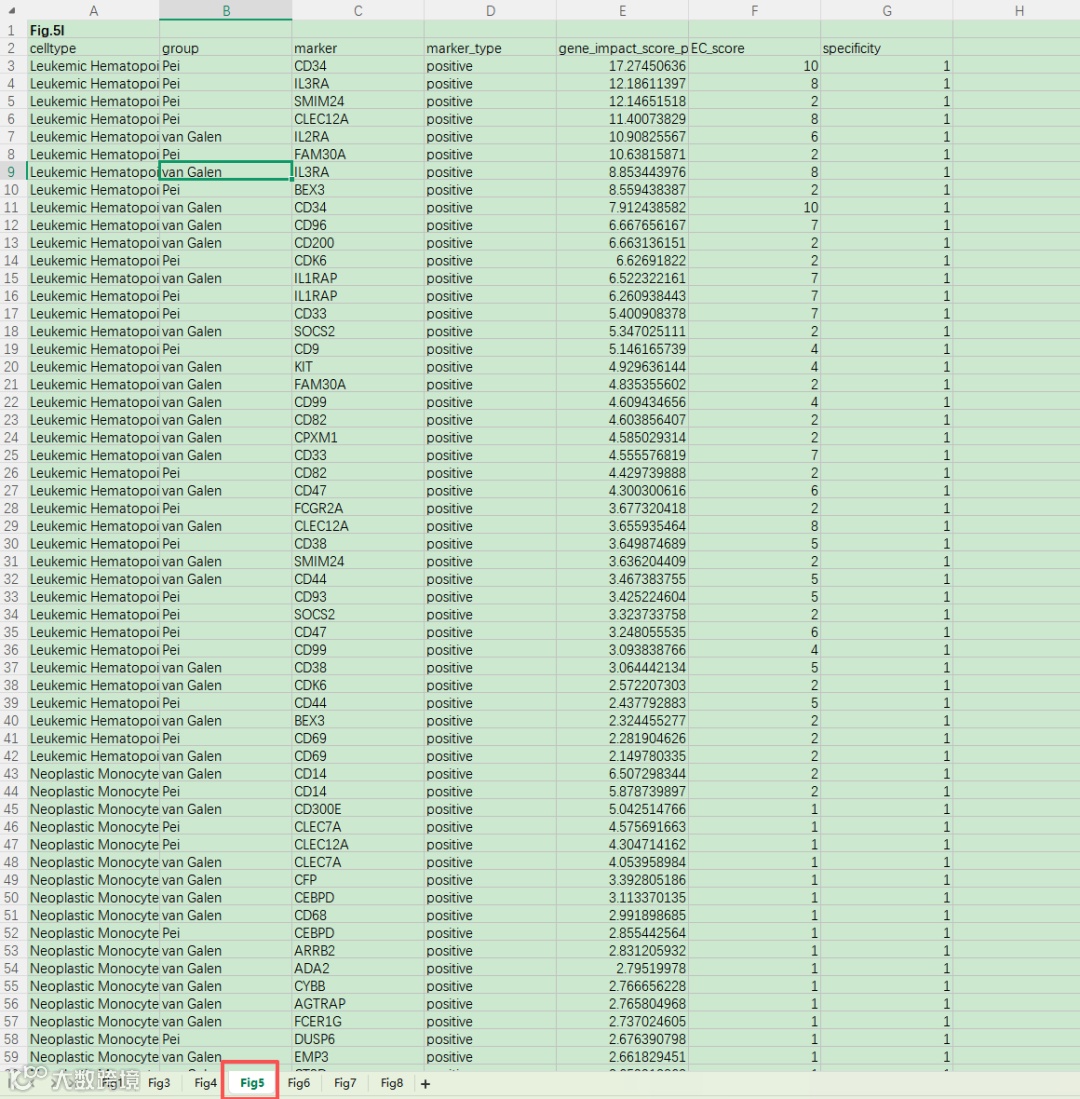
读取进来:
rm(list=ls())
library(readxl)
library(ggplot2)


# 读取数据
data <- read_xlsx("41467_2025_60900_MOESM13_ESM.xlsx",sheet = "Fig5",col_names = T,skip = 1)
head(data)

# 简单探索
table(data$celltype)
table(data$group)
table(data$marker_type)

这个数据的 celltype 列 有分别对应上图的左图和有图:左 Leukemic Hematopoietic Stem Cell Neoplastic Monocyte(右)
这里 以左边的为例进行绘制,右边的基本上操作一样,后续将两个图拼在一起就可以啦!
# 提取Fig5中左边的图数据
data_Leu <- data[data$celltype=="Leukemic Hematopoietic Stem Cell", ]
data_Leu <- as.data.frame(data_Leu)
绘图
参考我们前面的:Nature杂志:独特的背靠背双向间隔条形图
这个图是左右两部分拼接而成,拆成下面三部分的过程。
先把图里面的基因抠出来,使用AI指令:
简单的R代码从图片里面提取基因并生成R向量给我,不要其他的废话

# 设置图中marker的展示循序,基因可以让AI从图中薅出来
genes <- c("CD34", "IL3RA", "SMIM24", "CLEC12A", "IL2RA", "FAM30A", "BEX3", "CD96",
           "CD200", "CDK6", "IL1RAP", "CD33", "SOCS2", "CD9", "KIT", "CD99",
           "CD82", "CPXM1", "CD47", "FCGR2A")
length(genes)

data_Leu <- data_Leu[data_Leu$marker %in% genes, ]
data_Leu$marker <- factor(data_Leu$marker, levels = rev(genes))
data_Leu$marker
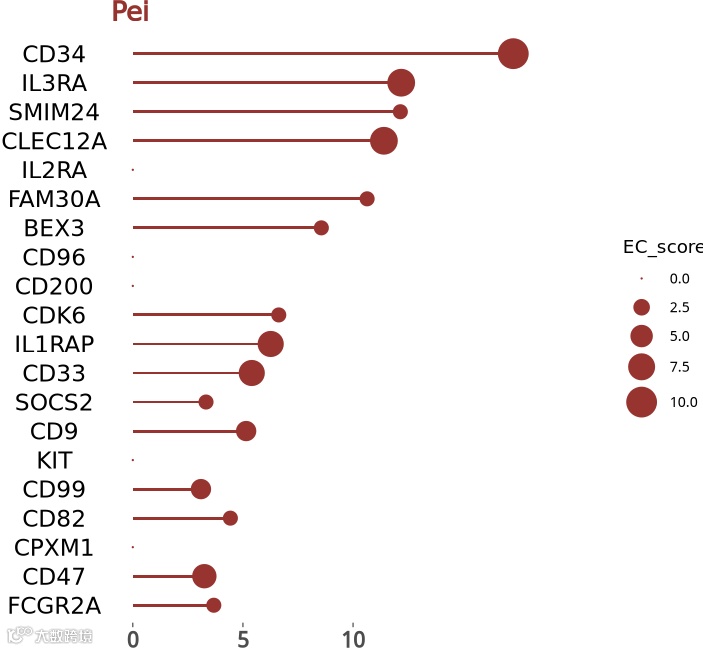
1.先绘制右边:
这里有个点,左右两边的marker不太一样,不一样的地方我就补充一下,用0值填充:
# 右侧棒棒图
table(data_Leu$group)
data_Leu_r <- data_Leu[data_Leu$group=="Pei", ]
data_Leu_r$marker
head(data_Leu_r)

geneno <- setdiff(genes,data_Leu_r$marker)
temp <- data.frame(celltype="Leukemic Hematopoietic Stem Cell",
                   group="Pei", marker=geneno,marker_type="positive",
                   gene_impact_score_per_celltype_cell=0,
                   EC_score=0,specificity=1)
data_Leu_r <- rbind(data_Leu_r,temp)

range(data_Leu_r$EC_score)
range(data_Leu_r$gene_impact_score_per_celltype_cell)


p1 <- ggplot(data_Leu_r, aes(x = gene_impact_score_per_celltype_cell, y = marker)) +
  geom_col(fill = "#a52a2a", width = 0.1) +
  geom_point(aes(size = EC_score), color = "#a52a2a") +
  scale_size_continuous(range = c(0, 8)) +
  scale_x_continuous(limits = c(0, 20), breaks = seq(0, 10, 5)) + #x轴刻度自定义
  labs(title = 'Pei') + #添加标题
  theme_bw() +
  theme(
    plot.title = element_text(face = 'bold',  color = '#a42929', size = 16), # #修改标题字体、字号、颜色
    axis.title = element_blank(),
    axis.ticks.y = element_blank(),
    axis.ticks.x = element_line(linewidth = 0.2,size = 0.3),
    axis.text.y = element_text(size = 14,colour = "black",hjust = 0.5),
    axis.text.x = element_text(size = 13,face = "bold"),
    panel.grid.major = element_blank(),
    panel.grid.minor = element_blank(),
    panel.border = element_blank()
    )
p1
2.画左边
同样的逻辑:
# 左侧棒棒图
table(data_Leu$group)
data_Leu_l <- data_Leu[data_Leu$group=="van Galen", ]
data_Leu_l$marker
head(data_Leu_l)

geneno <- setdiff(genes,data_Leu_l$marker)
temp <- data.frame(celltype="Leukemic Hematopoietic Stem Cell",
                   group="Pei", marker=geneno,marker_type="positive",
                   gene_impact_score_per_celltype_cell=0,
                   EC_score=0,specificity=1)
data_Leu_l <- rbind(data_Leu_l,temp)

range(data_Leu_l$EC_score)
range(data_Leu_l$gene_impact_score_per_celltype_cell)

p2 <- ggplot(data_Leu_l, aes(x = gene_impact_score_per_celltype_cell, y = marker)) +
  geom_col(fill = "#dc968d", width = 0.1) +
  geom_point(aes(size = EC_score), color = "#dc968d") +
  scale_size_continuous(range = c(0, 8)) +
  scale_y_discrete(position ="right") + #y轴逆转
  scale_x_reverse(limits = c(20, 0), breaks = seq(0, 10, 5)) +
  labs(title = 'van Galen') + #添加标题
  theme_bw() +
  theme(
    plot.title = element_text(face = 'bold',  color = '#a42929', size = 16, hjust = 1), # #修改标题字体、字号、颜色
    axis.title = element_blank(),
    #axis.text.y = element_blank(),
    axis.ticks.y = element_blank(),
    axis.ticks.x = element_line(linewidth = 0.2,size = 0.3),
    axis.text.y = element_text(size = 14,colour = "black"),
    axis.text.x = element_text(size = 13,face = "bold"),
    panel.grid.major = element_blank(),
    panel.grid.minor = element_blank(),
    panel.border = element_blank()
  )
p2
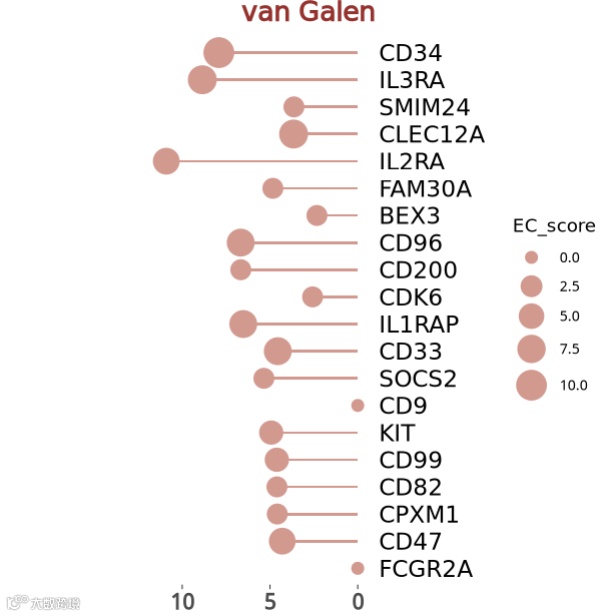
两个看一眼,y轴坐标标签一致,然后不需要y轴坐标标签
p2 <- ggplot(data_Leu_l, aes(x = gene_impact_score_per_celltype_cell, y = marker)) +
  geom_col(fill = "#dc968d", width = 0.1) +
  geom_point(aes(size = EC_score), color = "#dc968d") +
  scale_size_continuous(range = c(0, 8)) +
  scale_y_discrete(position ="right") + #y轴逆转
  scale_x_reverse(limits = c(20, 0), breaks = seq(0, 10, 5)) +
  labs(title = 'van Galen') + #添加标题
  theme_bw() +
  theme(
    plot.title = element_text(face = 'bold',  color = '#a42929', size = 16, hjust = 1), # #修改标题字体、字号、颜色
    axis.title = element_blank(),
    axis.text.y = element_blank(),
    axis.ticks.y = element_blank(),
    axis.ticks.x = element_line(linewidth = 0.2,size = 0.3),
    axis.text.x = element_text(size = 13,face = "bold"),
    panel.grid.major = element_blank(),
    panel.grid.minor = element_blank(),
    panel.border = element_blank()
  )
p2
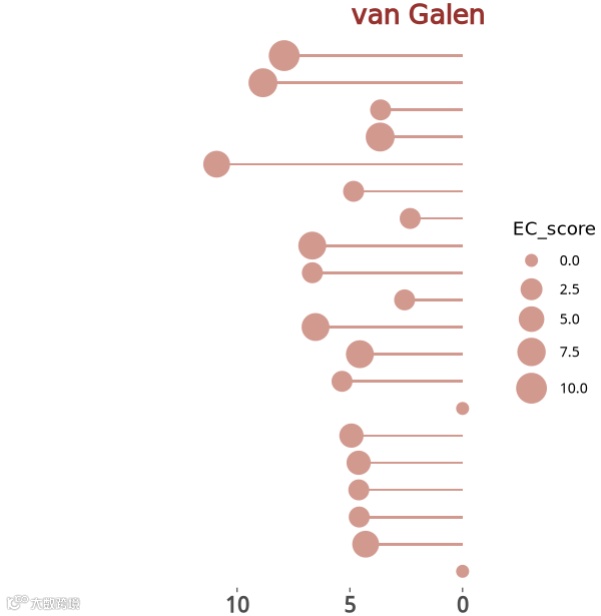
3.拼接
然后将两部分拼接在一起,并共用一个图例:
## #拼图:
library(patchwork)
p <-  (p2 | p1) + plot_layout(guides = 'collect') &
  theme( legend.justification = c("right", "bottom"),
         legend.text = element_text(face = "bold",size=15),  # 图例标签加粗
         legend.title = element_blank() # 移除图例标题
         )
p
ggsave(filename = "Fig5I.pdf", width = 8,height = 5.5,plot = p)
最终效果如下:
完美!
今天分享到这~
如果上面的内容对你有用,欢迎一键三连~
转发:
-
生信入门&数据挖掘线上直播课2026年1月班,你的生物信息学入门课 -
时隔5年,我们的生信技能树VIP学徒继续招生啦 -
满足你生信分析计算需求的低价解决方案 -
生信故事会,来看看他们的生信入门故事 -
生信马拉松答疑专辑,获取你的生信专属答疑