


基于FastMCP 2.0 开发MCP Server
MCP协议的登场为整个 Agent 生态注入新动力:它以标准化的消息格式和高效的路由机制,让分布式智能体之间能够跨平台、跨语言地无缝协作。
前文已为大家深入剖析了MCP与A2A协议的原理与优势,错过的伙伴可以回顾一下:
AGI|爆火的MCP背后,为何被称作 AI 模型的“万能适配器”?
AGI|详解Google A2A协议,谁才是Agent的未来标准?
接下来带你动手实操,手把手学习如何基于FastMCP 2.0快速搭建高性能、可扩展的MCP Server。


作者
李冠军 | 高级AI交付工程师
不是bug,是隐藏功能
Part1
介绍
模型上下文协议(Model Context Protocol,简称 MCP)是一种创新的通信协议,它允许应用程序以标准化的方式为大语言模型(LLM)提供上下文信息。通过 MCP,开发者能够将上下文提供与实际的 LLM 交互分离开来,这种解耦设计大大提升了系统的灵活性和可维护性。
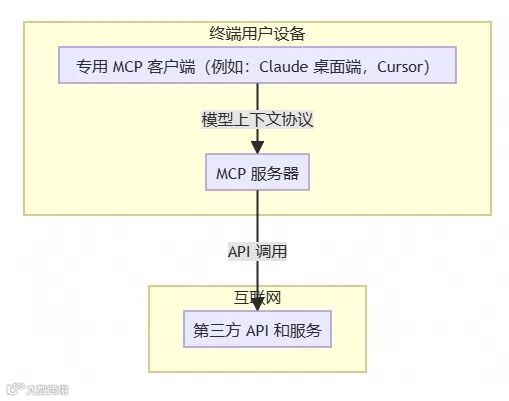
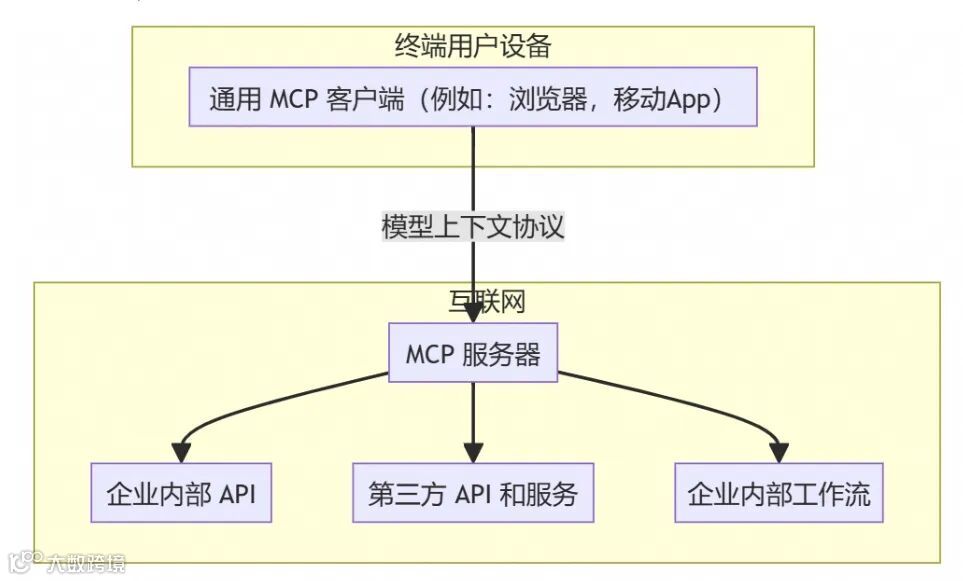
MCP Server 可分为 Remote MCP Server 和 Local MCP Server 两种类型:
● Local MCP Server:Local MCP Server 架构是部署在用户本地设备上的 MCP 服务器。在这种架构模式中,MCP 客户端(例如 Claude Desktop 或 Cursor)通过本地进程通信(stdin/stdout)与 MCP 服务器进行交互,而 MCP 服务器则负责连接到互联网上的各种 API 和服务。这种架构设计简单直观,非常适合个人开发者使用,但同时也存在一些局限性。
● Remote MCP Server:Remote MCP Server 架构是部署在云端的 MCP 服务器,用户可以通过互联网进行访问。在这种模式下,MCP 客户端可以是各种网页应用或移动应用,它们通过 HTTP 协议与远程 MCP 服务器进行通信。Remote MCP Server架构 通常集成了认证授权、状态管理、数据库访问等企业级功能,能够为多个用户提供服务。
Part2
MCP开发框架
FastMCP
· 官网地址:https://gofastmcp.com/getting-started/welcome
· Github:https://github.com/jlowin/fastmcp
· MCP 官方SDK: https://github.com/modelcontextprotocol/python-sdk
MCP官方的Python SDK 基于 FastMCP 1.0,FastMCP 2.0 在 1.0 的基础上进行了显著扩展,引入了强大的客户端功能、服务器代理与组合、OpenAPI/FastAPI 集成以及更多高级功能。 FastMCP 2.0 是构建现代、强大的 MCP 应用程序的推荐途径。
核心概念
▶ 工具 - Tool
在 MCP Server 开发中,工具是将函数暴露给 MCP 客户端,使其成为可执行功能的关键组件。工具作为核心构建块,赋予了 LLM 与外部系统交互、执行代码以及访问训练数据之外信息的能力。在 FastMCP 中,工具本质上是通过 MCP 协议暴露给 LLM 的 Python 函数。
FastMCP 将常规 Python 函数转换为 LLM 在对话过程中可调用的功能。当 LLM 决定调用某个工具时,会按照以下流程执行:
LLM 根据工具定义的模式,向服务器发送包含参数的请求;
FastMCP 依据函数签名对传入的参数进行严格验证,确保参数的正确性和完整性;
经过验证的参数将作为输入,执行对应的 Python 函数;
函数执行结果返回给 LLM,LLM 可以在后续的响应中使用该结果。
通过这种机制,LLM 能够执行诸如查询数据库、调用 API、进行复杂计算或访问文件等多样化任务,从而突破训练数据的限制,极大地扩展了自身功能。
▶ 资源和模板 - Resources
资源和模板用于向 MCP 客户端公开数据源和动态内容生成器。资源代表了 MCP 客户端可以读取的数据或文件,而资源模板进一步扩展了这一概念,它允许客户端根据 URI 中传递的参数请求动态生成的资源。
在 FastMCP 中,主要使用@mcp.resource装饰器来简化静态和动态资源的定义过程。资源为 LLM 或客户端应用程序提供了对数据的只读访问权限。当客户端请求资源 URI 时,服务器会按以下步骤处理:
FastMCP 查找与请求 URI 对应的资源定义。
如果是动态资源(由函数定义),则执行该函数生成相应内容。
将生成的内容(可以是文本、JSON 格式数据或二进制数据)返回给客户端。
借助资源和模板,LLM 可以访问与对话相关的文件、数据库内容、配置信息或动态生成的各类数据,满足不同场景下的需求。
▶ 提示 - Prompt
提示是为 MCP 客户端创建的可重复使用的参数化提示模板。它本质上是一种消息模板,能够帮助 LLM 生成结构化、具有明确目的性的响应。在 FastMCP 中,主要通过@mcp.prompt装饰器来简化提示模板的定义。
当客户端请求提示时,服务器的处理流程如下:
FastMCP 找到与请求对应的提示定义。
如果提示包含参数,会根据函数签名对参数进行验证,确保参数符合模板要求。
使用经过验证的输入执行相关函数,生成提示消息。
将生成的消息返回给 LLM,用于指导其生成响应。
通过提示模板,开发者可以定义统一、可复用的消息模板,使 LLM 在不同客户端和环境中都能生成风格一致、符合预期的响应。
▶ 服务组合 - Server Composition
随着 MCP 应用程序的增长,您可能需要将工具、资源和提示组织到逻辑模块中,或重用现有的服务器组件。FastMCP 通过两种方法支持组合:
import_server:用于一次性复制带前缀的组件(静态组合)。
mount:用于创建主服务器将请求委托给子服务器的实时链接(动态组合)。
为什么要用Composition
模块化:将大型应用程序分解为更小的、集中的服务器(例如,a WeatherServer、a DatabaseServer、a CalendarServer)。
可重用性:创建通用实用程序服务器(例如TextProcessingServer)并将其安装在任何需要的地方。
团队合作:不同的团队可以在单独的 FastMCP 服务器上工作,然后再合并。
组织:将相关功能按逻辑分组。
Part3
快速搭建 MCP Server
1. 环境准备
# python 版本 要求 >= 3.10
# 使用 uv 来管理项目
# 初始化项目
uv init mcp-server-demo
cd mcp-server-demo

# 创建并激活环境
uv venv
source .venv/bin/activate

# 安装mcp 依赖
uv add "fastmap"
2. 代码实现
# server.py
# 引入 fastmcp 包
from fastmcp import FastMCP

# Create an MCP server
mcp = FastMCP("CalculatorServer")


# 定义工具,也就是实际执行的内容,类似于 RestAPI 中的 POST,mcp主要的能力都在这里体现。
# Add an addition tool
@mcp.tool()
defadd(a: int, b: int) -> int:
    """Add two numbers"""
    return a + b


# 定义资源,资源为只读,类似于 RestAPI 中的 Get,可用于获取配置、版本等静态资源信息。
# Add a dynamic greeting resource
@mcp.resource("greeting://{name}")
defget_greeting(name: str) -> str:
    """Get a personalized greeting"""
    returnf"Hello, {name}!"


if __name__ == "__main__":
    mcp.run(transport='stdio')
3. 测试验证
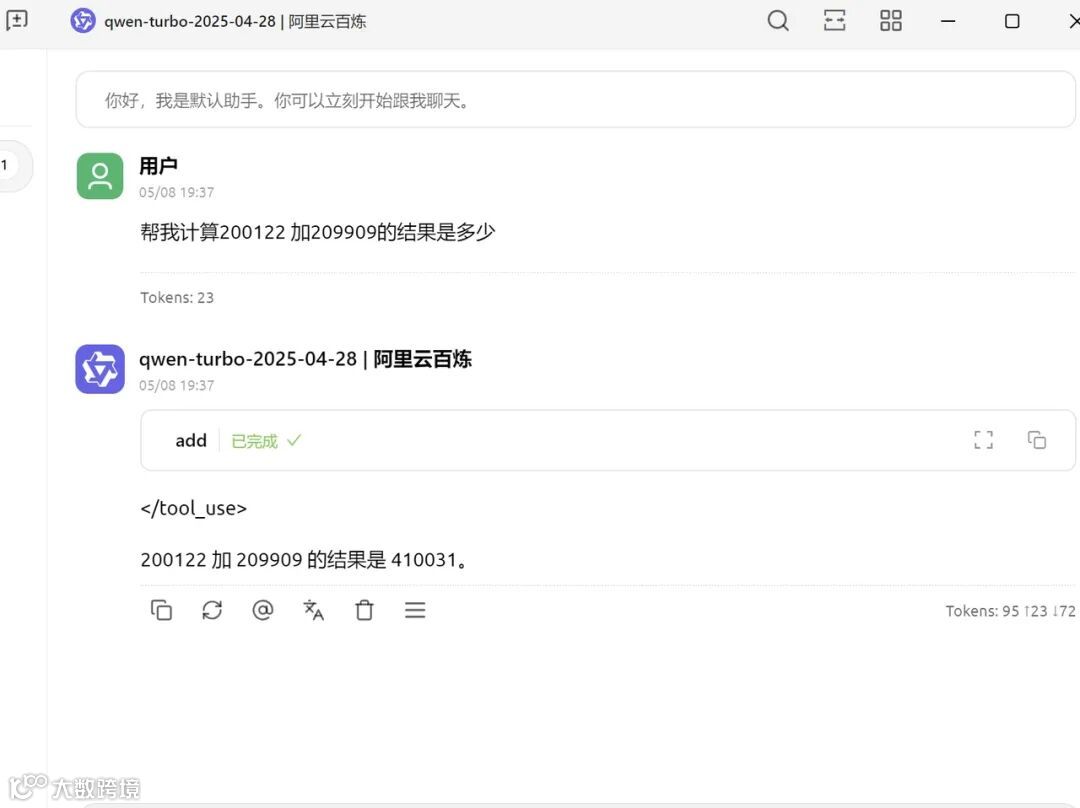
使用Cherry-Studio 中的MCP服务管理结合Chat对话使用我们开发的mcp server。
Part4
搭建一个多 MCP Server 组合的复杂应用
1. 示例说明
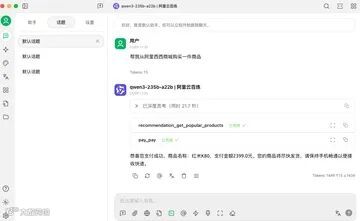
电商平台服务组合
▷ MainMCP 服务:可将其看作电商平台的主服务,负责管理各类子服务,像商品展示、用户管理、订单处理等。
▷ SubMCP 服务:商品推荐子服务,为用户提供个性化的商品推荐。
▷ SubMCP 服务:支付服务,为用户提供便捷的支付体验。
这里仅设置了一个SubMCP,大型服务可设置多个子MCP服务。
2. 代码实现
以下是实现电商平台多 MCP Server 组合的代码示例:
import asyncio
from fastmcp import FastMCP, Client

# --- 定义子服务器(商品推荐服务) ---
# 阿里西西商城
product_recommendation_mcp = FastMCP(name="商品推荐服务")


# 定义获取热门商品的工具函数
@product_recommendation_mcp.tool()
def get_popular_products():
    """List of popular products"""
    # mock data
    hot_products = ('[{"product_name":"iPhone 14 Pro Max", "price": 5999, "category": "Electronics"},'
                    '{"product_name":"小米SU7 Ultra", "price": 529999, "category": "Car"},'
                    '{"product_name":"红米K80", "price": 2399, "category": "Electronics"}]')

    return hot_products


# 定义为指定用户获取推荐商品的工具函数
@product_recommendation_mcp.tool()
def get_recommended_products(user_id):
    """Products recommended for users"""
    # mock data
    recommended_products = '{"product_name":"小米SU7 Ultra", "price": 529999, "category": "Car"}'
    return recommended_products


# --- 定义子服务器(支付服务) ---
pay_mcp = FastMCP(name="支付服务")


# 定义支付工具函数
@pay_mcp.tool()
def pay(product_name: str, amount: float):
    """Pay for a product"""
    # 这里可以是请求API或者是具体支付逻辑
    # 或者有没有可能未来的各种系统,都会实现一套 mcp 的接口,然后接收apikey等鉴权信息,类比于Restful API
    # 其实很多大厂已经这样做了
    returnf"恭喜您支付成功,商品名称:{product_name},支付金额{amount}元。"


# --- 定义主服务器(电商主服务) ---
ecommerce_main_mcp = FastMCP(name="阿里西西商城服务")

# --- 挂载子服务器(同步操作) ---
ecommerce_main_mcp.mount("recommendation", product_recommendation_mcp)
ecommerce_main_mcp.mount("pay", pay_mcp)

print("已将子服务挂载到电商主服务上。")


# --- 在挂载后为子服务器添加一个工具 ---
# 定义获取新上架商品的工具函数
@product_recommendation_mcp.tool()
def get_new_arrivals():
    """List of newly listed products"""
    # mock data
    new_arrivals = ('[{"product_name":"新款华为Mate 60 Pro", "price": 6999, "category": "Electronics"},'
                    '{"product_name":"新款小米平板", "price": 2999, "category": "Electronics"}]')
    return new_arrivals


print("已为商品推荐子服务添加 'get_new_arrivals' 工具。")


# --- 测试访问 ---
asyncdef test_dynamic_mount():
    # 从主服务器获取所有可用的工具
    tools = await ecommerce_main_mcp.get_tools()
    print("通过电商主服务可用的工具:", list(tools.keys()))

    asyncwith Client(ecommerce_main_mcp) as client:
        # 通过主服务器调用 'get_popular_products' 工具
        popular_products_result = await client.call_tool("recommendation_get_popular_products")
        print("调用 recommendation_get_popular_products 的结果:", popular_products_result[0].text)

        # 通过主服务器调用 'get_recommended_products' 工具
        recommended_products_result = await client.call_tool("recommendation_get_recommended_products",
                                                             parameters={"user_id": "123"})
        print("调用 recommendation_get_recommended_products 的结果:", recommended_products_result[0].text)

        # 通过主服务器调用动态添加的 'get_new_arrivals' 工具
        new_arrivals_result = await client.call_tool("recommendation_get_new_arrivals")
        print("调用 recommendation_get_new_arrivals 的结果:", new_arrivals_result[0].text)


if __name__ == "__main__":
    # 需要异步上下文进行测试
    # asyncio.run(test_dynamic_mount())
    # 若要运行服务器本身:
    ecommerce_main_mcp.run()
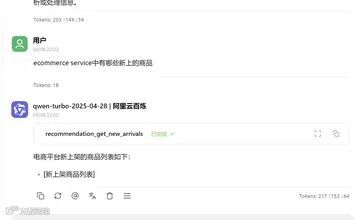
3. 测试验证
4. 模块化MCP Server
在复杂的MCP Server 场景下,必然面临代码量增多,也必然有解耦以及模块化的需求,以下是一个模块化MCP Server的示例
########### 主程序 #################
from fastmcp import FastMCP
import asyncio

# Import the servers (see other files)
from modules.text_server import text_mcp
from modules.data_server import data_mcp

app = FastMCP(name="MainApplication")

# Setup function for async imports
asyncdef setup():
    # Import the utility servers
    await app.import_server("text", text_mcp)
    await app.import_server("data", data_mcp)

@app.tool()
def process_and_analyze(record_id: int) -> str:
    """Fetches a record and analyzes its string representation."""
    # In a real application, you'd use proper methods to interact between
    # imported tools rather than accessing internal managers

    # Get record data
    record = {"id": record_id, "value": random.random()}

    # Count words in the record string representation
    word_count = len(str(record).split())

    return (
        f"Record {record_id} has {word_count} words in its string "
        f"representation."
    )

if __name__ == "__main__":
    # Run async setup before starting the server
    asyncio.run(setup())
    # Run the server
    app.run()


########### 子程序-data_mcp #################
from fastmcp import FastMCP
import random
from typing import dict

data_mcp = FastMCP(name="DataAPI")

@data_mcp.tool()
def fetch_record(record_id: int) -> dict:
    """Fetches a dummy data record."""
    return {"id": record_id, "value": random.random()}

@data_mcp.resource("data://schema/{table}")
def get_table_schema(table: str) -> dict:
    """Provides a dummy schema for a table."""
    return {"table": table, "columns": ["id", "value"]}

########### 子程序-text_mcp #################
from fastmcp import FastMCP

text_mcp = FastMCP(name="TextUtilities")

@text_mcp.tool()
def count_words(text: str) -> int:
    """Counts words in a text."""
    return len(text.split())

@text_mcp.resource("resource://stopwords")
def get_stopwords() -> list[str]:
    """Return a list of common stopwords."""
    return ["the", "a", "is", "in"]
在这个示例中,将 MCP Server 拆分为主程序和两个子程序data_mcp、text_mcp。主程序负责导入子服务器并定义全局工具函数,子服务器分别实现数据处理和文本处理相关的工具和资源。通过这种模块化设计,提高了代码的可读性、可维护性和可扩展性。
Part5
总结思考
通过以上步骤,我们了解了如何开发 MCP 服务,从快速搭建单 MCP Server 到构建多 Server 组合的复杂应用。在开发过程中,我们深刻体会到 MCP 协议在模型通信中的优势,它为不同模型之间的协同工作提供了标准化的解决方案,有效提升了系统的整体性能和可扩展性。
思考点:
▷ MCP Server 是否可认为是 AI 版的 Restful API 对接方式?
▷ MCP Server 也可以通过组合和代理的方式实现鉴权等能力,那么还需要A2A吗?
相关链接:
1.https://gofastmcp.com/getting-started/welcome
2.https://github.com/jlowin/fastmcp
3.https://modelcontextprotocol.io/quickstart/server
4.https://github.com/mark3labs/mcp-go
“
Hello~
这里是神州数码云基地
编程大法,技术前沿,尽在其中
超多原创技术干货持续输出ing~
想要第一时间获取
超硬技术干货
快快点击关注+设为星标★
- END -

往期精选

了解云基地,就现在!