


01
引言
欢迎回来!今天我们将焦点聚焦在我在图像处理中最喜欢的话题之一——透视变换。使用该技术,可以灵活方便的实现各种各样好玩的特效。
02
基本概念
我们首先展开对单应矩阵的深入研究。作为图像处理的基本工具,它在捕捉图像中的几何变换方面发挥着至关重要的作用。更具体地说,它是实现透视变换的秘密武器。
单应矩阵被定义为图像的两个平面投影之间的映射。它由齐次坐标空间中的3x3变换矩阵表示。这些变换可以是旋转、平移、缩放等操作的组合。
我们用示意图总结如下:

03
举个栗子
虽然上图简明地定义了常见的转换,但是如果我们将其应用到输入和输出为图像操作会怎样?根据变换,我们需要几个点来计算单应矩阵。让我们来做吧!像往常一样,让我们首先导入必要的库,如下:
# Import librariesfrom skimage.io import imread, imshowimport matplotlib.pyplot as pltimport numpy as npfrom skimage import transform
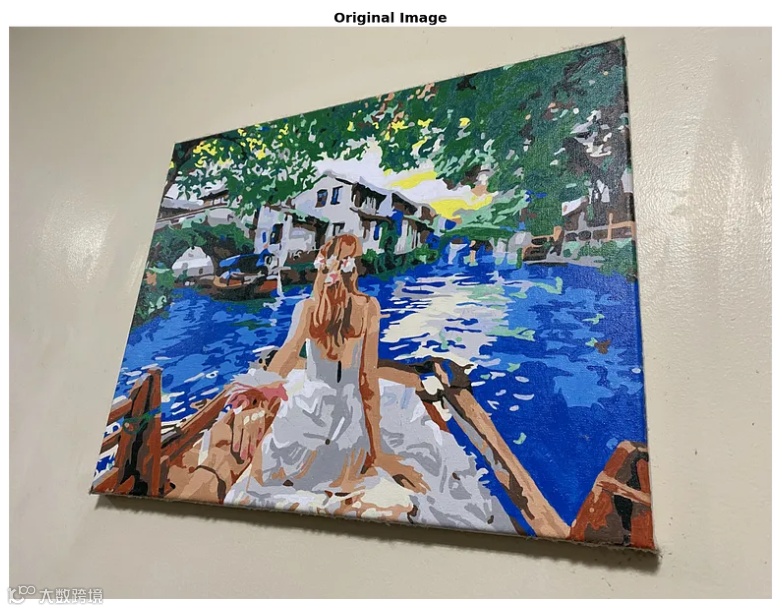
接着导入我们需要的测试图像,代码如下:
# Display the original imageimage = imread('painting.png')plt.figure(figsize=(20,20))plt.imshow(image)plt.title('Original Image', fontsize=20, weight='bold')plt.axis('off')plt.show()
显示图像如下:
04
计算变换矩阵
接着我们想对这幅画有一个自上而下的视图。我们需要计算单应矩阵。我们必须确定这幅画明确的角点。在这种情况下,我使用画图应用程序来识别画的四个角点坐标::
# Source pointssrc = np.array([879, 625, # top left431, 2466, # bottom left3251, 61, # top right3416, 2767]).reshape((4, 2)) # bottom right
为了执行单应性变换,我们需要一组与源点相对应的目标点。这些目标点表示我们希望源点在输出图像中的位置。对于自上而下的视图,这里我们引用源点的最小值和最大值x和y:
# Destination pointsdst = np.array([[np.min(src[:, 0]), np.min(src[:, 1])], # top left[np.min(src[:, 0]), np.max(src[:, 1])], # bottom left[np.max(src[:, 0]), np.min(src[:, 1])], # top right[np.max(src[:, 0]), np.max(src[:, 1])], # bottom right])
接着我们用以下代码计算单应矩阵,如下:
tform = transform.estimate_transform('projective', src, dst)
05
透视变换
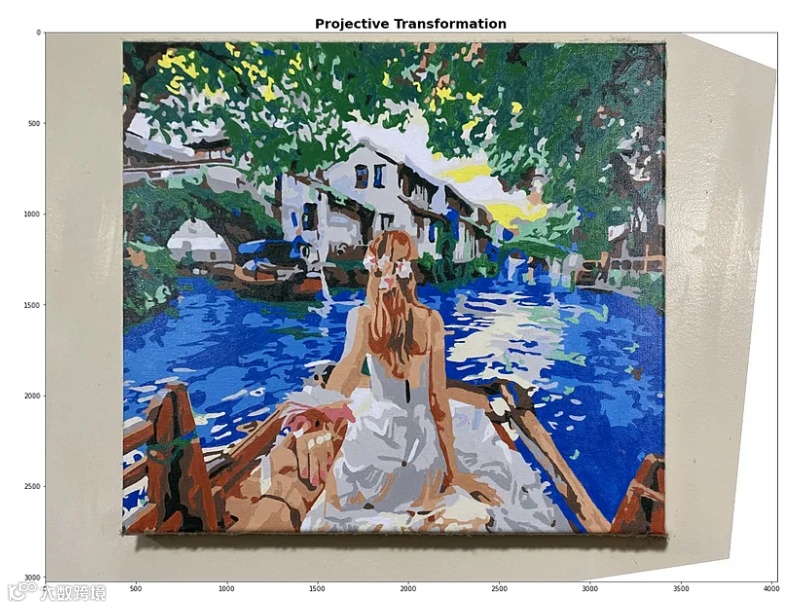
经过上述处理,我们有了执行透视变换所需要的单应性矩阵,接着我们来执行对应的透视变换,如下:
tf_img = transform.warp(image, tform.inverse)fig, ax = plt.subplots(figsize=(20,20))ax.imshow(tf_img)_ = ax.set_title('projective transformation')
结果如下:
06
美化显示效果
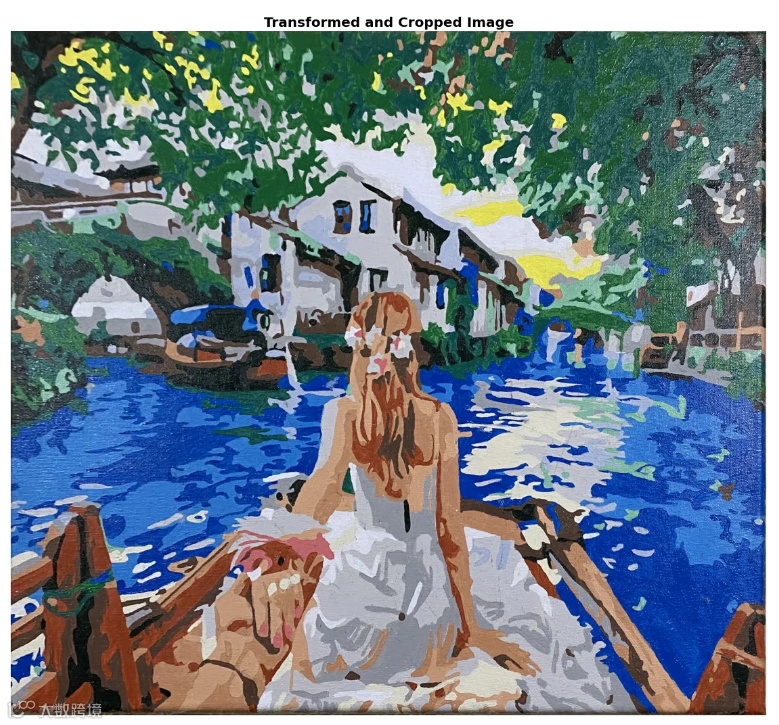
观察上图,考虑到图像外围添加了白色像素,输出看起来很奇怪,我们可以编辑出代码来裁剪这些奇怪的墙和额外的像素:
# Load the imageimage = imread('painting.png')# Source pointssrc = np.array([879, 625, # top left431, 2466, # bottom left3251, 61, # top right3416, 2767]).reshape((4, 2)) # bottom right# Estimate the width and height from the source pointswidth = np.max(src[:, 0]) - np.min(src[:, 0])height = np.max(src[:, 1]) - np.min(src[:, 1])# Destination points (forming a box shape)dst = np.array([[0, 0],[0, height],[width, 0],[width, height]])# Compute the projective transformtform = transform.estimate_transform('projective', src, dst)# Apply the transformationwarped_image = transform.warp(image, tform.inverse, output_shape=(height, width))# Convert the warped image to uint8warped_image_uint8 = (warped_image * 255).astype(np.uint8)# Display the transformed and cropped imageplt.figure(figsize=(20,20))plt.imshow(warped_image_uint8)plt.title('Transformed and Cropped Image', fontsize=20, weight='bold')plt.axis('off')plt.show()
最终的显示效果如下:
07
总结
您学废了嘛?
点击上方小卡片关注我
新年寄语:
所求皆如愿,
所行皆坦途。
多喜乐,长安宁。