



01
引言
大家好,在上一节中我们介绍了白平衡算法的原理,并详细实现了基于白色补丁算法的白平衡实现,本文继续就白平衡的其他算法实现进行展开。
02
Gray-world Algorithm
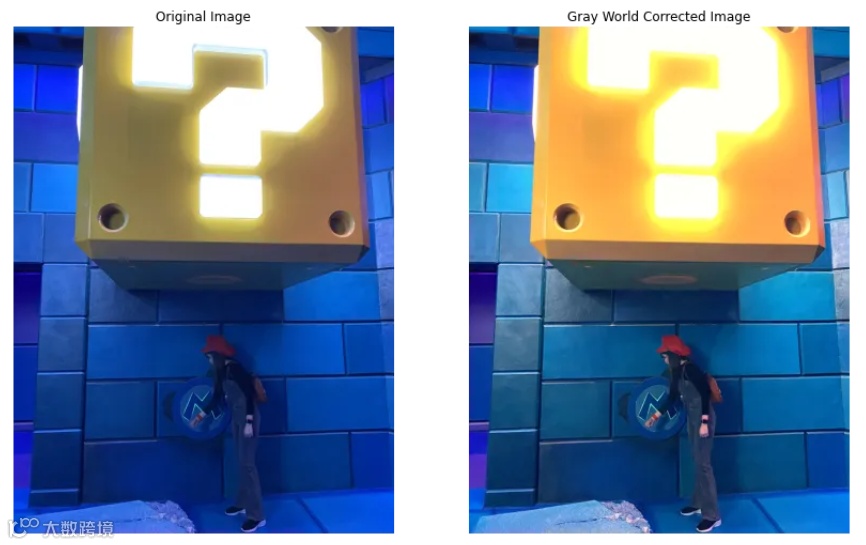
灰色世界算法(Gray-world Algotithm)假设图像的平均颜色应该是灰色的。它会相应地调整颜色通道以校正颜色映射关系。
代码实现如下:
def gray_world(image):# Apply the Gray World algorithmimage_grayworld = ((image * (image.mean() / image.mean(axis=(0, 1)))).clip(0, 255).astype(int))# Plot the comparison between the original and gray world corrected imagesfig, ax = plt.subplots(1, 2, figsize=(14, 10))ax[0].imshow(image)ax[0].set_title('Original Image')ax[0].axis('off')ax[1].imshow(image_grayworld)ax[1].set_title('Gray World Corrected Image')ax[1].axis('off')plt.show()# Call the function to apply the Gray World algorithmgray_world(image)
结果如下:
03
算法优缺点
我们观察上述例子的可视化结果,可以看出基于灰色世界算法提供了比白色补丁算法更温和的结果。这主要是由于灰色平均颜色的假设,它并没有完美地将问号块转换为黄色,但红色、蓝色、白色、黑色和棕色得到了正确的增强。
针对上述实现,可以总结出该算法的优点归纳如下:
简单且计算高效。
假设图像的平均颜色为灰色,这通常是一般场景的合理性假设。
同时其缺点也可以归纳如下:
可能对大面积存在的单一主色较为敏感,导致颜色平衡算法无法正常工作。
假设图像的平均颜色应该是灰色,这种假设可能并不总是正确的。
04
Ground Truth Algorithm
接着我们来介绍最后一种白平衡常用的算法 Ground Truth Algorithm,该算法需要图像中已知对象的颜色作为参考色。它根据此参考色来调整颜色通道以更正颜色投射关系。
代码实现如下:
def ground_truth(image, img_patch, mode='mean'):if mode == 'mean':image_gt = ((image * (img_patch.mean() / image.mean(axis=(0, 1)))).clip(0, 255).astype(int))if mode == 'max':image_gt = ((image * 1.0 / img_patch.max(axis=(0, 1))).clip(0, 1))# Plot the comparison between the original and ground truth corrected imagesfig, ax = plt.subplots(1, 2, figsize=(14, 10))ax[0].imshow(image)ax[0].set_title('Original Image')ax[0].axis('off')ax[1].imshow(image_gt)ax[1].set_title('Ground Truth Corrected Image')ax[1].axis('off')plt.show()s
05
挑选参考色块
一般来说,考虑到在正常光线下,问号块看起来是这样的:

接着,我们挑选问号内的任何正方形块的颜色作为该算法的图像补丁(下图红色矩形框):
from matplotlib.patches import Rectanglefig, ax = plt.subplots(figsize=(10,10))ax.set_title('Reference patch in red square')ax.imshow(image)ax.add_patch(Rectangle((1800, 800), 50, 50, edgecolor='r', facecolor='none'));
结果如下:

06
算法效果
有了上述参考色块,我们可以调用上述实现的ground_truth函数,参考代码如下:
# To visualize the specific reference patchimg_patch = image[3845:3865, 1820:1840]# Call the function to apply the Ground Truth algorithmground_truth(image, img_patch, mode='mean')
结果如下:

使用白色灯光色块作为参考补丁会导致图像看起来过于明亮。这是因为算法试图根据参考补丁的颜色来调整颜色平衡映射关系。如果参考补丁是明亮的源,则算法可能会过度补偿,导致具有褪色颜色的明亮图像,如在上述示例中显而易见的。
07
其他效果
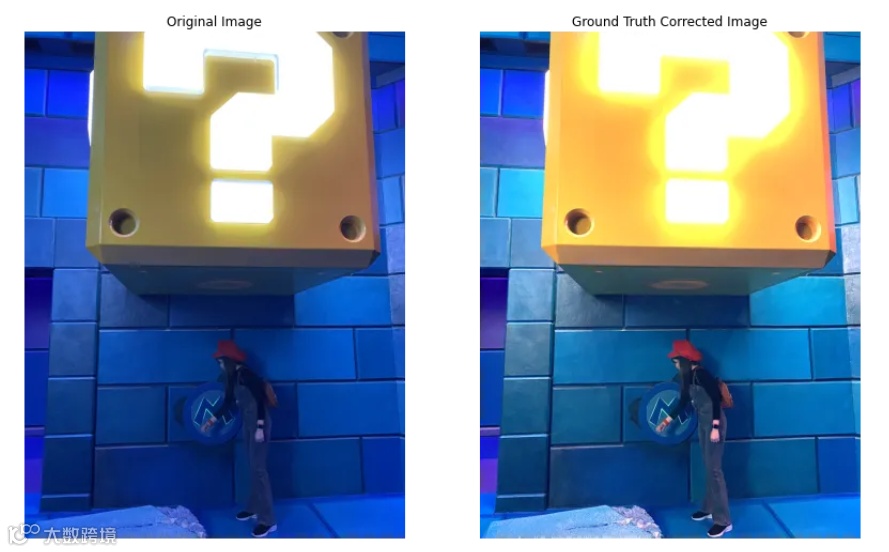
为了更加充分的展示 Ground Truth Algorithm的效果,这里我们选择鞋子色块作为我们的参考图像补丁,样例代码如下:
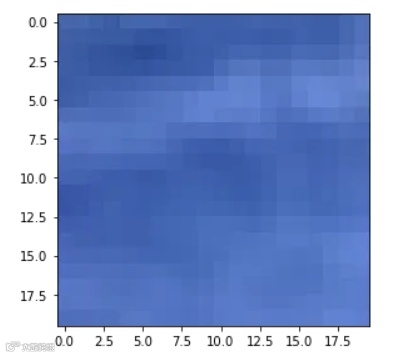
# To visualize the specific reference patchimg_patch = image[3845:3865, 1820:1840]imshow(img_patch);# Call the function to apply the Ground Truth algorithmground_truth(image, img_patch, mode='mean')
补丁展示如下:
白平衡后的效果如下:
08
总结
点击上方小卡片关注我
新年寄语:
所求皆如愿,
所行皆坦途。
多喜乐,长安宁。