


snakemake如何连接不同的rule
我在stackoverflow中问了一个问题, 获得了答案, 对snakemake的理解也加深了一步.
经验所得
每一个
snakemake的rule都要有input,output, 里面的内容交叉的地方, 是确定不同rule的依赖, 比如rule1的输出文件(output)b.bed, b.bim, b.fam, 如果作为rule2的输入文件(input), 那么rule1和rule2就可以关联了.rule all是定义最后的输出文件, 比如rule2的最后输出文件是c.raw, 那么也写为c.raw即可.
测试文件
这里, 有两个plink的文件,a.map和a.ped, 内容如下:
[dengfei@localhost plink-test]$ cat a.map1 snp1 0 11 snp2 0 21 snp3 0 3[dengfei@localhost plink-test]$ cat a.ped1 1 0 0 1 0 1 1 2 2 1 11 2 0 0 2 0 2 2 0 0 2 11 3 1 2 1 2 0 0 1 2 2 12 1 0 0 1 0 1 1 2 2 0 02 2 0 0 2 2 2 2 2 2 0 02 3 1 2 1 2 1 1 2 2 1 1
1. 将plink文件变为二进制bfile格式
正常plink方式:
plink --file a --out b结果:
(base) [dengfei@localhost plink-test]$ plink --file a --out bPLINK v1.90b6.5 64-bit (13 Sep 2018) www.cog-genomics.org/plink/1.9/(C) 2005-2018 Shaun Purcell, Christopher Chang GNU General Public License v3Logging to b.log.Options in effect:--file a--out b63985 MB RAM detected; reserving 31992 MB for main workspace..ped scan complete (for binary autoconversion).Performing single-pass .bed write (3 variants, 6 people).--file: b.bed + b.bim + b.fam written.
2. 将bfile变为raw格式
plink --bfile b --out c --recodeA结果:
(base) [dengfei@localhost plink-test]$ plink --bfile b --out c --recodeAPLINK v1.90b6.5 64-bit (13 Sep 2018) www.cog-genomics.org/plink/1.9/(C) 2005-2018 Shaun Purcell, Christopher Chang GNU General Public License v3Note: --recodeA flag deprecated. Use 'recode A ...'.Logging to c.log.Options in effect:--bfile b--out c--recode A63985 MB RAM detected; reserving 31992 MB for main workspace.3 variants loaded from .bim file.6 people (4 males, 2 females) loaded from .fam.3 phenotype values loaded from .fam.Using 1 thread (no multithreaded calculations invoked).Before main variant filters, 4 founders and 2 nonfounders present.Calculating allele frequencies... done.Total genotyping rate is 0.777778.3 variants and 6 people pass filters and QC.Among remaining phenotypes, 3 are cases and 0 are controls. (3 phenotypes aremissing.)--recode A to c.raw ... done.
3. 使用snakemake进行连接
命名为: plink.smk
rule all:input:"c.log","c.raw"rule bfile:input:"a.map","a.ped"output:"b.bed","b.bim","b.fam"params:a1 = "a",a2 = "b"shell:"plink --file {params.a1} --out {params.a2}"rule cfile:input:"b.bed","b.bim","b.fam"output:"c.log", "c.raw"params:aa1 = "b",aa2 = "c"shell:"plink --bfile {params.aa1} --out {params.aa2} --recodeA"
命令解析:
1, rule all定义最终的输出文件, 这里fule cfile输出的是
c.log和c.raw, 因此rule all中的input也写为c.log和c.raw2, rule bfile, 这里的input是
a.map和a.ped, output是b.bed,b.bim,b.fam, 这三个文件也要写, 因为是下一个rule的input文件, 建立依赖关系.3, rule cfile中建立input, 是上一个rule bfile的输出, 这样就建立的依赖
4, rule cfile中的output, 对应的是rule all的input, 这样三个就建立好了依赖关系.
4. 查看流程图
运行命令:
snakemake -s plink.smk查看流程图:
snakemake --dag -s plink.smk |dot -Tpdf >a.pdf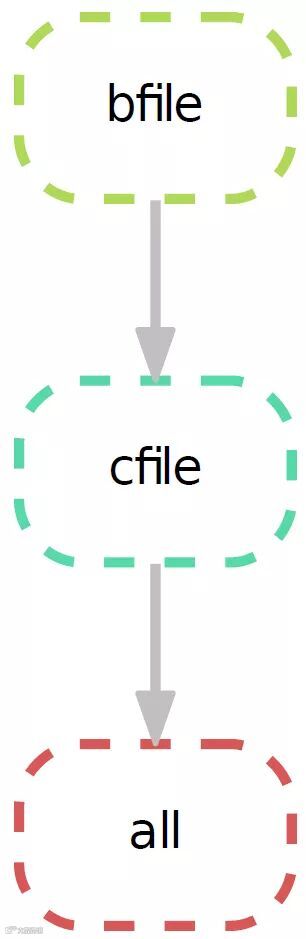
欢迎关注我的公众号