Pandas模块当中的数据类型转换的相关技巧,干货满满的哦!
导入数据集和模块
那么我们第一步惯例就是导入Pandas模块以及创建数据集了,代码如下
import pandas as pd
import numpy as np

df = pd.DataFrame({
        'string_col': ['1','2','3','4'],
        'int_col': [1,2,3,4],
        'float_col': [1.1,1.2,1.3,4.7],
        'mix_col': ['a', 2, 3, 4],
        'missing_col': [1.0, 2, 3, np.nan],
        'money_col': ['£1,000.00', '£2,400.00', '£2,400.00', '£2,400.00'],
        'boolean_col': [True, False, True, True],
        'custom': ['Y', 'Y', 'N', 'N']
  })

df
output
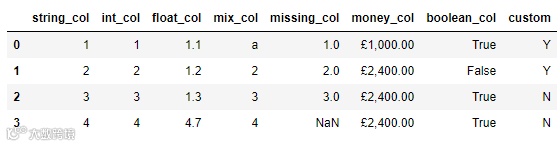
我们先来看一下每一列的数据类型,代码如下
df.dtypes
output
string_col      object
int_col          int64
float_col      float64
mix_col         object
missing_col    float64
money_col       object
boolean_col       bool
custom          object
dtype: object
当然了我们也可以调用info()方法来实现上述的目的,代码如下
df.info()
output
<class 'pandas.core.frame.DataFrame'>
RangeIndex: 4 entries, 0 to 3
Data columns (total 8 columns):
 #   Column       Non-Null Count  Dtype
---  ------       --------------  -----
 0   string_col   4 non-null      object
 1   int_col      4 non-null      int64
 2   float_col    4 non-null      float64
 3   mix_col      4 non-null      object
 4   missing_col  3 non-null      float64
 5   money_col    4 non-null      object
 6   boolean_col  4 non-null      bool
 7   custom       4 non-null      object
dtypes: bool(1), float64(2), int64(1), object(4)
memory usage: 356.0+ bytes
数据类型转换
astype()方法,例如我们将浮点型的数据转换成整型,代码如下
df['float_col'] = df['float_col'].astype('int')
或者我们将其中的“string_col”这一列转换成整型数据,代码如下
df['string_col'] = df['string_col'].astype('int')
当然我们从节省内存的角度上来考虑,转换成int32或者int16类型的数据,
df['string_col'] = df['string_col'].astype('int8')
df['string_col'] = df['string_col'].astype('int16')
df['string_col'] = df['string_col'].astype('int32')
然后我们再来看一下转换过后的各个列的数据类型
df.dtypes
output
string_col     float32
int_col          int64
float_col        int32
mix_col         object
missing_col    float64
money_col       object
boolean_col       bool
custom          object
dtype: object
但是当某一列的数据类型不止一个的时候,转换的过程当中则会报错,例如“mix_col”这一列
df['mix_col'] = df['mix_col'].astype('int')
output
ValueError: invalid literal for int() with base 10: 'a'
于是乎我们可以调用的to_numeric()方法以及errors参数,代码如下
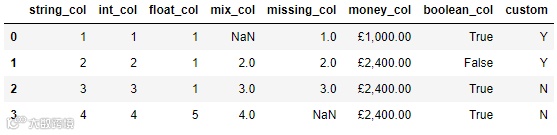
df['mix_col'] = pd.to_numeric(df['mix_col'], errors='coerce')
df
output
而要是遇到缺失值的时候,进行数据类型转换的过程中也一样会出现报错,代码如下
df['missing_col'].astype('int')
output
ValueError: Cannot convert non-finite values (NA or inf) to integer
我们可以先通过调用fillna()方法来将缺失值填充成其他数值,然后再进行类型的转换,代码如下
df["missing_col"] = df["missing_col"].fillna(0).astype('int')
df
output

最后的则是“money_col”这一列,我们看到当中有货币符号,因此第一步我们要做的则是将这些货币符号给替换掉,然后再进行数据类型的转换,代码如下
df['money_replace'] = df['money_col'].str.replace('£', '').str.replace(',','')
df['money_replace'] = pd.to_numeric(df['money_replace'])
df['money_replace']
output
0    1000.0
1    2400.0
2    2400.0
3    2400.0
当遇上时间序列数据时
to_datetime()方法,代码如下
df = pd.DataFrame({'date': ['3/10/2015', '3/11/2015', '3/12/2015'],
                   'value': [2, 3, 4]})
df
output
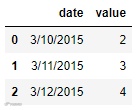
我们先来看一下各个列的数据类型
df.dtypes
output
date     object
value     int64
dtype: object
我们调用to_datetime()方法的代码如下
pd.to_datetime(df['date'])
output
0   2015-03-10
1   2015-03-11
2   2015-03-12
Name: date, dtype: datetime64[ns]
当然这并不意味着不能调用astype()方法了,出来的结果与上述的一样,代码如下
df['date'].astype('datetime64')
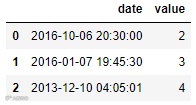
而当我们遇到自定义格式的日期格式的数据时,同样也是调用to_datetime()方法,但是需要设置的格式也就是format参数需要保持一致
df = pd.DataFrame({'date': ['2016-6-10 20:30:0',
                            '2016-7-1 19:45:30',
                            '2013-10-12 4:5:1'],
                   'value': [2, 3, 4]})

df['date'] = pd.to_datetime(df['date'], format="%Y-%d-%m %H:%M:%S")
output
是不是可以一步到位呢?
最后,或许有人会问,是不是有什么办法可以一步到位实现数据类型的转换呢?那当然也是可以实现的,代码如下
df = pd.DataFrame({'date_start': ['3/10/2000', '3/11/2000', '3/12/2000'],
                   'date_end': ['3/11/2000', '3/12/2000', '3/13/2000'],
                   'string_col': ['1','2','3'],
                   'float_col': [1.1,1.2,1.3],
                   'value': [2, 3, 4]})

df = df.astype({
    'date_start': 'datetime64',
    'date_end': 'datetime64',
    'string_col': 'int32',
    'float_col': 'int64',
    'value': 'float32',
})
我们来看一下出来的结果
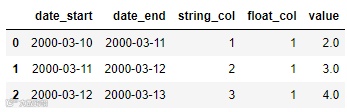
df
output