
SQL介绍
SQL优化方法
SQL优化实例
Part 1
MySQL的基本架构

① show engines;

② show variables like “%storage_engine%”;

id int(4) auto_increment,
name varchar(5),
dept varchar(5),
primary key(id)
) engine=myISAM auto_increment=1 default charset=utf8;
Part 2
SQL优化
① 编写过程
② 解析过程
① 什么是索引?
② 索引图示说明(这里用二叉树来帮助我们理解索引)


关于B+树的说明:
Part 3
索引的分类与创建
① 单值索引
② 唯一索引
③ 复合索引

② 创建索引的第一种方式
③ 创建索引的第二种方式
④ 补充说明
① 索引删除
② 索引查询

Part 4
SQL性能问题的探索
id :编号
select_type :查询类型
table :表
type :类型
possible_keys :预测用到的索引
key :实际使用的索引
key_len :实际使用索引的长度
ref :表之间的引用
rows :通过索引查询到的数据量
Extra :额外的信息
建表语句和插入数据:
create table course
(
cid int(3),
cname varchar(20),
tid int(3)
);
create table teacher
(
tid int(3),
tname varchar(20),
tcid int(3)
);
create table teacherCard
(
tcid int(3),
tcdesc varchar(200)
);
# 插入数据
insert into course values(1,'java',1);
insert into course values(2,'html',1);
insert into course values(3,'sql',2);
insert into course values(4,'web',3);
insert into teacher values(1,'tz',1);
insert into teacher values(2,'tw',2);
insert into teacher values(3,'tl',3);
insert into teacherCard values(1,'tzdesc') ;
insert into teacherCard values(2,'twdesc') ;
insert into teacherCard values(3,'tldesc') ;
Part 5
explain执行计划常用关键字详解
① 案例:查询课程编号为2 或 教师证编号为3 的老师信息:
explain select t.*
from teacher t,course c,teacherCard tc
where t.tid = c.tid and t.tcid = tc.tcid
and (c.cid = 2 or tc.tcid = 3);

insert into teacher values(5,'tb',5);
insert into teacher values(6,'tc',6);
explain select t.*
from teacher t,course c,teacherCard tc
where t.tid = c.tid and t.tcid = tc.tcid
and (c.cid = 2 or tc.tcid = 3);

2 3 4
最终:2 * 3 * 4 = 6 * 4 = 24
c b a
4 3 2
最终:4 * 3 * 2 = 12 * 2 = 24
② 案例:查询教授SQL课程的老师的描述(desc)
explain select tc.tcdesc from teacherCard tc
where tc.tcid =
(
select t.tcid from teacher t
where t.tid =
(select c.tid from course c where c.cname = 'sql')
);

③ 针对②做一个简单的修改
explain select t.tname ,tc.tcdesc from teacher t,teacherCard tc
where t.tcid= tc.tcid
and t.tid = (select c.tid from course c where cname = 'sql') ;


① simple:简单查询

② primary:包含子查询的主查询(最外层)
③ subquery:包含子查询的主查询(非最外层)
④ derived:衍生查询(用到了临时表)
from ( select * from course where tid = 1 union select * from course where tid = 2 ) cr ;

⑤ union:union之后的表称之为union表,如上例
⑥ union result:告诉我们,哪些表之间使用了union查询

① system
② const

# 再次查看执行计划
explain select tid from test01 where tid =1 ;

③ eq_ref
alter table teacherCard add constraint pk_tcid primary key(tcid);
alter table teacher add constraint uk_tcid unique index(tcid) ;
explain select t.tcid from teacher t,teacherCard tc where t.tcid = tc.tcid ;

④ ref

alter table teacher add index index_name (tname) ;
# 查看执行计划
explain select * from teacher where tname = 'tz';

⑤ range
alter table teacher add index tid_index (tid) ;
# 查看执行计划:以下写了一种等价SQL写法,查看执行计划
explain select t.* from teacher t where t.tid in (1,2) ;
explain select t.* from teacher t where t.tid <3 ;

⑥ index
⑦ ALL

create index cname_index on course(cname);
# 查看执行计划
explain select t.tname ,tc.tcdesc from teacher t,teacherCard tc
where t.tcid= tc.tcid
and t.tid = (select c.tid from course c where cname = 'sql') ;

① 新建一张新表,用于测试
create table test_kl
(
name char(20) not null default ''
);
# 添加索引
alter table test_kl add index index_name(name) ;
# 查看执行计划
explain select * from test_kl where name ='' ;

② 给test_kl表,新增name1列,该列没有设置“not null”

③ 删除原来的索引name和name1,新增一个复合索引
drop index index_name on test_kl ;
drop index index_name1 on test_kl ;
# 增加一个复合索引
create index name_name1_index on test_kl(name,name1);
# 查看执行计划
explain select * from test_kl where name1 = '' ; --121
explain select * from test_kl where name = '' ; --60

④ 再次怎加一个name2字段,并为该字段创建一个索引。
alter table test_kl add column name2 varchar(20) ;
# 给name2字段,设置为索引字段
alter table test_kl add index name2_index(name2) ;
# 查看执行计划
explain select * from test_kl where name2 = '' ;

create index tid_index on course(tid);
# 查看执行计划
explain select * from course c,teacher t
where c.tid = t.tid
and t.tname = 'tw';

from course c,teacher t
where c.tid = t.tid
and t.tname = 'tz' ;

① using filesort:针对单索引的情况
create table test02
(
a1 char(3),
a2 char(3),
a3 char(3),
index idx_a1(a1),
index idx_a2(a2),
index idx_a3(a3)
);
# 查看执行计划
explain select * from test02 where a1 ='' order by a1 ;
explain select * from test02 where a1 ='' order by a2 ;

② using filesort:针对复合索引的情况
drop index idx_a1 on test02;
drop index idx_a2 on test02;
drop index idx_a3 on test02;
# 创建一个复合索引
alter table test02 add index idx_a1_a2_a3 (a1,a2,a3) ;
# 查看下面SQL语句的执行计划
explain select *from test02 where a1='' order by a3 ; --using filesort
explain select *from test02 where a2='' order by a3 ; --using filesort
explain select *from test02 where a1='' order by a2 ;

③ using temporary
explain select a1 from test02 where a1 in ('1','2','3') group by a2 ; --using temporary

explain select * from test03 where a2=2 and a4=4 group by a3;
④ using index
drop index idx_a1_a2_a3 on test02;
# 重新创建一个复合索引idx_a1_a2
create index idx_a1_a2 on test02(a1,a2);
# 查看执行计划
explain select a1,a3 from test02 where a1='' or a3= '' ;
explain select a1,a2 from test02 where a1='' and a2= '' ;

explain select a1,a2 from test02;
⑤ using where
drop index idx_a1_a2 on test02;
# 将a1字段,新增为一个索引
create index a1_index on test02(a1);
# 查看执行计划
explain select a1,a3 from test02 where a1="" and a3="" ;

⑥ impossible where(了解)
explain select a1 from test02 where a1="a" and a1="b" ;

Part 6
优化示例
create table test03
(
a1 int(4) not null,
a2 int(4) not null,
a3 int(4) not null,
a4 int(4) not null
);
# 创建一个复合索引
create index a1_a2_a3_test03 on test03(a1,a2,a3);
# 查看执行计划
explain select a3 from test03 where a1=1 and a2=2 and a3=3;

explain select a3 from test03 where a3=1 and a2=2 and a1=3;

explain select a3 from test03 where a1=1 and a3=2 group by a3;

create table book
(
bid int(4) primary key,
name varchar(20) not null,
authorid int(4) not null,
publicid int(4) not null,
typeid int(4) not null
);
# 插入数据
insert into book values(1,'tjava',1,1,2) ;
insert into book values(2,'tc',2,1,2) ;
insert into book values(3,'wx',3,2,1) ;
insert into book values(4,'math',4,2,3) ;

select bid from book
where typeid in(2,3) and authorid=1
order by typeid desc ;

① 优化1:基于此,我们进行索引的添加,并再次查看执行计划。
create index typeid_authorid_bid on book(typeid,authorid,bid);
# 再次查看执行计划
explain
select bid from book
where typeid in(2,3) and authorid=1
order by typeid desc ;

② 优化2:使用了in有时候会导致索引失效,基于此有了如下一种优化思路。
drop index typeid_authorid_bid on book;
# 再次创建索引
create index authorid_typeid_bid on book(authorid,typeid,bid);
# 再次查看执行计划
explain
select bid from book
where authorid=1 and typeid in(2,3)
order by typeid desc ;

最佳做前缀,保持索引的定义和使用的顺序一致性
索引需要逐步优化(每次创建新索引,根据情况需要删除以前的废弃索引)
将含In的范围查询,放到where条件的最后,防止失效。
where authorid=1 and typeid =3
order by typeid desc ;

create table teacher2
(
tid int(4) primary key,
cid int(4) not null
);
# 插入数据
insert into teacher2 values(1,2);
insert into teacher2 values(2,1);
insert into teacher2 values(3,3);
# 创建course2新表
create table course2
(
cid int(4) ,
cname varchar(20)
);
# 插入数据
insert into course2 values(1,'java');
insert into course2 values(2,'python');
insert into course2 values(3,'kotlin');
select *
from teacher2 t
left outer join course2 c
on t.cid=c.cid
where c.cname='java';

① 优化
大表:300
# 小表驱动大表
select ...where 小表.x10=大表.x300 ;
for(int i=0;i<小表.length10;i++)
{
for(int j=0;j<大表.length300;j++)
{
...
}
}
# 大表驱动小表
select ...where 大表.x300=小表.x10 ;
for(int i=0;i<大表.length300;i++)
{
for(int j=0;j<小表.length10;j++)
{
...
}
}
create index cid_teacher2 on teacher2(cid);
# 查看执行计划
explain
select *
from teacher2 t
left outer join course2 c
on t.cid=c.cid
where c.cname='java';

create index cname_course2 on course2(cname);
# 查看执行计划
explain
select t.cid,c.cname
from teacher2 t
left outer join course2 c
on t.cid=c.cid
where c.cname='java';

大于等于张表,优化原则一样
小表驱动大表
索引建立在经常查询的字段上
Part 7
避免索引失效的一些原则
① 复合索引需要注意的点
复合索引,不要跨列或无序使用(最佳左前缀)
复合索引,尽量使用全索引匹配,也就是说,你建立几个索引,就使用几个索引
② 不要在索引上进行任何操作(计算、函数、类型转换),否则索引失效
explain select * from book where authorid*2 = 1 and typeid = 2 ;

③ 索引不能使用不等于(!= <>)或is null (is not null),否则自身以及右侧所有全部失效(针对大多数情况)。复合索引中如果有>,则自身和右侧索引全部失效。
explain select * from book where authorid != 1 and typeid =2 ;
explain select * from book where authorid != 1 and typeid !=2 ;

drop index authorid_index on book;
drop index typeid_index on book;
# 创建一个复合索引
alter table book add index idx_book_at (authorid,typeid);
# 查看执行计划
explain select * from book where authorid > 1 and typeid = 2 ;
explain select * from book where authorid = 1 and typeid > 2 ;


④ SQL优化,是一种概率层面的优化。至于是否实际使用了我们的优化,需要通过explain进行推测。
drop index authorid_typeid_bid on book;
# 为authorid和typeid,分别创建索引
create index authorid_index on book(authorid);
create index typeid_index on book(typeid);
# 查看执行计划
explain select * from book where authorid = 1 and typeid =2 ;

explain select * from book where authorid = 1 and typeid =2 ;

⑤ 索引覆盖,百分之百没问题
⑥ like尽量以“常量”开头,不要以’%'开头,否则索引失效
explain select * from teacher where tname like 'x%';
explain select tname from teacher where tname like '%x%';

⑦ 尽量不要使用类型转换(显示、隐式),否则索引失效
explain select * from teacher where tname = 123 ;

⑧ 尽量不要使用or,否则索引失效
explain select * from teacher where tname ='' or tcid >1 ;

Part 7
一些其他的优化方法
select ..from table where 字段 in (子查询) ;
IO就是访问硬盘文件的次数
using filesort 有两种算法:双路排序、单路排序(根据IO的次数)
MySQL4.1之前默认使用双路排序;双路:扫描2次磁盘(1:从磁盘读取排序字段,对排序字段进行排序(在buffer中进行的排序)2:扫描其他字段)
MySQL4.1之后默认使用单路排序:只读取一次(全部字段),在buffer中进行排序。但种单路排序会有一定的隐患(不一定真的是“单路/1次IO”,有可能多次IO)。原因:如果数据量特别大,则无法将所有字段的数据一次性读取完毕,因此会进行“分片读取、多次读取”。
注意:单路排序 比双路排序 会占用更多的buffer。
单路排序在使用时,如果数据大,可以考虑调大buffer的容量大小:
set max_length_for_sort_data = 1024
① 提高order by查询的策略:
选择使用单路、双路 ;调整buffer的容量大小
避免使用select * …(select后面写所有字段,也比写*效率高)
复合索引,不要跨列使用 ,避免using filesort保证全部的排序字段,排序的一致性(都是升序或降序)

往期推荐
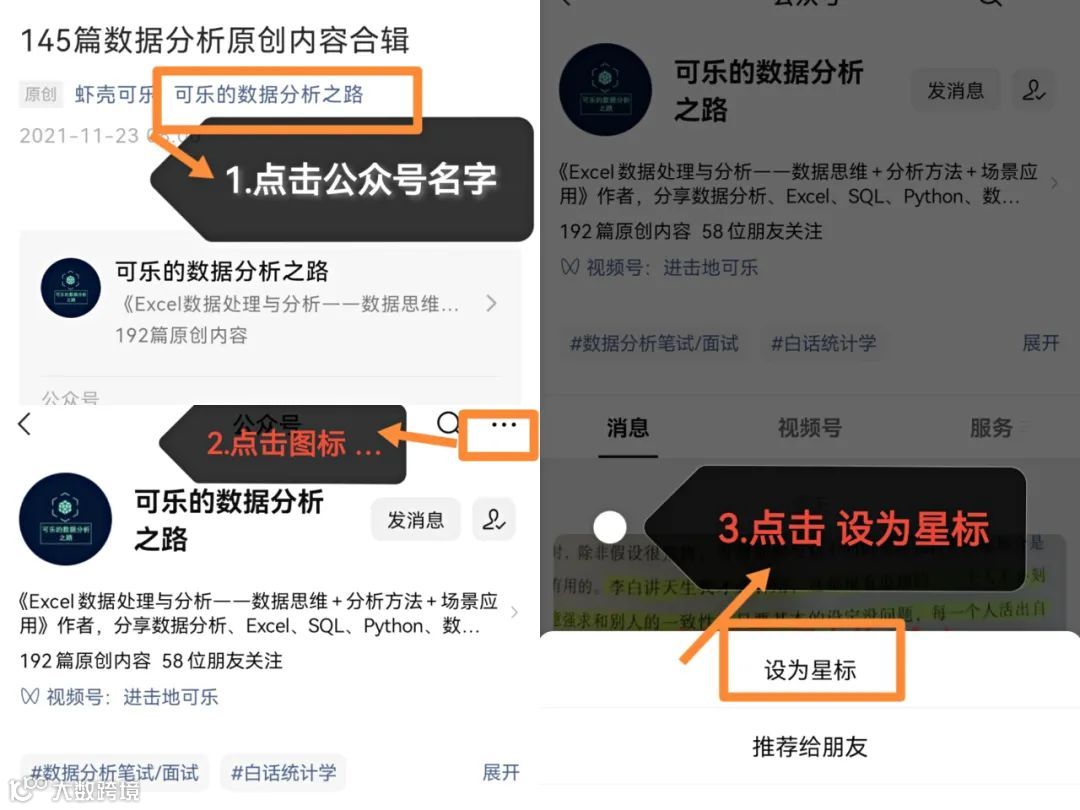
近期公众号改变了推送规则,不是按照时间顺序来排序。
为了不错过每次推送的好文,请大家设置“星标”,以防走散。