


之前录制视频介绍过如何绘制堆积柱形图展示密码子偏向性的内容,但是之前的内容只能画一组堆积柱形图,如果你有好几个物种想要画到一起,可能比较麻烦,我记录一些我自己的画图代码
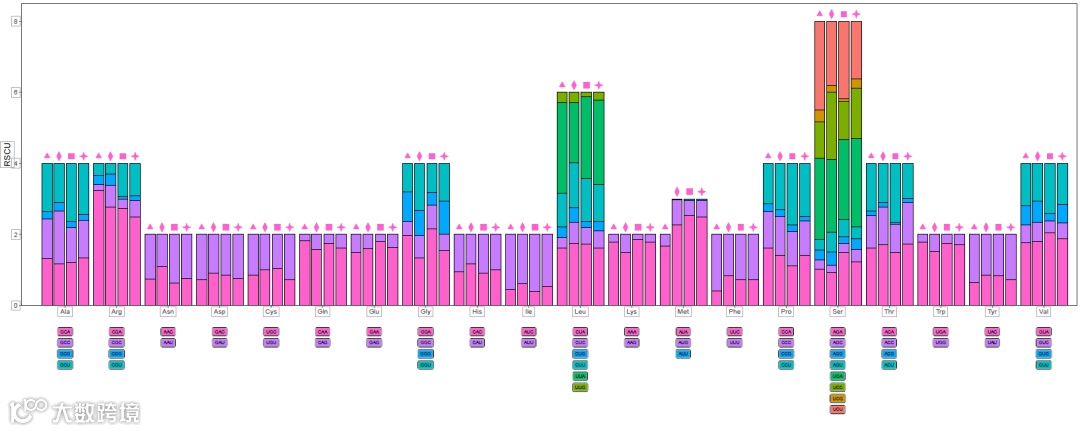
最终效果就是这个样子的,柱子上的形状用来表示分组,可以在右侧添加一个图例写上具体的物种名
aa.csv文件的内容

RSCU值文件的内容
-
V2是氨基酸 -
V3是密码子 -
V5是RSUC值 -
V6是密码子在下方的位置 -
V7是x轴的位置,取值是1到20
代码应该还有很多需要完善的地方,先在这里记录一下
#rm(list=ls())
library(readr)
library(dplyr)
library(ggplot2)
library(ggstar)
library(aplot)
help(package="ggstar")
df<-read.csv("RSCU/aa.csv",header=F)
head(df)
# df %>%
#   arrange(V2,V4,V1) -> df
# dim(df)
read.csv("RSCU/CBS1_rscu.txt",
               sep="\t",
               na.strings = "*",
         header = F) %>%
  select(c("V2","V3","V5","V6","V7")) -> cbs1

cbs1 %>%
  group_by(V7) %>%
  summarise(y=sum(V5)) -> cbs1.1

read.csv("RSCU/DF2_rscu.txt",
         sep="\t",
         na.strings = "*",
         header = F) %>%
  select(c("V2","V3","V5","V6","V7")) -> df2

df2 %>%
  group_by(V7) %>%
  summarise(y=sum(V5)) -> df2.1


read.csv("RSCU/GS1_rscu.txt",
         sep="\t",
         na.strings = "*",
         header = F) %>%
  select(c("V2","V3","V5","V6","V7")) -> gs1

gs1 %>%
  group_by(V7) %>%
  summarise(y=sum(V5)) -> gs1.1


read.csv("RSCU/XZXS1_rscu.txt",
         sep="\t",
         na.strings = "*",
         header = F) %>%
  select(c("V2","V3","V5","V6","V7")) -> xzxs1

xzxs1 %>%
  group_by(V7) %>%
  summarise(y=sum(V5)) -> xzxs1.1

p1<-ggplot()+
  geom_bar(data=cbs1,
           aes(x=V7,
               y=V5,
               fill=as.character(V6)),
           position = "stack",
           stat = "identity",
           width = 0.2,
           color="black")+
  geom_star(data=cbs1.1,aes(x=V7,y=y+0.2),
            starshape=11,size=3,
            fill="#ff61cc",color="#ff61cc")+
  geom_bar(data=df2,
           aes(x=V7+0.23,
               y=V5,
               fill=as.character(V6)),
           position = "stack",
           stat = "identity",
           width = 0.2,
           color="black")+
  geom_star(data=df2.1,aes(x=V7+0.23,y=y+0.2),
            starshape=12,size=3,
            fill="#ff61cc",color="#ff61cc")+
  geom_bar(data=gs1,
           aes(x=V7+0.47,
               y=V5,
               fill=as.character(V6)),
           position = "stack",
           stat = "identity",
           width = 0.2,
           color="black")+
  geom_star(data=gs1.1,aes(x=V7+0.47,y=y+0.2),
            starshape=13,size=3,
            fill="#ff61cc",color="#ff61cc")+
  geom_bar(data=xzxs1,
           aes(x=V7+0.71,
               y=V5,
               fill=as.character(V6)),
           position = "stack",
           stat = "identity",
           width = 0.2,
           color="black")+
  geom_star(data=xzxs1.1,aes(x=V7+0.71,y=y+0.2),
            starshape=14,size=3,
            fill="#ff61cc",color="#ff61cc")+
  theme_bw()+
  scale_y_continuous(expand=c(0,0),
                     limits = c(0,8.5))+
  scale_x_continuous(expand = c(0,0),
                     limits = c(0.5,21),
                     breaks = seq(1.35,20.35,1),
                     labels = df$V1)+
  labs(y="RSCU",x="")+
  theme(legend.position = "none",
        panel.grid = element_blank())+
  geom_star(aes(x=1.2,y=8),
            starshape=11,
            size=3,
            fill="#ff61cc",
            color="#ff61cc")+
  geom_text(aes(x=1.3,y=8),label="CBS1",hjust=0)+
  geom_star(aes(x=1.2,y=7.7),
            starshape=12,
            size=3,
            fill="#ff61cc",
            color="#ff61cc")+
  geom_text(aes(x=1.3,y=7.7),label="DF2",hjust=0)+
  geom_star(aes(x=1.2,y=7.4),
            starshape=13,
            size=3,
            fill="#ff61cc",
            color="#ff61cc")+
  geom_text(aes(x=1.3,y=7.4),label="GS1",hjust=0)+
  geom_star(aes(x=1.2,y=7.1),
            starshape=14,
            size=3,
            fill="#ff61cc",
            color="#ff61cc")+
  geom_text(aes(x=1.3,y=7.1),label="XZXS1",hjust=0)
ggsave(filename = "RSCU/p1-2.pdf",
       p1,
       width = 15,
       height = 8)

df2
p2<-ggplot(df2,aes(x=V7+0.35,y=V6))+
  geom_label(aes(label=V3,fill=as.character(V6)),
             size=2)+
  labs(x="",y="")+ylim(2.4,6.1)+
  theme_minimal()+
  theme(legend.position = "none",
        axis.text = element_blank(),
        axis.ticks = element_blank(),
        panel.grid = element_blank())
p3<-p1%>%
  insert_bottom(p2,height = 0.3)

ggsave(filename = "RSCU/p3-1.pdf",
       p3,
       width = 20,
       height = 8)
哈哈哈配图无关哈,只是发现mdnice这个工具的一个新功能~可以插入动图,就试了试

欢迎大家关注我的公众号
小明的数据分析笔记本
小明的数据分析笔记本 公众号 主要分享:1、R语言和python做数据分析和数据可视化的简单小例子;2、园艺植物相关转录组学、基因组学、群体遗传学文献阅读笔记;3、生物信息学入门学习资料及自己的学习笔记!