


ggh4x软件包是ggplot2扩展软件包。它提供了一些不完全符合“图形语法”概念的实用功能,但在调整ggplots时仍然有用,喜欢的小伙伴欢迎关注我的公众号R语言数据分析指南,持续分析更多优质资源
下面通过几个小例子来展示一下ggh4x的功能
devtools::install_github("teunbrand/ggh4x")

library(ggh4x)
library(tidyverse)
g <- ggplot(mtcars, aes(wt, mpg)) +
  geom_point() +
  theme(axis.line = element_line(colour = "black"))

g

g + guides(x = "axis_truncated")

可以通过设置引导功能中的trunc_lower和trunc_upper来控制截断轴线的距离
g + guides(x = guide_axis_truncated(trunc_lower = unit(0.1, "npc"),
                                    trunc_upper = unit(0.9, "npc")))

g + guides(x = guide_axis_truncated(trunc_lower = 2.5,
                                    trunc_upper = 4.5))

在下面的示例中,使用interaction()函数将项目名称及其所属的组注释在一起。该guide_axis_nested()`以逗号将标签分开
df <- data.frame(
  item = c("Coffee", "Tea", "Apple", "Pear", "Car"),
  type = c("Drink", "Drink", "Fruit", "Fruit", ""),
  amount = c(5, 1, 2, 3, 1))
df
> df
    item  type amount
1 Coffee Drink      5
2    Tea Drink      1
3  Apple Fruit      2
4   Pear Fruit      3
5    Car            1
ggplot(df, aes(interaction(item, type), amount)) +
  geom_col() +
  guides(x = "axis_nested")
可以使用paste0()功能将名称与分组组合在一起。在以下情况下,名称会自动按字母顺序排序,可以使用delim参数来定义分割标签
ggplot(df, aes(paste0(item, "~nonsense~", type), amount)) +
  geom_col() +
  guides(x = guide_axis_nested(delim = "nonsense"))
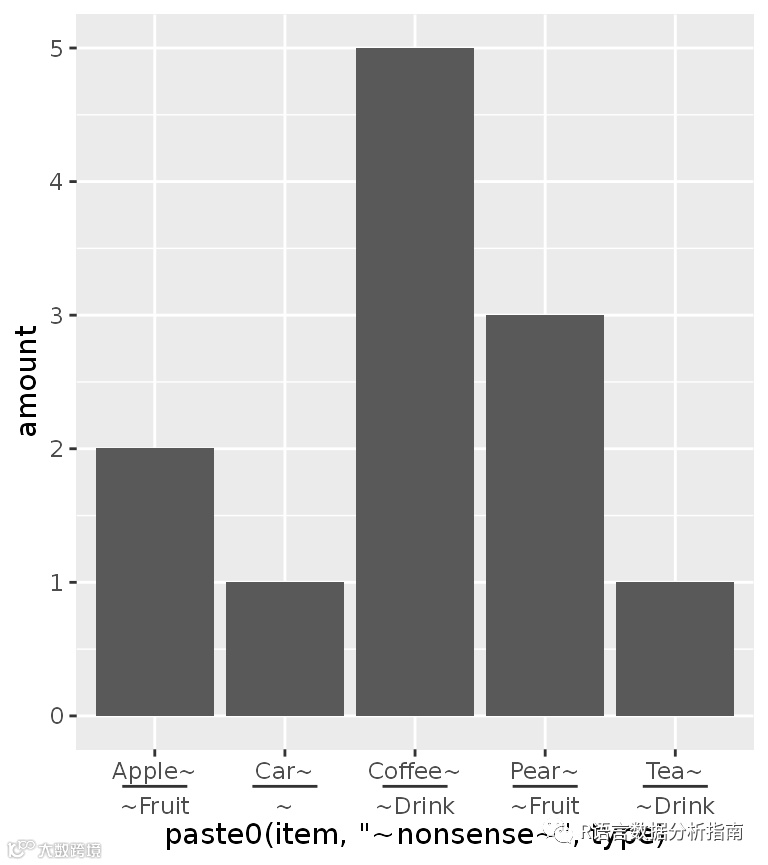
ggh4x具有weave_factors()功能,该功保持输入数据的自然顺序
ggplot(df, aes(weave_factors(item, type), amount)) +
  geom_col() +
  guides(x = "axis_nested")

还可以修改刻度条颜色与注释条信息
ggplot(df, aes(weave_factors(item, type), amount)) +
  geom_col() +
  guides(x = "axis_nested") +
  theme(
    axis.ticks = element_line(colour = "red"),
    ggh4x.axis.nestline.x = element_line(size = 2),
    ggh4x.axis.nesttext.x = element_text(colour = "blue"))

还可以堆砌显示注释信息
df$type2 <- c(rep("Consumables", 4), "Vehicle")
df$appletea <- c("", rep("Ingredient of apple tea", 2), rep(NA, 2))

ggplot(df, aes(weave_factors(item, type, appletea, type2), amount)) +
  geom_col() +
  guides(x = "axis_nested")

往期精彩:
配置R与Rstudio
ggplot2中的一些关键概念
tidyverse的基础使用
ggplot2绘制终极版热图
ggtree绘制进化树
初探相关性热图
再探相关性热图
ggplot2绘制相关性热图
初探柱状图
绘制具有显著性的条行图
ggplo2绘制经典条行图
ggplo2绘制双误差线条行图
揭开ggplot2中stat图层的神秘面纱
R中的图片注释神包aplot
ggplot2使用patchwork高质量拼图
ggplot2绘制基础散点图
ggplot2绘制经典散点图-1
ggplot2绘制经典散点图-2
ggplot2绘制云雨图
ggplot2绘制经典云雨图
ggplot2绘制哑铃图
ggplot2绘制经典哑铃图
ggplot2添加git