


本节来介绍如何通过ggplot2来绘制时间轴,绘图也可以生活化;回复关键词20210713获取本文代码,喜欢的小伙伴欢迎扫描文末二维码加入我的交流群,更多精彩内容为您而准备
加载R包
library(tidyverse)
点击下方图片关注我的公众号
构建数据集
df <- tribble(
  ~year, ~book_author, ~quote,
  1840, "清王朝", "鸦片战争-中国近代史开端",
  1894,"清王朝","甲午战争",
  1915,"民国","五四运动",
  1911,"清王朝","辛亥革命",
  1949, "共和国建立", "新民主主义革命结束"
)
label_segments <- tibble(
  label = glue::glue("*{df$quote}*<br /><span style='font-family: Roboto Condensed; color:red; font-size: 10px'>**{df$book_author}**</span>"),
  x = df$year,
  xend = x + 6 * rep(c(1,-1), length.out = 5),
  y = 1,
  yend = 1 * rep(c(0.7, 1.3), length.out = 5),
  x2 = xend + 10 *  rep(c(1,-1), length.out = 5),
  hjust = rep(c(0.06, 0.4), length.out = 5),
  vjust = rep(c(0.98, 0.07), length.out = 5)
)
数据可视化
ggplot(df, aes(x = year, y = 1)) +
  geom_segment(data = label_segments,
               aes(x = x, y = y, xend = xend, yend = yend),
               color = "grey70", size = 0.75) +
  geom_segment(data = label_segments,
               aes(x = xend, y = yend, xend = x2, yend = yend),
               color = "grey70", size = 0.75) +
  geom_line(color = "#1d3557", size = 2) +
  geom_point(shape = 21, size = 6, stroke = 1.5,
fill = "#a8dadc", color = "#457b9d") +
  geom_text(aes(label = year), nudge_y = 0.15*rep(c(1,-1),
length.out = 5),size = 4)+
  ggtext::geom_textbox(data = label_segments,
                       aes(x = xend, y = yend, label = label,
hjust = hjust, vjust = vjust),
                       width = unit(40,"mm"), box.color = NA, fill = NA,
                       size =5,lineheight = 1.1,color="black") +
  scale_y_continuous(limits = c(0, 2)) +
  coord_cartesian(clip = "off") +
  labs(title="中国近代史时间轴")+
  theme_void() +
  theme(plot.margin = margin(t = 10, b = 10, l = 30,r = 80),
        plot.title = element_text(hjust = 0.5,size=20))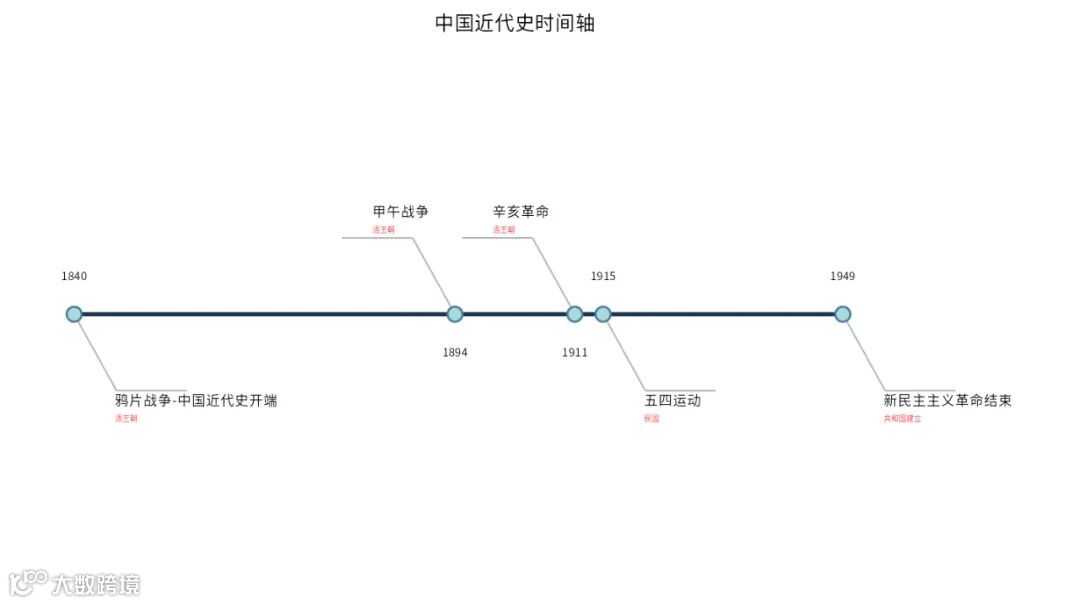

往期精彩:
配置R与Rstudio
ggplot2中的一些关键概念
tidyverse的基础使用
ggplot2绘制终极版热图
ggtree绘制进化树
初探相关性热图
再探相关性热图
ggplot2绘制相关性热图
初探柱状图
绘制具有显著性的条形图
ggplo2绘制经典条形图
ggplo2绘制双误差线条行图
揭开ggplot2中stat图层的神秘面纱
R中的图片注释神包aplot
ggplot2使用patchwork高质量拼图
ggplot2绘制基础散点图
ggplot2绘制经典散点图-1
ggplot2绘制经典散点图-2
ggplot2绘制云雨图
ggplot2绘制经典云雨图
ggplot2绘制哑铃图
ggplot2绘制经典哑铃图
ggplot2添加gif