


本文介绍了安信可 BW21-CBV-Kit 开发板结合扩展板,实现了基于 HTTP 协议的洗衣机网页控制面板,可模拟远程控制洗衣机的运行、暂停和停止状态,并通过 OLED 实时显示洗衣机状态。
项目介绍
项目介绍
HTTP 网页发送指令,实现远程控制洗衣机运行状态且驱动OLED实时显示。
硬件连接
流程图
工程代码
效果演示
硬件连接
该项目是模拟洗衣机控制,因此硬件方面仅使用 OLED 显示屏。

若要对外设进行实际控制,可在相关代码模块中添加对应的 GPIO 操作。
流程图

工程代码
打开 Arduino IDE ,新建工程并添加如下代码
Adafruit_SSD1306 display(SCREEN_WIDTH, SCREEN_HEIGHT, &Wire, OLED_RESET);// Washer stateenum WasherState {IDLE,WASHING,RINSING,SPINNING,DONE,PAUSED};const char* stateNames[] = {"Standby","Washing","Rinsing","Spinning","Completed","Paused"};WasherState currentState = IDLE;int remainingTime = 0; // secondunsigned long lastUpdateTime = 0;// WiFi credentialschar ssid[] = "xxx";char password[] = "xxx";WiFiServer server(80);void setup() {Serial.begin(115200);// Initialize OLEDif(!display.begin(SSD1306_SWITCHCAPVCC, 0x3C)) {Serial.println(F("SSD1306 allocation failed"));for(;;);}display.display();delay(2000);display.clearDisplay();// Connect to WiFiSerial.print("Connecting to ");Serial.println(ssid);WiFi.begin(ssid, password);while (WiFi.status() != WL_CONNECTED) {delay(500);Serial.print(".");}Serial.println("");Serial.println("WiFi connected");Serial.print("IP address: ");Serial.println(WiFi.localIP());server.begin();Serial.println("HTTP server started");updateDisplay();}void loop() {WiFiClient client = server.available();if (client) {Serial.println("New client connected");String currentLine = "";while (client.connected()) {if (client.available()) {char c = client.read();Serial.write(c);if (c == '\n') {if (currentLine.length() == 0) {// Send HTTP headersclient.println("HTTP/1.1 200 OK");client.println("Content-type:text/html");client.println("Connection: close");client.println();// Send HTML contentclient.print("<!DOCTYPE html><html><head><title>Washer Control</title>");client.print("<meta name=\"viewport\" content=\"width=device-width, initial-scale=1\">");client.print("<style>body{font-family:Arial;text-align:center;margin:0 auto;padding:20px;max-width:400px;}");client.print(".btn{background-color:#4CAF50;border:none;color:white;padding:15px 32px;text-align:center;");client.print("text-decoration:none;display:inline-block;font-size:16px;margin:4px 2px;cursor:pointer;border-radius:8px;width:150px;}");client.print(".status{font-size:24px;margin:20px 0;padding:10px;background-color:#f0f0f0;border-radius:8px;}");client.print(".btn-container{display:flex;flex-direction:column;align-items:center;gap:10px;}</style></head>");client.print("<body><h1>Washer Control Panel</h1>");client.print("<div class=\"status\">Current Status: ");client.print(stateNames[currentState]);client.print("</div><div class=\"btn-container\">");client.print("<a href=\"/start\"><button class=\"btn\">Start</button></a>");client.print("<a href=\"/pause\"><button class=\"btn\">Pause</button></a>");client.print("<a href=\"/stop\"><button class=\"btn\">Stop</button></a>");client.print("</div></body></html>");break;} else {// Process requestsif (currentLine.startsWith("GET /start")) {handleStart();} else if (currentLine.startsWith("GET /pause")) {handlePause();} else if (currentLine.startsWith("GET /stop")) {handleStop();}currentLine = "";}} else if (c != '\r') {currentLine += c;}}}client.stop();Serial.println("Client disconnected");}// Update washer stateif (currentState != IDLE && currentState != DONE && currentState != PAUSED) {if (millis() - lastUpdateTime >= 1000) { // Update every secondlastUpdateTime = millis();remainingTime--;// State transition logicif (remainingTime <= 0) {currentState = DONE;} else if (currentState == WASHING && remainingTime <= 20) {currentState = RINSING;} else if (currentState == RINSING && remainingTime <= 10) {currentState = SPINNING;}updateDisplay();}}}void updateDisplay() {display.clearDisplay();display.setTextSize(1);display.setTextColor(SSD1306_WHITE);display.setCursor(0, 0);display.println("Washer Status: ");display.setTextSize(2);display.setCursor(0, 16);display.println(stateNames[currentState]);display.setTextSize(1);display.setCursor(0, 40);display.print("IP: ");display.println(WiFi.localIP());if (currentState != IDLE && currentState != DONE) {display.setCursor(0, 52);display.print("Time left: ");display.print(remainingTime);display.println("s");}display.display();}void handleStart() {if (currentState == IDLE || currentState == DONE) {currentState = WASHING;remainingTime = 30; // 30 seconds (simulating 30 minutes)lastUpdateTime = millis();Serial.println("Washer started");} else if (currentState == PAUSED) {currentState = WASHING; // Simplified - should resume previous statelastUpdateTime = millis();Serial.println("Washer resumed");}updateDisplay();}void handlePause() {if (currentState == WASHING || currentState == RINSING || currentState == SPINNING) {currentState = PAUSED;Serial.println("Washer paused");}updateDisplay();}void handleStop() {if (currentState != IDLE) {currentState = IDLE;remainingTime = 0;Serial.println("Washer stopped");}updateDisplay();}
保存工程,设备选择 AMB82-MINI 开发板,选择串口对应的端口号;
按住 BOOT 键的同时,短按 EN 键,使设备进入下载模式;
点击 上传 按钮,待上传完成,短按 EN 键复位并运行程序。
效果演示
串口打印网页服务器 ip 地址 192.168.31.111

网页端
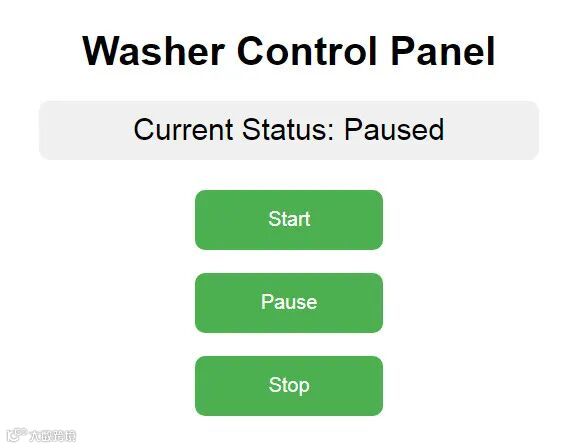
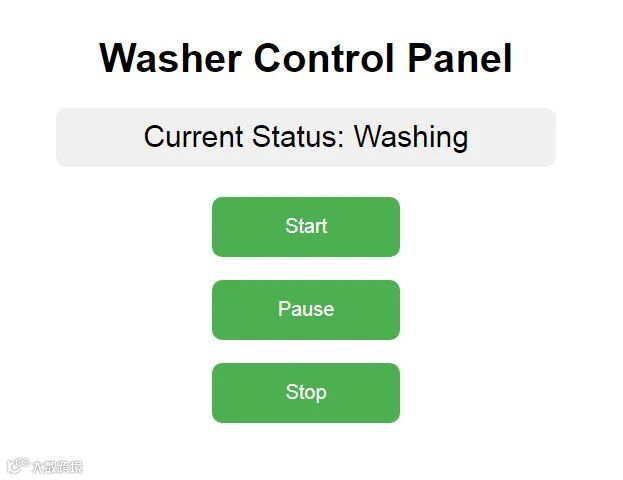
打开浏览器输入开发板 ip 地址,进入洗衣机控制面板。
停止状态

暂停状态
洗涤状态
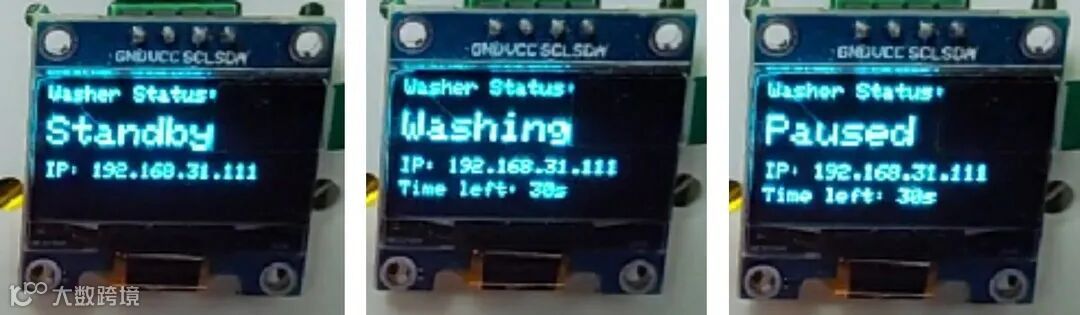
OLED状态显示
点击网页的按钮即可进入相应的工作状态,同时 OLED 显示当前状态。
动态演示





业务咨询请联系:18022036575
