


UWB模组之BU03
1.1简介
1.2技术亮点
●板载陶瓷天线与射频电路:BU03采用全向陶瓷天线设计,无需额外RF设计即可实现信号稳定收发,且天线布局经过优化,确保定位精度不受环境干扰。
●DW3000芯片方案:基于Decawave DW3000的射频前端芯片,支持双向测距(TWR)、TDOA和到达相位差(PDOA)算法。
●低功耗与宽电压支持:供电范围2.5V-3.6V,睡眠模式下功耗低于1μA,适用于纽扣电池供电的便携设备。
定位精度与算法实现
●厘米级定位:通过TDOA或PDOA算法,BU03可在室内复杂环境中实现10厘米级定位精度。例如,在仓储物流中,标签与基站间的实时距离测算误差可控制在±10cm以内。
●动态校准功能:用户可通过线性拟合校准参数(如指令AT+SETDEV),进一步提升实际场景中的测距准确性。测试数据显示,校准后误差可降低至毫米级。
1.3安信可官方资料及工具
●规格书与原理图下载:安信可UWB专题文档
●测试教程与SDK:飞书知识库
●开箱即用的开发套件:BU03-Kit开发板集成STM32F103主控,提供LCD屏幕实时显示测距数据,并支持通过USB/TTL接口进行AT指令配置。用户可通过指令(如AT+SETCFG)快速切换基站与标签模式,搭建多节点定位系统。
●上位机支持与资源开放:配套上位机软件支持基站坐标编辑与标签轨迹可视化,开发资料包涵盖原理图、PCB封装、SDK及校准模板,大幅缩短开发周期。
功耗测试
在进行测试之前,先配置两个开发板进入出厂的模式,一个进入标签,一个进入基站。教程参考:教程
由于需要测量功耗,所以要使用外部供电,条件有限,这边只有一个四位半的万用表,因此供电选择使用串口。
供电电源选择的是串口,选择电压输入的为5V,因为LDO也是有一点功耗的,这里测量的是开发板的整体功耗。(单独买来模组也不会单独的部署,所以测量整个开发板的功耗还是具有代表性)
基站


标签


电压为5.019V,开机后工作电流为54.03mA,整体功耗为:271.17657 mW,差不多就是0.27W(整个开发板的功耗,包括LED)。
由上可知BU03-Kit开发板的功耗其实是很低。
如果没有LED功耗,应该可以控制在0.2瓦以下,同时标签的功耗可以达到基站的一半。
测距配置
一个为基站,先发送AT+SETCFG=0,1,1,1 然后再发送AT+SAVE
一个为标签,先发送AT+SETCFG=0,0,1,1 然后再发送AT+SAVE
成功后基站将会显示其到标签的距离:

校准

校准方式采用的是线性拟合,相应的文件可以前往安信可文档下载中心进行下载链接如下:
UWB系列模组专题 | 安信可科技

方法也很简单,先准备一把尺子,将显示屏上显示的距离和尺子上面的距离填到表格中对应的位置即可。数据多测量几次,测量数据越多,屏幕上面显示的实际距离将会越精确。

类似于下图,由于这里没有米尺,这里就用直尺了,后面测试是利用瓷砖的距离,每测一次加一块瓷砖测量。

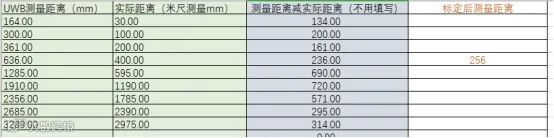
上面就是实际测得的数据a=0.9138,b=-244.61
通过下面的指令可以填入校正参数:
AT+SETDEV=X1,X2,X3,X4,X5,X6,X7,X8,X9
其中各个参数指代的含义如下:
X1: 标签容量 (标签刷新速率)
X2: 天线延迟参数
X3: 是否卡尔曼滤波使能位
X4: 卡尔曼滤波参数 Q
X5: 卡尔曼滤波参数 R
X6: 校正参数 a
X7: 校正参数 b
X8: 是否定位使能位
X9: 定位维度设置
这里只需发送
AT+SETDEV=5,16336,1, 0.018,0.642,0.9198,-244.61,0,0

复测20厘米实际测量值为256毫米,相较于没有标定之前的数据来说,精度得到了大大的提高。
使用SDK按键唤醒模组
通知公告SDK下载
下载方法可以看下面的链接:链接
由于之前有Ai-M61系列模组和Ai-WB2系列模组搭建环境的经验,想必已经有很多人在电脑上面装了git了吧,只需要在一个空的文件夹里面点击右键后点击下图位置:

输入这个:git clone
https://gitee.com/Ai-Thinker-Open/STM32F103-BU0x_SDK.git 回车即可。

等待大概10秒钟左右即可。
建议下载完之后复制一个,因为这次测试中一个要接收,一个要发送。
激活例程
建议观看这个教程:教程,教程建议直接观看tx_simple_sleep和simple_rx。
修改例程

/* Loop forever sending frames periodically. */while(1){/* 写入待发送数据到DW3000准备发送. (Write frame data to DW IC and prepare transmission. See NOTE 3 below.) */dwt_writetxdata(FRAME_LENGTH-FCS_LEN, tx_msg, 0); /* Zero offset in TX buffer. *//* 设置发送数据长度 (In this example since the length of the transmitted frame does not change,* nor the other parameters of the dwt_writetxfctrl function, the* dwt_writetxfctrl call could be outside the main while(1) loop.)*/dwt_writetxfctrl(FRAME_LENGTH, 0, 0); /* Zero offset in TX buffer, no ranging. *//* 立即发送. (Start transmission.) */dwt_starttx(DWT_START_TX_IMMEDIATE);/* 查询DW3000是否发送成功. (Poll DW IC until TX frame sent event set. See NOTE 4 below.* STATUS register is 4 bytes long but, as the event we are looking at is in the first byte of the register, we can use this simplest API* function to access it.) */while (!(dwt_read32bitreg(SYS_STATUS_ID) & SYS_STATUS_TXFRS_BIT_MASK)){ };/* 清除发送事件. (Clear TX frame sent event.) */dwt_write32bitreg(SYS_STATUS_ID, SYS_STATUS_TXFRS_BIT_MASK);_dbg_printf((unsigned char *)"发送成功\n");/* 休眠TX_DELAY_MS. (Execute a delay between transmissions.) */Sleep(TX_DELAY_MS);/* 标志位Seq++处理. (Increment the blink frame sequence number (modulo 256).) */tx_msg[BLINK_FRAME_SN_IDX]++;}
void tx_timed_sleep_GPIO_INIT(){RCC_APB2PeriphClockCmd(RCC_APB2Periph_GPIOB,ENABLE);GPIO_InitTypeDef GPIO_Init_structure;GPIO_Init_structure.GPIO_Mode=GPIO_Mode_IPU;GPIO_Init_structure.GPIO_Pin=GPIO_Pin_8;GPIO_Init_structure.GPIO_Speed=GPIO_Speed_50MHz;GPIO_Init(GPIOB,&GPIO_Init_structure);}/*** Application entry point.*/int tx_timed_sleep(void){uint16_t lp_osc_freq, sleep_cnt;tx_timed_sleep_GPIO_INIT();/* 串口输出应用名称. Display application name on LCD. */_dbg_printf((unsigned char *)APP_NAME);/* 配置SPI快速率. Configure SPI rate, DW3000 supports up to 38 MHz */port_set_dw_ic_spi_fastrate();/* 硬复位DW3000模块. Reset DW IC */reset_DWIC(); /* Target specific drive of RSTn line into DW IC low for a period. */Sleep(2); // Time needed for DW3000 to start up (transition from INIT_RC to IDLE_RC)/* 检查DW3000模块是否处于IDLE_RC */while (!dwt_checkidlerc()) /* Need to make sure DW IC is in IDLE_RC before proceeding */{ };/* 初始化DW3000模块 */if (dwt_initialise(DWT_DW_INIT) == DWT_ERROR){_dbg_printf((unsigned char *)"INIT FAILED ");while (1){ };}/* 清除SPI就绪中断. Clearing the SPI ready interrupt*/dwt_write32bitreg(SYS_STATUS_ID, SYS_STATUS_RCINIT_BIT_MASK | SYS_STATUS_SPIRDY_BIT_MASK);/* 配置DW3000中断函数. Install DW IC IRQ handler. NOTE: the IRQ line must have a PULLDOWN or else it may trigger incorrectly when the device is sleeping*/// port_set_dwic_isr(dwt_isr);/* 校准和配置UWB计数. Calibrate and configure sleep count. */lp_osc_freq = XTAL_FREQ_HZ / dwt_calibratesleepcnt();sleep_cnt = ((SLEEP_TIME_MS * ((uint32_t) lp_osc_freq)) / 1000) >> 12;//sleep_cnt = 0x06; // 1 step is ~ 175ms, 6 ~= 1sdwt_configuresleepcnt(sleep_cnt);/* 配置DW3000信道参数. Configure DW IC. See NOTE 6 below. */if(dwt_configure(&config)) /* if the dwt_configure returns DWT_ERROR either the PLL or RX calibration has failed the host should reset the device */{_dbg_printf((unsigned char *)"CONFIG FAILED ");while (1){ };}/* 配置DW3000发送频谱参数. Configure the TX spectrum parameters (power, PG delay and PG count) */dwt_configuretxrf(&txconfig_options);/* 配置DW3000发送频谱参数. Configure sleep and wake-up parameters. */dwt_configuresleep(DWT_CONFIG, DWT_PRES_SLEEP | DWT_WAKE_CSN | DWT_SLEEP | DWT_SLP_EN);/* 注册中断回调函数. Register the call-backs (only SPI ready callback is used). */dwt_setcallbacks(NULL, NULL, NULL, NULL, NULL, &spi_ready_cb);port_EnableEXT_IRQ();_dbg_printf("配置成功\n");/* Loop forever sending frames periodically. */while (1){/* DW3000进入休眠模式,唤醒后进入IDLE. Put DW IC to sleep. Go to IDLE state after wakeup*/dwt_entersleep(DWT_DW_IDLE);sleeping = 1;/* In this example, there is nothing to do to wake the DW IC up as it is handled by the sleep timer. */while (sleeping){Sleep(1);}; /* Wait for device to wake up *//* 增加延时.必要*/Sleep(5);if(KEY==0){_dbg_printf((unsigned char *)"唤醒成功:%04x\n", dwt_readdevid());/* 唤醒时恢复所有配置. Restore the required configurations on wake */dwt_restoreconfig();/* Increment the blink frame sequence number (modulo 256). */tx_msg[BLINK_FRAME_SN_IDX]++;/* 写入待发送数据到DW3000准备发送,并设置发送长度. Write frame data to DW IC and prepare transmission. See NOTE 4 below. */dwt_writetxdata(sizeof(tx_msg), tx_msg, 0); /* Zero offset in TX buffer. */dwt_writetxfctrl(sizeof(tx_msg), 0, 0); /* Zero offset in TX buffer, no ranging. *//* 立即发送. Start transmission. */dwt_starttx(DWT_START_TX_IMMEDIATE);/* 查询DW3000是否发送成功. It is not possible to access DW IC registers once it has sent the frame and gone to sleep, and therefore we do not try to poll for TX* frame sent, but instead simply wait sufficient time for the DW IC to wake up again before we loop back to send another frame.* If interrupts are enabled, (e.g. if MTXFRS bit is set in the SYS_MASK register) then the TXFRS event will cause an active interrupt and* prevent the DW IC from sleeping. *//* Poll DW IC until TX frame sent event set. See NOTE 7 below.* STATUS register is 4 bytes long but, as the event we are looking at is in the first byte of the register, we can use this simplest API* function to access it.*/while (!(dwt_read32bitreg(SYS_STATUS_ID) & SYS_STATUS_TXFRS_BIT_MASK)){};/* 清除发送完成事件. Clear TX frame sent event. */dwt_write32bitreg(SYS_STATUS_ID, SYS_STATUS_TXFRS_BIT_MASK);}}}
实验现象


最后,欢迎大家来安信可论坛,笔者发布的原贴下一起交流讨论:
原贴地址
【BU03-Kit 测评】UWB 测距初体验--两点测距+校准
【BU03-Kit 测评】UWB KIT出厂固件功耗测试
【BU03-Kit 测评】UWB 使用SDK按键唤醒





业务咨询请联系:18022036575
