
Matplotlib功能和matlab中的画图的功能十分类似。因为matlab进行画图相对来说比较复杂,所以使用python中的Matplotlib来画图比较方便。Matplotlib是一个Python 2D绘图库,它以多种硬拷贝格式和跨平台的交互式环境生成出版物质量的图形。Matplotlib可用于Python脚本,Python和IPython open in new window Shell、Jupyter open in new window笔记本,Web应用程序服务器和四个图形用户界面工具包。
Matplotlib 代码在概念上分为三个部分:pylab 接口是由 matplotlib.pylab 提供 的函数集,允许用户使用非常类似于 MATLAB 图生成代码(Pyplot 教程)的代码 创建绘图。 Matplotlib 前端或 Matplotlib API 是一组重要的类,创建和管理图形, 文本,线条,图表等(艺术家教程)。这是一个对输出无所了解的抽象接口。后端 是设备相关的绘图设备,也称为渲染器,将前端表示转换为打印件或显示设备。
1、https://github.com/rougier/matplotlib-cheatsheet/
2、https://www.matplotlib.org.cn/
3、https://github.com/Kivy-CN/matplotlib-user-guide-zh
风格1
import numpy as npimport matplotlib.pyplot as pltcmaps = ('tab10', 'tab20', 'tab20b', 'tab20c','Pastel1', 'Pastel2', 'Paired','Set1', 'Set2', 'Set3', 'Accent', 'Dark2' )n = len(cmaps)fig = plt.figure(figsize=(4.25, n*.22))ax = plt.subplot(1, 1, 1, frameon=False,xlim=[0,10], xticks=[], yticks=[])fig.subplots_adjust(top=0.99, bottom=0.01, left=0.18, right=0.99)y, dy, pad = 0, 0.5, 0.1ticks, labels = [], []for cmap in cmaps[::-1]:Z = np.linspace(0,1,512).reshape(1,512)plt.imshow(Z, extent=[0,10,y,y+dy], cmap=plt.get_cmap(cmap))ticks.append(y+dy/2)labels.append(cmap)y = y + dy + padax.set_ylim(-pad,y)ax.set_yticks(ticks)ax.set_yticklabels(labels)ax.tick_params(axis='y', which='both', length=0, labelsize="small")plt.savefig("reference-colormap-qualitative.pdf", dpi=600)plt.show()

风格2
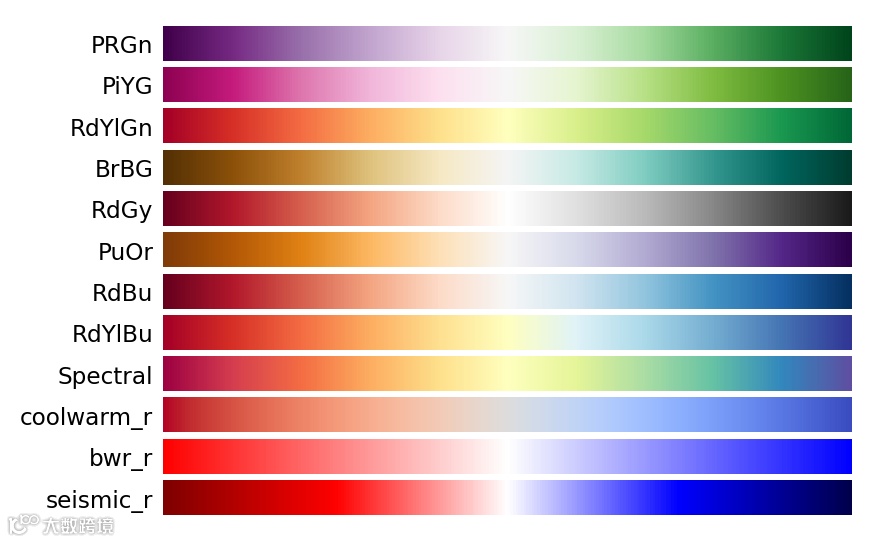
import numpy as npimport matplotlib.pyplot as pltcmaps = ('PRGn', 'PiYG', 'RdYlGn', 'BrBG', 'RdGy', 'PuOr', 'RdBu','RdYlBu', 'Spectral', 'coolwarm_r', 'bwr_r', 'seismic_r')n = len(cmaps)fig = plt.figure(figsize=(4.25, n*.22), dpi=200)ax = plt.subplot(1, 1, 1, frameon=False,xlim=[0,10], xticks=[], yticks=[])fig.subplots_adjust(top=0.99, bottom=0.01, left=0.18, right=0.99)y, dy, pad = 0, 0.5, 0.1ticks, labels = [], []for cmap in cmaps[::-1]:Z = np.linspace(0,1,512).reshape(1,512)plt.imshow(Z, extent=[0,10,y,y+dy], cmap=plt.get_cmap(cmap))ticks.append(y+dy/2)labels.append(cmap)y = y + dy + padax.set_ylim(-pad,y)ax.set_yticks(ticks)ax.set_yticklabels(labels)ax.tick_params(axis='y', which='both', length=0, labelsize="small")plt.savefig("reference-colormap-diverging.pdf", dpi=600)plt.show()
风格3
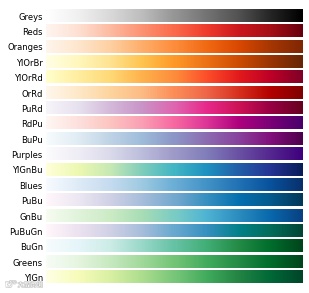
import numpy as npimport matplotlib.pyplot as pltcmaps = ('Greys', 'Reds','Oranges','YlOrBr', 'YlOrRd', 'OrRd', 'PuRd', 'RdPu', 'BuPu','Purples', 'YlGnBu', 'Blues','PuBu', 'GnBu','PuBuGn', 'BuGn','Greens', 'YlGn')n = len(cmaps)fig = plt.figure(figsize=(4.25, n*.22))ax = plt.subplot(1, 1, 1, frameon=False,xlim=[0,10], xticks=[], yticks=[])fig.subplots_adjust(top=0.99, bottom=0.01, left=0.15, right=0.99)y, dy, pad = 0, 0.5, 0.1ticks, labels = [], []for cmap in cmaps[::-1]:Z = np.linspace(0,1,512).reshape(1,512)plt.imshow(Z, extent=[0,10,y,y+dy], cmap=plt.get_cmap(cmap))ticks.append(y+dy/2)labels.append(cmap)y = y + dy + padax.set_ylim(-pad,y)ax.set_yticks(ticks)ax.set_yticklabels(labels)ax.tick_params(axis='y', which='both', length=0, labelsize="small")plt.savefig("reference-colormap-sequential-1.pdf", dpi=600)plt.show()
风格4
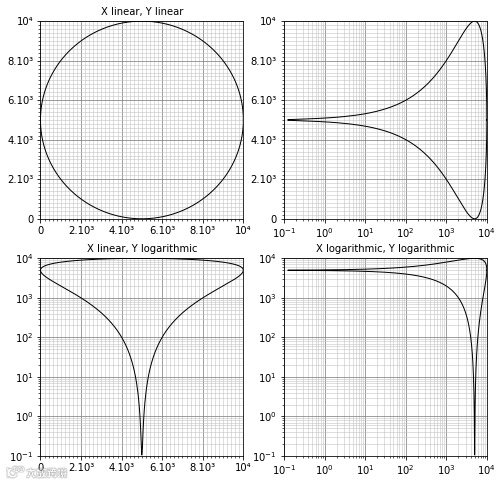
import numpy as npimport matplotlib.pyplot as pltfrom matplotlib.ticker import AutoMinorLocatorfrom matplotlib.collections import LineCollectiondef grid(ax):segments,colors,linewidths = [], [], []for x in ax.xaxis.get_minorticklocs():segments.append([(x,ymin), (x,ymax)])colors.append("0.75")linewidths.append(0.50)for x in ax.xaxis.get_majorticklocs():segments.append([(x,ymin), (x,ymax)])colors.append("0.50")linewidths.append(0.75)for y in ax.yaxis.get_minorticklocs():segments.append([(xmin,y), (xmax,y)])colors.append("0.75")linewidths.append(0.50)for y in ax.yaxis.get_majorticklocs():segments.append([(xmin,y), (xmax,y)])colors.append("0.50")linewidths.append(0.75)collection = LineCollection(segments, zorder=-10,colors=colors, linewidths=linewidths)ax.add_collection(collection)fig = plt.figure(figsize=(8,8))xmin, xmax = 0,10000ymin, ymax = 0,10000T = np.linspace(0,2*np.pi,1000)X = (xmax+xmin)/2 + 4999.9*np.cos(T)Y = (ymax+ymin)/2 + 4999.9*np.sin(T)# -----------------------------------------------------------------------------ax = plt.subplot(2,2,1)ax.ticklabel_format(axis="both", style="sci")ax.xaxis.set_minor_locator(AutoMinorLocator(10))ax.yaxis.set_minor_locator(AutoMinorLocator(10))ax.plot(X, Y, color="black", linewidth=1.0)ax.set_xlim(xmin, xmax)ax.set_ylim(ymin, ymax)ax.set_xticklabels(["0","2.10³","4.10³","6.10³","8.10³","10⁴"])ax.set_yticklabels(["0","2.10³","4.10³","6.10³","8.10³","10⁴"])grid(ax)ax.set_title("X linear, Y linear", size="medium")# -----------------------------------------------------------------------------ax = plt.subplot(2,2,2)ax.xaxis.set_minor_locator(AutoMinorLocator(10))ax.yaxis.set_minor_locator(AutoMinorLocator(10))ax.plot(X, Y, color="black", linewidth=1.0)xmin, ymin = 0.1, 0.0ax.set_xlim(xmin, xmax)ax.set_ylim(ymin, ymax)ax.set_xscale("log")ax.set_yticklabels(["0","2.10³","4.10³","6.10³","8.10³","10⁴"])grid(ax)# -----------------------------------------------------------------------------ax = plt.subplot(2,2,3)ax.xaxis.set_minor_locator(AutoMinorLocator(10))ax.yaxis.set_minor_locator(AutoMinorLocator(10))ax.plot(X, Y, color="black", linewidth=1.0)xmin, ymin = 0.0, 0.1ax.set_xlim(xmin, xmax)ax.set_ylim(ymin, ymax)ax.set_yscale("log")ax.set_xticklabels(["0","2.10³","4.10³","6.10³","8.10³","10⁴"])grid(ax)ax.set_title("X linear, Y logarithmic", size="medium")# -----------------------------------------------------------------------------ax = plt.subplot(2,2,4)ax.xaxis.set_minor_locator(AutoMinorLocator(10))ax.yaxis.set_minor_locator(AutoMinorLocator(10))ax.plot(X, Y, color="black", linewidth=1.0)xmin, ymin = 0.1, 0.1ax.set_xlim(xmin, xmax)ax.set_ylim(ymin, ymax)ax.set_xscale("log")ax.set_yscale("log")grid(ax)ax.set_title("X logarithmic, Y logarithmic", size="medium")plt.savefig("scales.pdf")plt.show()