


       本文约2000字,建议阅读5分钟
       本文介绍了如何在Python/Pandas中运用管道的概念,以使代码更高效易读。
简介
什么是管道?
使数据处理的顺序结构化为从左到右(而不是从内到外);
避免嵌套函数的调用;
最大限度地减少对局部变量和函数定义的需求;
可以轻松地在数据处理序列中的任何位置添加步骤。
foo_foo_1 <- hop(foo_foo, through = forest)foo_foo_2 <- scoop(foo_foo_1, up = field_mice)foo_foo_3 <- bop(foo_foo_2, on = head)
foo_foo %>%hop(through = forest) %>%scoop(up = field_mice) %>%bop(on = head)
bop(scoop(hop(foo_foo, through = forest),up = field_mice ),on = head)
foo_foo_1 = hop(foo_foo, through = forest)foo_foo_2 = scoop(foo_foo_1, up = field_mice)foo_foo_3 = bop(foo_foo_2, on = head)
foo_foo.hop(through = forest).scoop(up = field_mice).bop(on = head)(foo_foo .hop(through = forest).scoop(up = field_mice).bop(on = head))
https://r4ds.had.co.nz/pipes.html?q=pipe#pipes
Python中的无缝管道(即方法链)
读取数据集并导入相关包
# import libsimport pandas as pd# read datamelb = pd.read_csv("../01-data/melb_data.csv")# Have a quick look at the data(melb .head())
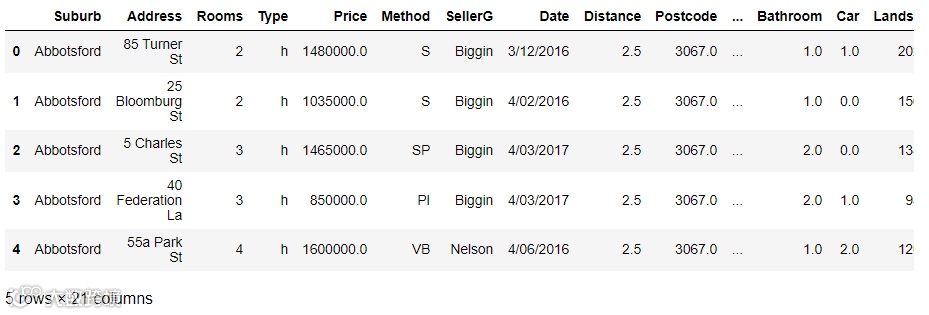
图片来自作者
筛选,分组并生成新变量
(melb.query("Distance < 2") # query equals filter in Pandas.filter(["Type", "Price"]) # select the columns Type and Price.groupby("Type") .agg("mean").reset_index().set_axis(["Type", "averagePrice"], axis = 1, inplace = False))

图片来自作者
(melb.query("Distance < 2 & Rooms > 2").filter(["Type", "Price"]).groupby("Type").agg(["mean", "count"]).reset_index().set_axis(["Type", "averagePrice", "numberOfHouses"],axis = 1, inplace = False) .assign(averagePriceRounded = lambda x: x["averagePrice"].round(1)))

图片来自作者
排序
(melb .query('Regionname.str.startswith("South")', engine = 'python').filter(["Type", "Regionname","Distance"]).groupby(["Regionname", "Type"]).agg(["mean"]).reset_index() .set_axis(["Regionname", "Type", "averageDistance"], axis = 1, inplace = False).sort_values(by = ['averageDistance'], ascending = False))
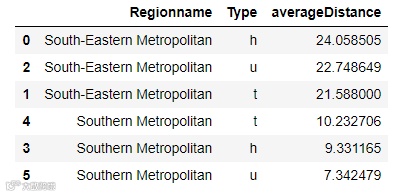
图片来自作者
为不同区域的平均距离绘制条形图
(melb#.query('Regionname.str.startswith("South")', engine = 'python').filter(["Regionname", "Distance"]).groupby(["Regionname"]).agg(["mean"]).reset_index().set_axis(["Regionname", "averageDistance"],axis = 1, inplace = False).set_index("Regionname").sort_values(by = ['averageDistance'], ascending = False).plot(kind = "bar"))

图片来自作者
使用直方图绘制价格分布
(melb.Price # getting one specific variable.hist())

图片来自作者
结语
参考资料
Melbourne Housing Snapshot | Kaggle:https://www.kaggle.com/dansbecker/melbourne-housing-snapshot
Tidyverse:https://www.tidyverse.org/
The Flawless Pipes of Tidyverse. Exploratory data analysis made easy | by Soner Yıldırım | Mar, 2021 | Towards Data Science:ttps://towardsdatascience.com/the-flawless-pipes-of-tidyverse-bb2ab3c5399f
Welcome | R for Data Science (had.co.nz):https://r4ds.had.co.nz/
18 Pipes | R for Data Science (had.co.nz):https://r4ds.had.co.nz/pipes.html?q=pipe#pipes
Data visualization in Python like in R’s ggplot2 | by Dr. Gregor Scheithauer | Medium:https://gscheithauer.medium.com/data-visualization-in-python-like-in-rs-ggplot2-bc62f8debbf5
译者简介:王闯(Chuck),台湾清华大学资讯工程硕士。曾任奥浦诺管理咨询公司数据分析主管,现任尼尔森市场研究公司数据科学经理。很荣幸有机会通过数据派THU微信公众平台和各位老师、同学以及同行前辈们交流学习。
版权声明:本号内容部分来自互联网,转载请注明原文链接和作者,如有侵权或出处有误请和我们联系。
合作请加QQ:365242293
数据分析(ID : ecshujufenxi )互联网科技与数据圈自己的微信,也是WeMedia自媒体联盟成员之一,WeMedia联盟覆盖5000万人群。
