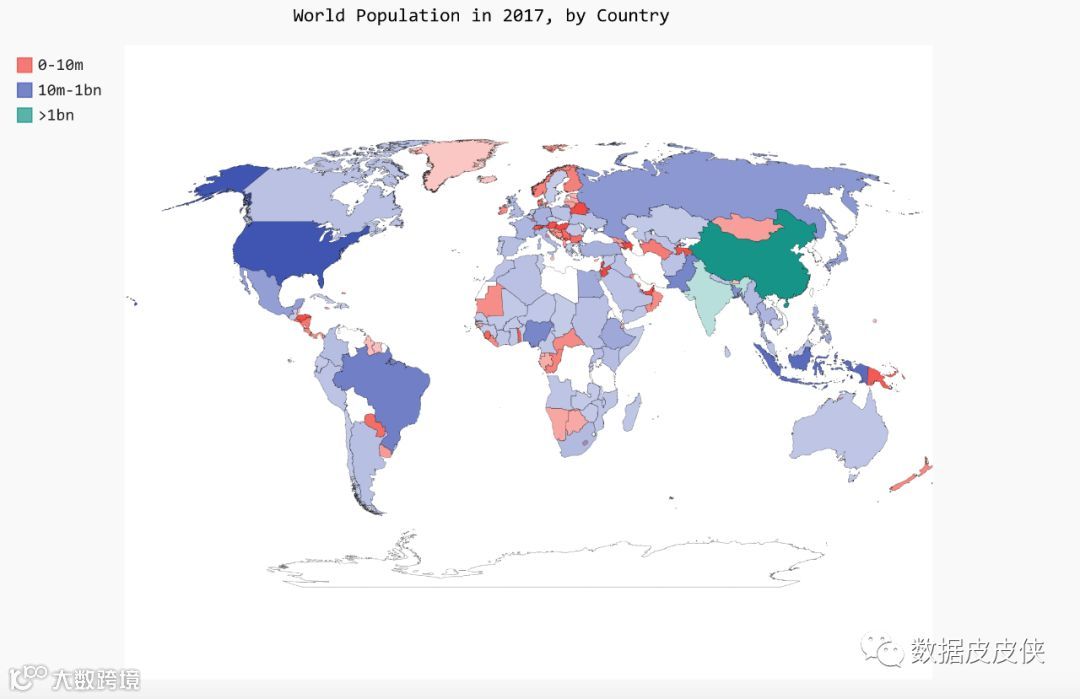
看了《python编程:从入门到实践》,里边设计的项目拿来学习学习,绘制世界人口地图。
首先,下载数据,http://data.okfn.org/ ,从这里下载population_data.json,我没有找到书上的原版数据,下载了如下,一样可以用,数据附在后边,数据是19年4月更新的,书上的案例是2010年的,有点旧了,本案例用2017年的数据
然后写python代码如下
#!/usr/bin/python
# -*- coding: UTF-8 -*-

import pygal_maps_world.maps
import json
from country_codes import get_country_code

cc_populations = {}
with open('country_population.csv', 'r') as f:
   for line in f.readlines():
       datas = line.split(',')
       countryCode = get_country_code(datas[0].strip('"'))
       squan = datas[-3].strip().strip('"')
       if (squan.isdigit()):
           quantity    = int(squan)
           cc_populations[countryCode] = quantity
       else:
           continue

wm = pygal_maps_world.maps.World()
wm.title = 'World Population in 2017, by Country'
wm.add('2017', cc_populations)

wm.render_to_file('World_population_1.svg')
引入的模块country_codes需要自己写,主要实现国家名称和简称的转换,如下:
#!/usr/bin/python
# -*- coding: UTF-8 -*-

from pygal.maps.world import COUNTRIES

def get_country_code(country_name):
    #根据指定的国家,返回Pygal使用的两个字母的国别码
    for code,name in COUNTRIES.items():
        if name == country_name :
            return code
    # 如果没有找到指定的国家,就返回None
    return None
然后运行,得到如下图,开始生成的图片是svg格式,可以通过浏览器打开查看

对文件进行修改,按不同的范围分成不同的颜色,代码如下:
#!/usr/bin/python
# -*- coding: UTF-8 -*-

import pygal_maps_world.maps
import json
from country_codes import get_country_code

cc_populations = {}
with open('country_population.csv', 'r') as f:
   for line in f.readlines():
       datas = line.split(',')
       countryCode = get_country_code(datas[0].strip('"'))
       squan = datas[-3].strip().strip('"')
       if (squan.isdigit()):
           quantity    = int(squan)
           cc_populations[countryCode] = quantity
       else:
           continue

cc_pops_1, cc_pops_2, cc_pops_3 = {}, {}, {}

for cc, pop in cc_populations.items():
    if pop < 10000000:
        cc_pops_1[cc] = pop
    elif pop < 1000000000:
        cc_pops_2[cc] = pop
    else:
        cc_pops_3[cc] = pop

wm = pygal_maps_world.maps.World()
wm.title = 'World Population in 2017, by Country'
#wm.add('2017', cc_populations)
wm.add('0-10m', cc_pops_1)
wm.add('10m-1bn', cc_pops_2)
wm.add('>1bn', cc_pops_3)

wm.render_to_file('World_population.svg')
运行之后的图片如下: