


二、问题背景
三、解决方案
1、使用SpringBoot的监控actuator
2、根据应用的启动日志分析
2.1 Tomcat启动扫描TLD文件优化
因为我们使用的是外置Tomcat容器,通过查看启动日志发现Tomcat启动日志打印的时间和Tomcat引导Spring容器启动中间隔了几十秒没有额外的日志,只有一行 org.apache.jasper.servlet.TldScanner.scanJars: At least one JAR was scanned for TLDs yet none were found. Enable debug logging for this logger to find out which JAR was scanned for TLDs,因为没有别的日志,只能从这行日志开刀,看这行日志大体的意思是Tomcat在启动时尝试扫描某些JAR文件以查找TLD文件,但没有找到。
那么Tomcat在启动的时候为什么要扫描TLD文件(什么是TLD文件?点击这里了解 ),Tomcat 作为 Servlet 规范的实现者,它在应用启动的时候会扫描 Jar 包里面的 .tld 文件,加载里面定义的标签库,但是,我们项目没有使用 JSP 作为 Web 页面的模板,为了加快应用的启动速度,我们可以把 Tomcat 里面的这个功能给关掉那么如何关闭这个扫描以提高启动速度?,通过查阅文档发现可以修改Tomcat的catalina.properties文件,
修改一个配置项tomcat.util.scan.StandardJarScanFilter.jarsToSkip设置值为 *.jar就可以关闭扫描。
2.2 应用启动Hbase异步预热
3、使用自定义BeanPostProcessor方案
3.1 @JsfConsumer消费者异步导出
4jpublic class TimeCostPriorityOrderedBeanPostProcessor implements BeanPostProcessor, PriorityOrdered {private Map<String, Long> costMap = Maps.newConcurrentMap();public Object postProcessBeforeInitialization(Object bean, String beanName) throws BeansException {costMap.put(beanName, System.currentTimeMillis());return bean;}public Object postProcessAfterInitialization(Object bean, String beanName) throws BeansException {if (costMap.containsKey(beanName)) {Long start = costMap.get(beanName);long cost = System.currentTimeMillis() - start;if (cost > 50) {log.info("==>Before方法耗时beanName:{},操作耗时:{}", beanName, cost);}}return bean;}public int getOrder() {return Integer.MIN_VALUE;}}
另外一个后置处理器是ZLowOrderTimeCostBeanPostProcessor ,他基本会最后执行,原因是他没有实现优先级接口,同时类名还是Z开头的,我们可以用它来监控容器中所有bean执行BeanPostProcessor的after方法的执行耗时,具体实现方式和上文类似,下面直接贴出源码
public class ZBeanPostProcessor implements BeanPostProcessor {private Map<String, Long> costMap = Maps.newConcurrentMap();public Object postProcessBeforeInitialization(Object bean, String beanName) throws BeansException {costMap.put(beanName, System.currentTimeMillis());return bean;}public Object postProcessAfterInitialization(Object bean, String beanName) throws BeansException {if (costMap.containsKey(beanName)) {Long start = costMap.get(beanName);long cost = System.currentTimeMillis() - start;if (cost > 50) {log.info("==>After方法耗时beanName:{},操作耗时:{}", beanName, cost);}}return bean;}}
1.我们项目中引用了大约170+的JSF consumer接口,@JsfConsumer注解是我们内部自己定义的一个针对Cosnumer接口使用的注解,他的使用方式很简单,只需要在引用的接口上打上这个注解,内部的starter会自动的帮你去做consumer的refer,在RPC调用中,我们作为消费者去调用生产者,其实我们只是依赖了一个接口,需要在启动的时候调用refer方法帮我们去生成代理对象我们才能发起调用,通过翻阅starter的源码发现是通过一个BeanPostProcessor的postProcessBeforeInitialization方法去做的,源码如下
public Object postProcessBeforeInitialization( Object bean, String beanName) throws BeansException {if (this.isMatchPackage(bean)) {if (isProvider()) {this.scanProvider(bean, beanName);}if (isConsumer()) {this.scanConsumer(bean, beanName);}}return bean;}private void scanConsumer(Object bean, String beanName) {Class<?> beanClass = bean.getClass();Set<Field> fields = getFieldSetWithSuperClassFields(beanClass);for (Field field : fields) {boolean accessible = field.isAccessible();try {if (!accessible) {field.setAccessible(true);}JsfConsumerTemplate jsfConsumerTemplate = null;JsfConsumer jsfConsumer = field.getAnnotation(JsfConsumer.class);if (jsfConsumer != null) {jsfConsumerTemplate = convert(jsfConsumer, JsfConsumerTemplate.class);}if (jsfConsumerTemplate != null) {logger.info("==> Final consumer config for JSF interface [{}]: {}", beanClass, JSON.toJSONString(jsfConsumerTemplate));//生成客户端配置ConsumerConfig consumerConfig = this.parseAnnotationConsumer(jsfConsumerTemplate, field.getType());addFilters(beanName, consumerConfig);//触发refer方法执行,生成代理对象Object ref = consumerConfig.refer();if (ref != null) {if (!this.beanFactory.containsSingleton(field.getName())) {//将生成的对象注册到spring容器this.beanFactory.registerSingleton(field.getName(), consumerConfig);}Object fieldBean = beanFactory.getBean(field.getName());try {logger.info("JsfConsumer class {} field {} inject", bean.getClass().getSimpleName(), field.getName());//将代理对象设置到对应的属性field.set(bean, fieldBean);} catch (IllegalAccessException exp) {throw new InitErrorException("Set proxy to field error", exp);}}}} finally {if (!accessible) {field.setAccessible(false);}}}}
2、通过分析上面的代码,可以发现唯一耗时的地方只可能在refer方法的调用,所以修改stater源码,在refer方法执行的前后打印日志,重新部署后查看日志,发现果然就是这个方法执行很慢,有的接口甚至达到了十几秒,因为spring容器的初始化是单线程执行,这些时间累加起来就是一个很大的量级,随即阅读JSF源码,探究一下为什么会慢。
3、通过从refer方法进入,一步步探究,最终找到了和服务端建立连接的代码,,这个方法的大体流程就是找到这个接口所有的提供者,和这些提供者所在的机器建立长连接用于后续的通信,建立的时候使用了多线程,但是如果一个接口对应的提供者太多,或者某些提供者机器不健康了,就可能会导致整个建立连接的时间过长。
4、分析出原因以后,解决方案也就很简单了,既然JSF在建立连接的时候使用了线程池,那我们就可以在上面再套一层线程池,这样refer方法的执行就不会阻塞后续其他流程的执行,只需要保证在应用启动成功之前我们的异步线程都执行完成即可,具体改动如下
public static final ThreadPoolExecutor CONSUMER_REFER = new ThreadPoolExecutor(32, 32,60, TimeUnit.SECONDS,new LinkedBlockingQueue<>(102400),ThreadFactories.create("JSF-REFER"),new ThreadPoolExecutor.CallerRunsPolicy());/*** 扫描当前bean的所有属性,查看该属性是否携带有JsfConsumer注解,如果有的话,需要调用{@link ConsumerConfig#refer()}生成代理,* 该方法使用了异步线程池进行操作,这样可以不阻塞localhost线程的执行* 在进行导出之前使用了synchronized关键字锁住当前字段,防止出现并发,出现并发的情况可能是在两个bean里面注入了同一个consumer导致* @param bean* @param beanName*/private void scanConsumer(Object bean, String beanName) {Class<?> beanClass = bean.getClass();Set<Field> fields = getFieldSetWithSuperClassFields(beanClass);for (Field field : fields) {boolean accessible = field.isAccessible();//首先将需要处理的字段计数,防止在异步线程丢失REFER_COUNT.increment();Future<?> referFuture = CONSUMER_REFER.submit(() -> {try {if (!accessible) {field.setAccessible(true);}JsfConsumerTemplate jsfConsumerTemplate = null;JsfConsumer jsfConsumer = field.getAnnotation(JsfConsumer.class);if (jsfConsumer != null) {jsfConsumerTemplate = convert(jsfConsumer, JsfConsumerTemplate.class);}if (jsfConsumerTemplate != null) {//锁住当前字段,防止多线程并发导出导致异常synchronized (field.getType()) {logger.info("==> Final consumer config for JSF interface [{}]: {}", beanClass, JSON.toJSONString(jsfConsumerTemplate));ConsumerConfig consumerConfig = this.parseAnnotationConsumer(jsfConsumerTemplate, field.getType());addFilters(beanName, consumerConfig);Object ref = consumerConfig.refer();if (ref != null) {if (!this.beanFactory.containsSingleton(field.getName())) {this.beanFactory.registerSingleton(field.getName(), consumerConfig);}Object fieldBean = beanFactory.getBean(field.getName());try {logger.info("JsfConsumer class {} field {} inject", bean.getClass().getSimpleName(), field.getName());field.set(bean, fieldBean);} catch (IllegalAccessException var18) {throw new InitErrorException("Set proxy to field error", var18);}}}}} finally {if (!accessible) {field.setAccessible(false);}//执行完成后减1REFER_COUNT.decrement();}});//加到future里面 会监听ContextRefreshedEvent判断异步任务是否都已经完成REFER_FUTURE.add(referFuture);}}/*** 监听容器刷新事件** @param contextRefreshedEvent the event to respond to*/(Ordered.LOWEST_PRECEDENCE)public synchronized void onApplicationEvent(@NonNull ContextRefreshedEvent contextRefreshedEvent) {logger.info("==> Ready for JSF consumer refer! Application name: {} count:{}", contextRefreshedEvent.getApplicationContext().getApplicationName(), REFER_FUTURE.size());CONSUMER_REFER.allowCoreThreadTimeOut(true);try {int i = 100;boolean isDone = false;while (i-- > 0) {if (REFER_COUNT.sum() == 0) {isDone = true;break;}Thread.sleep(100);}if (!isDone) {throw new InitErrorException(Strings.format("init jsf consumer error, undo sum :[{}]", REFER_COUNT.sum()));}for (Future<?> future : REFER_FUTURE) {future.get();}} catch (Exception exp) {// 在Web应用中,容器可能是一个父子容器,因此关闭上下文时需要递归往上遍历,把父容器也一起收拾掉logger.error("<== Exception while batch exporting JSF refer!", exp instanceof ApplicationException ? exp.getCause() : exp);ApplicationContext toClose = contextRefreshedEvent.getApplicationContext();while (toClose instanceof ConfigurableApplicationContext) {ApplicationContext parentApplicationContext = toClose.getParent();try {((ConfigurableApplicationContext) toClose).close();} catch (Exception closeExp) {logger.error("<== Exception while close application context: {}", toClose.getDisplayName(), closeExp);}toClose = parentApplicationContext;}return;}}
3.2 魔改JSF自带的ConsumerBean
1、我们项目中除了上述通过@JsfConsumer注解生成客户端代理外,还有另外一种方式来生成客户端代理,那就是借助JSF自身提供的ConsumerBean类,该类实现了FactoryBean接口,可以将每个JsfConsumer的配置都生成一个BeanDefinition实例,同时设置BeanDefinition的beanClass属性来使用它,使用这种方法可以确保生成的bean一定是单例的,防止上面那种方式可能存在不同类的同一个JSF Consumer配置不一致的情况。
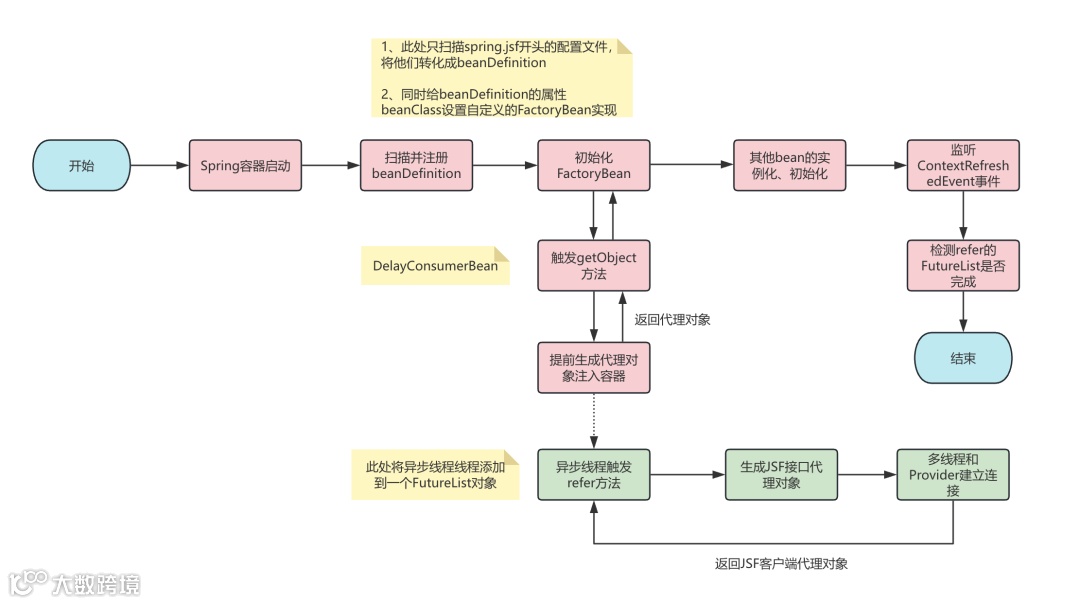
2、熟悉Spring源码的小伙伴都知道,容器刷新的时候会使用BeanDefinition里面的beanClass属性来实例化对象,这里我们指定这个属性为ConsumerBean.class,等到容器刷新初始化对象完成后,会继续判断该对象是否实现了FactoryBean接口,我们用的这个肯定实现了,然后会触发该对象getObject方法调用,那么我们就看下JSF自带的这个FactoryBean的getObject方法都做了些什么,源码如下
/*** 根据config实例化所需的Reference实例<br/>* 返回的应该是具备全操作能力的接口代理实现类对象** @see org.springframework.beans.factory.FactoryBean#getObject()*/public T getObject() throws Exception {object = CommonUtils.isUnitTestMode() ? null : refer();return object;}
3、还是熟悉的配方,和我们上面分析的调用refer方法一模一样,因为consumer初始化的核心就是通过refer方法生成代理对象,然后客户端持有代理对象,使用的时候通过代理对象去发起远程调用,但是这里有个关键问题就是之前的refer方法是我们自己控制的,我们可以任意去修改调用他的位置,但是现在的是JSF自己提供的,我们没法修改JSF的源码,而且他的触发是容器回调的,那我们该怎么办?
4、其实这个时候我们可以想一下,refer方法慢,我们想加速,可以和上面一样使用异步模式,但是异步的代码写在哪里,其次是这个方法是容器回调触发,如果我们开启了异步,那容器就得不到真实的引用,会导致错误,那应该怎么解决?
5、这个时候代理的作用就显示出来了,我们其实可以先给容器返回一个我们自己生成的代理对象,然后我们这个代理对象再包装原来refer产生的对象,这样客户端实际持有的是我们自己生成的代理对象,而不是JSF refer方法产生的代理对象,剩下的最后一步就是仿照原来的ConsumerBean魔改一个我们自己的版本,将getObject方法的逻辑改为使用线程池导出,同时先返回一个自己的代理对象,其实这种提前返回代理的思想也适用于其他一些场景。
6、我们可以通过一个流程图来梳理一下上面说的流程。
7、魔改后的源码如下,供大家参考
/*** 延迟导出的ConsumerBean* 该类的getObject方法会返回一个自定义的代理对象*/public class DelayConsumerBean<T> extends ConsumerConfig<T> implements InitializingBean, FactoryBean<T>, ApplicationContextAware, DisposableBean, BeanNameAware {private static final long serialVersionUID = 6835324481364430812L;private static final Logger LOGGER = LoggerFactory.getLogger(DelayConsumerBean.class);private ApplicationContext applicationContext;protected transient String beanName;private transient T object;private transient Class objectType;public static final List<Future<?>> REFER_FUTURE_LIST = Lists.newArrayList();public static final ThreadPoolExecutor CONSUMER_REFER_EXECUTOR = new ThreadPoolExecutor(32, 32,60, TimeUnit.SECONDS,new LinkedBlockingQueue<>(102400),ThreadFactories.create("JSF-REFER-2"),new ThreadPoolExecutor.CallerRunsPolicy());(serialize = false)("unchecked")public T getObject() throws Exception {Class<T> consumerInterfaceClass = ClassLoaderUtils.forName(this.interfaceId);//先生成一个代理对象T delayConsumer = (T) Proxy.newProxyInstance(consumerInterfaceClass.getClassLoader(),new Class[]{consumerInterfaceClass},new DelayConsumerInvocationHandler());//使用异步线程referREFER_FUTURE_LIST.add(CONSUMER_REFER_EXECUTOR.submit(() -> {super.refer();}));object = CommonUtils.isUnitTestMode() ? null : delayConsumer;//返回提前生成的代理对象return object;}private class DelayConsumerInvocationHandler implements InvocationHandler {public Object invoke(Object proxy, Method method, Object[] args) throws Throwable {if (method.getDeclaringClass() == Object.class) {return method.invoke(DelayConsumerBean.this, args);}if (DelayConsumerBean.this.proxyIns == null) {throw new RuntimeException("DelayConsumerBean.this.proxyIns is null");}try {//客户端发起调用后,触发真实的consumer代理执行return method.invoke(DelayConsumerBean.this.proxyIns, args);} catch (InvocationTargetException exp) {throw exp.getTargetException();} catch (Exception ex) {throw ApplicationException.mirrorOf(ex);}}}/*** 等待所有的任务完成,确保所有的consumer都refer成功了* @param contextRefreshedEvent*/public static void waitForRefer(ContextRefreshedEvent contextRefreshedEvent) {CONSUMER_REFER_EXECUTOR.allowCoreThreadTimeOut(true);LOGGER.info("==> Ready for JSF consumer 2 refer! Application name: {} count:{}", contextRefreshedEvent.getApplicationContext().getApplicationName(), REFER_FUTURE_LIST.size());try {for (Future<?> future : REFER_FUTURE_LIST) {future.get();}} catch (Exception exp) {// 在Web应用中,容器可能是一个父子容器,因此关闭上下文时需要递归往上遍历,把父容器也一起关闭LOGGER.error("<== Exception while batch exporting JSF provider!", exp instanceof ApplicationException ? exp.getCause() : exp);ApplicationContext toClose = contextRefreshedEvent.getApplicationContext();while (toClose instanceof ConfigurableApplicationContext) {ApplicationContext parentApplicationContext = toClose.getParent();try {((ConfigurableApplicationContext) toClose).close();} catch (Exception closeExp) {LOGGER.error("<== Exception while close application context: {}", toClose.getDisplayName(), closeExp);}toClose = parentApplicationContext;}}}protected DelayConsumerBean() {}public void setApplicationContext(ApplicationContext appContext) throws BeansException {this.applicationContext = appContext;}}
4、玄学-Tomcat版本问题?
5、金钱的力量
1、不同的机房对于应用的启动速度也会有一些影响,如果使用的机器是一些老旧过保的机器,也会对应用的启动速度有影响,使用旧机器也无法保障应用的稳定性,可以将应用迁移到高性能的新机房去,这样可以加快应用启动的速度。
2、在京东内部对比发现,两个不同的机房对于同一个应用启动速度差距非常大,在新机房里面比旧机房快至少20%。
四、方案总结和效果展示
下面我们来总结一下我们都做了什么
1、Tomcat启动关闭TLD文件扫描。
2、应用启动Hbase预热异步化,其实这块我们可以应用到其他场景,大家可以检查下自己的项目启动的时候有没有同步预热的场景。
3、JsfConsumer客户端代理bean异步生成,此处主要核心在于使用一个自定义代理对象提前返回引用,这种思想我们也可以应用到其他需要异步初始化对象的地方去,具体可以参考3.2节的流程图。
4、不同Tomcat版本对于应用启动速度的影响。
5、更换到高性能机房对于启动速度的提升。
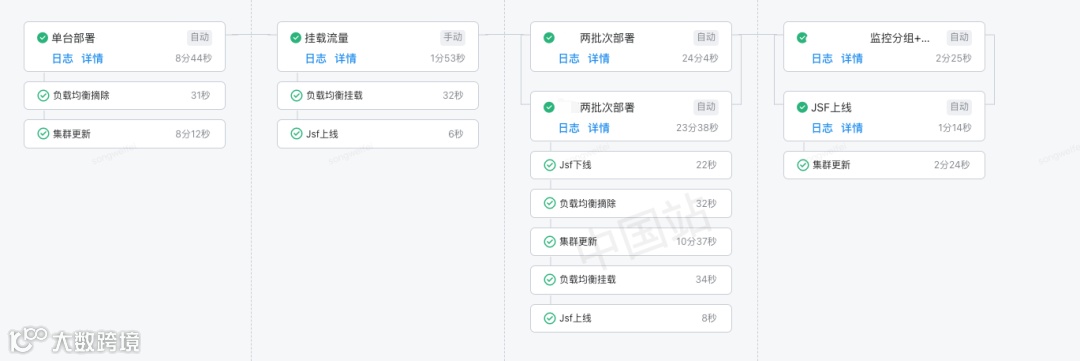
通过上述的几项优化过后,应用的启动速度得到了大幅改善,下图展示是一个简略的新旧对比,可以看到应用的启动速度从之前400-500秒到现在的130-150s,提升了近60%多。

(优化后)

(优化前)

扫一扫,加入技术交流群